
Archive of the Gamebuino Classic wiki, recovered from the Wayback Machine (capture 2017-10-28). Read-only.
Troubleshooting
This page is meant to help you sort out the problems you may encounter. If you've been through this page (and the Getting started page) and didn't find any answers, then you can:
- Search on the forum if someone had a similar issue and solved it
- Post on the forum in Installation & Troubleshooting
Boot
My Gamebuino won't turn on
- There is no start up sound
- Solution to most of the problems : You may not have a program loaded in your Gamebuino, or you may have a corrupted program if something went wrong while loading a program. To solve that problem hold the C button down, turn your Gamebuino on, release C, and wait 30 seconds. What it does it that it force your Gamebuino to flash LOADER.HEX from the micro SD card.Note that nothing will appear on the screen during these 30 seconds, it's normal. You can also upload one of the Gamebuino examples through USB using the Arduino IDE.
- Your Gamebuino may be out of battery: turn your Gamebuino off, and plug it in (the "charging" led should turn on) for about one hour and try again.
- If a micro SD card is present, check that the C button is not jammed in the pressed position, or LOADER.HEX will be continuously re-flashed.
- I hear the start up sound
- If you hear the start-up sound but the screen don't show anything, then it's a screen issue.
Screen
Screen is blank, dark, dim, displaying randomly, etc.
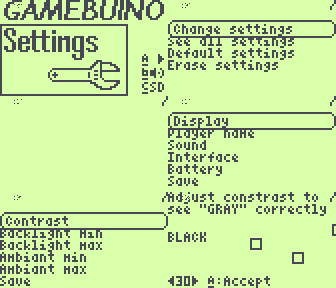
- You can adjust the contrast using the program SETTINGS.HEX located on the SD card. Note that contrast can't be adjusted on some screens.
If it doesn't solve your problem, it's probably a bad contact between the screen and the PCB.
- Pinch the top of the screen to improve the contact with the PCB
- Check that the screen is correctly snapped to the PCB
- The screen might have moved and the contacts are now misaligned. Try to gently push the screen upward/downward/leftward/rightward and restart the Gamebuino until the contacts are correctly aligned and you can see something.
- Sometimes some dust gets in between the screen and the PCB. Clean the rubberized contact on the back of the screen using alcohol with a piece of soft fabric
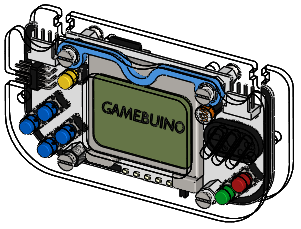
- Check the screen holder is in place to prevent the screen from moving (see picture on the right). Note : the screen holder has now been replaced by a grey rubber pad stuck on the upper part of the screen so the pressure is more even and it limits PCB bending.
Scratched screen
These screens are recycled from old cell phones so they often have tiny nicks or scratches. There's no such thing as a 'new' Nokia 5110 display, but the scratches should not be noticeable when in use.
Change the screen
If you want to get another screen you can buy them for as low as 2€ on eBay (including shipping). To swap to another screen you just have to unscrew your Gamebuino and snap the screen off the PCB, it's very simple.
SD card
The loader says "Please insert an SD card"
- Check that the micro SD card is correctly inserted, obviously.
- Check that there are files on the card. You need at least
LOADER.HEXandSETTINGS.HEX. Download them here along with some games : Gamebuino-Games-Compilation [download zip]
- Try another micro SD card (2GB or below) to see if it's a compatibility issue.
- Try to format the micro SD card to FAT16 (aka FAT). Don't forget to copy the
.HEXfiles back on the micro SD card afterward (see download link above).
Won't load the game I select in the loader
- Your game's name must be 8 characters long or shorter with only capitals. The extension must be HEX. for example CRABATOR.HEX or PONG.HEX
- You have formatted your micro SD card in the wrong format (see "How to format the micro SD" below).
- The file you try to load might be corrupted, try to upload it again on the micro SD card.
Won't get back to the loader when I press C
- When you press 'C' when in the title screen, it loads LOADER.HEX for you to be able to browse games. However, some programs don't allow you to get back to the title screen once the game is started, so you have to turn your Gamebuino off and back on again.
- Some programmers don't use the official library so you are not able to press 'C' in the titleScreen to get back to the loader. You can turn your Gamebuino off, hold 'C' down, turn it on, wait for a second, and then release 'C'. The screen will stay blank for up to 20 seconds while it loads your game. Don't turn off your Gamebuino while it's loading a game.
- LOADER.HEX might be corrupted, download it again from GitHub [download zip] and upload it on your micro SD card.
- You have formatted your micro SD card in the wrong format (see How to format my micro SD).
My Gamebuino hangs while loading a game
When you select a game to flash from the micro SD card on your Gamebuino, it shows "Flashing game... DON'T TURN OFF!" for up to 20 seconds. If after a while the screen goes blank and nothing happens, there was an error during flashing.
- Now you have a corrupted program on your Gamebuino so it won't start up again. Don't worry, to solve that problem upload one of the Gamebuino examples via USB using the Arduino IDE.
- If it happens again, try with another micro SD card. You might also want to try to burn the experimental bootloader v2.0 which solves some compatibility issues.
How to format the micro SD card
The micro SD card must be 2GB or less to be compatible with the bootloader. You have to format it in FAT16 (aka FAT) format.
- Insert the micro SD card in the micro SD card reader, then plug the reader in your computer.
- Windows users
- Open "Computer", right click on the micro SD card, then click on "Format...". Select the "FAT" format (not FAT32).
- Alternative: run the command
format F: /q /fs:FAT /v:GAMEBUINO(replace F: with the letter of your device)
- Linux users
- open a terminal
- type lsblk to check the device, so the /dev/sdXn
- as root (replacing the /dev/sdXn with your device), run
mkfs.vfat -F 16 /dev/sdXn
- Windows users
USB
Device not detected
- Check that you correctly installed the drivers
- Try with another USB cable