
Archive of the Gamebuino Classic forum (2014-2018), rebuilt from the pages kept by the Wayback Machine: only part of the topics and pages were captured. Read-only. Removal on request: hi@gamebuino.com.
Bub - Bubble-slurping platform puzzle game
penduin Fri Sep 05, 2014 7:48 pm
This is a game inspired directly by the Gamebuino! I started working on a prototype during the Indiegogo campaign, and have recently got it ported and running.
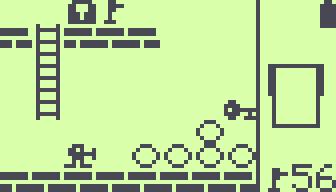
Bub's home page, including the repo and web-playable prototype:
http://smogheap.github.io/bub/
Zip file with the source, .HEX and .ELF:
http://smogheap.github.io/bub/gb/bub.zip
Bub's home page, including the repo and web-playable prototype:
http://smogheap.github.io/bub/
Zip file with the source, .HEX and .ELF:
http://smogheap.github.io/bub/gb/bub.zip
Jolly Sat Sep 06, 2014 4:06 pm
Hey penduin,
thank you so much for this litte game, it's really fun to play. :)
I just can't seem to complete level 26 in the web version:
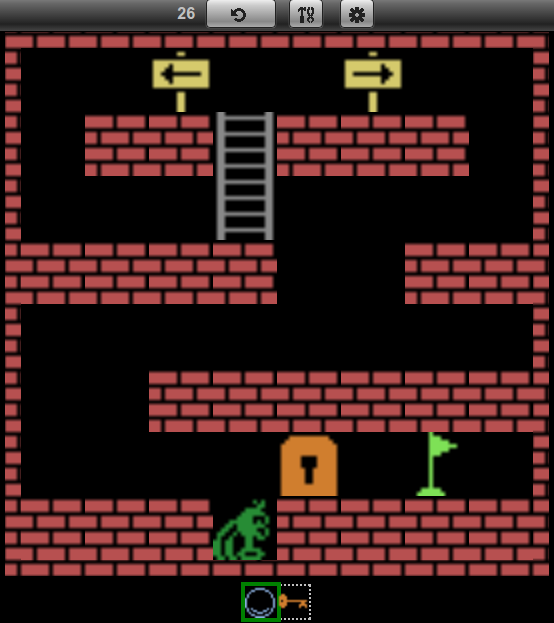
It's not possible to put down the bubble, so I'm stuck down there.
Am I missing something?
thank you so much for this litte game, it's really fun to play. :)
I just can't seem to complete level 26 in the web version:
It's not possible to put down the bubble, so I'm stuck down there.
Am I missing something?
Myndale Sun Sep 07, 2014 8:56 am
Really enjoying playing this one! The level numbers seem to be going up by 2 though, what's up with that? In any case I'm up to level 40 (or thereabouts) and I do have two suggestions:
1) Any chance of adding a menu option to jump to any arbitrary level?
2) There seems to be a bit of a balancing issue, levels suddenly appear that are way more easy than levels that appeared before them. I don't like giving constructive criticism without suggestions of how to fix the issues, I guess my only suggestion here would be to get some volunteer testers to grade each level on some kind of scale and rearrange them accordingly?
I do like the appearance of different mechanics as you progress, the most notable ones so far being the introduction of the ladders and then the arrows. Looking forward to seeing what else you throw at us in future levels. :)
1) Any chance of adding a menu option to jump to any arbitrary level?
2) There seems to be a bit of a balancing issue, levels suddenly appear that are way more easy than levels that appeared before them. I don't like giving constructive criticism without suggestions of how to fix the issues, I guess my only suggestion here would be to get some volunteer testers to grade each level on some kind of scale and rearrange them accordingly?
I do like the appearance of different mechanics as you progress, the most notable ones so far being the introduction of the ladders and then the arrows. Looking forward to seeing what else you throw at us in future levels. :)
penduin Mon Sep 08, 2014 12:19 am
Jolly: Oops! I recently made a fix to the web prototype that introduced a bug when laying an item on the bottom cell. Fixed now! I'm glad you're enjoying Bub. What browser are you using that's still doing blurry scaling? I thought I had that fixed everywhere...
Myndale: Thanks for your feedback! I was hoping to get some stuff like this. To answer your questions...
I did initially have the ability to go to any old level, maybe I'll include that in the menu now that I have that working. (The earliest implementation just jumped to the next level anytime you hit B, pretty tedious :^)
I love the idea of collecting people's opinions about difficulty. You guys are among the first to really try it out; if you feel like taking notes on which levels seem too soon or too late difficulty-wise I would really appreciate that, otherwise I'll try to incorporate some "rate this level and its difficulty" thing into the web prototype and sort out somewhere to compile that data.
As for levels jumping by two, I've been playing with the concept of "normal" and "evil twin" levels. I sort of like having each pair together, even though that plays hell with the already-questionable difficulty curve. In the gamebuino version, the "evil twins" are off by default (you can toggle in the B button menu), where in the web version the background turns red for the "evil" levels. I probably need to do a proper level-select screen to sort this stuff out, with least-moves and lowest-time high scores etc. Just haven't gotten around to caring about that stuff yet. :^)
Thank you so much for your feedback, please keep it coming! The web version's level editor is kinda busted at the moment but once I get that fixed, I'll welcome your custom levels too!
Myndale: Thanks for your feedback! I was hoping to get some stuff like this. To answer your questions...
I did initially have the ability to go to any old level, maybe I'll include that in the menu now that I have that working. (The earliest implementation just jumped to the next level anytime you hit B, pretty tedious :^)
I love the idea of collecting people's opinions about difficulty. You guys are among the first to really try it out; if you feel like taking notes on which levels seem too soon or too late difficulty-wise I would really appreciate that, otherwise I'll try to incorporate some "rate this level and its difficulty" thing into the web prototype and sort out somewhere to compile that data.
As for levels jumping by two, I've been playing with the concept of "normal" and "evil twin" levels. I sort of like having each pair together, even though that plays hell with the already-questionable difficulty curve. In the gamebuino version, the "evil twins" are off by default (you can toggle in the B button menu), where in the web version the background turns red for the "evil" levels. I probably need to do a proper level-select screen to sort this stuff out, with least-moves and lowest-time high scores etc. Just haven't gotten around to caring about that stuff yet. :^)
Thank you so much for your feedback, please keep it coming! The web version's level editor is kinda busted at the moment but once I get that fixed, I'll welcome your custom levels too!
rodot Mon Sep 08, 2014 6:24 am
Great game :)
If I had a suggestion, that would be to add a small animation when your character moves from one tile to another to make the movement smoother, but that's really a minor thing ^^
The nearest neighbor up-scaling of pictures is something only chrome doesn't support with CSS, you have to do it yourself using javascript (I had the issue with the Games Gallery, and eventually gave up on Chrome). I don't know if you do your up-scaling using CSS though.
If I had a suggestion, that would be to add a small animation when your character moves from one tile to another to make the movement smoother, but that's really a minor thing ^^
penduin wrote:What browser are you using that's still doing blurry scaling? I thought I had that fixed everywhere...
The nearest neighbor up-scaling of pictures is something only chrome doesn't support with CSS, you have to do it yourself using javascript (I had the issue with the Games Gallery, and eventually gave up on Chrome). I don't know if you do your up-scaling using CSS though.
Jolly Mon Sep 08, 2014 8:33 am
Thank you for fixing that, penduin. Now I can be unproductive all day and it's your fault. :D
As rodot said, the blurry effect is only in Google Chrome.
As rodot said, the blurry effect is only in Google Chrome.
penduin Mon Sep 08, 2014 4:29 pm
I will have animation (and proper scaling even in Chrome, sorry!) in the "real" canvas-based version of the game. I have a few different skin ideas too beyond the mock-atari style. (Of course the super-low-res Gamebuino graphics will be available :^) But this non-animated prototype has been very handy for figuring out mechanics and sharing something early. Say, with all of you fine fellows. :^)
early walk animation test:
https://raw.githubusercontent.com/smogheap/bub/master/image/animtest.gif
I should probably animate the Gamebuino version too, even just a bit. I've become used to the everything-is-instant play, but I think you're right and animation would add some polish. As far as the graphics, is it obvious (or at least easily learned) what all the little pieces are? I'm particularly interested if anyone has a better idea for a crate that would fit in 8x6 pixels.
early walk animation test:
https://raw.githubusercontent.com/smogheap/bub/master/image/animtest.gif

I should probably animate the Gamebuino version too, even just a bit. I've become used to the everything-is-instant play, but I think you're right and animation would add some polish. As far as the graphics, is it obvious (or at least easily learned) what all the little pieces are? I'm particularly interested if anyone has a better idea for a crate that would fit in 8x6 pixels.
rodot Mon Sep 08, 2014 4:34 pm
Nice animation! Actually I was not speaking of an actual animation, just a smooth translation instead of the instant move ^^
Yup everything seemed pretty obvious, good job :)
I've designed crates for Crabator, but they are 8x8, not 8x6 :(
Yup everything seemed pretty obvious, good job :)
I've designed crates for Crabator, but they are 8x8, not 8x6 :(
milk Thu Mar 26, 2015 9:54 pm
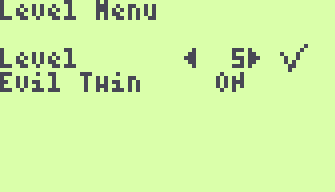
I love this game, and spent quite some time on it, but I really missed a better level access. So here it is.
The level access menu is redesigned, let you select any level. It also shows you if the level was succesfully passed or not (V or X). All the passed levels are saved to EEPROM for the next game.
Control :
- left / right : modify selected value
- up / down : choose value to be modified (level or evil twin)
- a : select chosen level
- b : cancel level selection
- c : go to title screen
- Bub.png (913 Bytes) Viewed 1568 times
The level access menu is redesigned, let you select any level. It also shows you if the level was succesfully passed or not (V or X). All the passed levels are saved to EEPROM for the next game.
Control :
- left / right : modify selected value
- up / down : choose value to be modified (level or evil twin)
- a : select chosen level
- b : cancel level selection
- c : go to title screen
Attachments: bub-levelMenu.zip
penduin Thu Mar 26, 2015 10:56 pm
Thanks milk!
I've merged your changes into the repo on github and updated the .zip file to include your new and improved menu. I'm glad to hear you enjoy my game!
It's not finished yet, but I'm working on an HTML5 canvas version of Bub as well. You can see it here:
http://smogheap.github.io/bub/html5/
It's got a pretty different feel from the good ol' Gamebuino version, but it's been fun to play with.
I've merged your changes into the repo on github and updated the .zip file to include your new and improved menu. I'm glad to hear you enjoy my game!
It's not finished yet, but I'm working on an HTML5 canvas version of Bub as well. You can see it here:
http://smogheap.github.io/bub/html5/
It's got a pretty different feel from the good ol' Gamebuino version, but it's been fun to play with.
Skyrunner65 Fri Mar 27, 2015 2:58 am
I was bored, so I made a level:
Somewhat Simple is the name of the level, I guess.
Somewhat Simple is the name of the level, I guess.
milk Fri Mar 27, 2015 3:58 pm
I like your animations html5 version. They are nice, but a little slow. You may want your animations to be fast, more like jumping from one place to another than walking.
This got me thinking, ... and coding aswell. See attached. I only animated the ork walking anf falling, but more can be done, like swallowing a bubble, climbing a ladder, opening a door, reaching the flag, pushing a crate. wip
<-- edit --> I updated the attached zip to contain all .ino files.
This got me thinking, ... and coding aswell. See attached. I only animated the ork walking anf falling, but more can be done, like swallowing a bubble, climbing a ladder, opening a door, reaching the flag, pushing a crate. wip
<-- edit --> I updated the attached zip to contain all .ino files.
Attachments: bub-orkAnimation.zip (not archived)
penduin Fri Mar 27, 2015 4:55 pm
Skyrunner65: That's awesome! I love to see other people create and share maps. I haven't thought of a good way to make a level editor on the Gamebuino version, but if anyone has suggestions (or patches :^) that would be most welcome!
milk: Did you add to sprites.ino? I'm getting undefined refs to 'orkjump1' etc when I try to build.
As for the canvas version, it's been easier to implement motions slowly at first to see what's going on, then speed things up as I get the rest of the gameplay working. I also haven't done much optimizing for cases where it's not running at 60fps yet. (Walking in particular gets really sluggish at lower framerates, which I will get around to fixing.) I'm OK with it having a different, less-immediate feel than the prototype too. It's an experiment in-progress; just thought I'd share. :^)
milk: Did you add to sprites.ino? I'm getting undefined refs to 'orkjump1' etc when I try to build.
As for the canvas version, it's been easier to implement motions slowly at first to see what's going on, then speed things up as I get the rest of the gameplay working. I also haven't done much optimizing for cases where it's not running at 60fps yet. (Walking in particular gets really sluggish at lower framerates, which I will get around to fixing.) I'm OK with it having a different, less-immediate feel than the prototype too. It's an experiment in-progress; just thought I'd share. :^)
milk Fri Mar 27, 2015 5:06 pm
milk: Did you add to sprites.ino? I'm getting undefined refs to 'orkjump1' etc when I try to build.
Oops my bad. I modified the zip in my previous post.
Sorunome Tue May 12, 2015 7:27 pm
I had issues with the contrast being low when starting, so I re-built it and here it is:
(P.S. allowing .HEX attachment uploads would make life easier :) )
(P.S. allowing .HEX attachment uploads would make life easier :) )
Attachments: bub.zip (not archived)
penduin Tue May 12, 2015 7:51 pm
Sorunome wrote:I had issues with the contrast being low when starting, so I re-built it and here it is
Is Bub doing something with the contrast? As far as I understood, it should leave the display settings alone. Has there been a major library change for which I should make some alterations?
Do you have a patch, or updated source? Thanks!
Sorunome Tue May 12, 2015 8:12 pm
penduin wrote:Sorunome wrote:I had issues with the contrast being low when starting, so I re-built it and here it is
Is Bub doing something with the contrast? As far as I understood, it should leave the display settings alone. Has there been a major library change for which I should make some alterations?
Do you have a patch, or updated source? Thanks!
I haven't done anything to the source, I suspect that the gamebuino library used to compile it was an older version.
penduin Tue May 12, 2015 8:39 pm
Ahh. I'd better get on that then. Been away from this scene too long! Anything I should read, guides or pitfalls to avoid when updating stuff? Wouldn't want to cause any damage to my or any other Gamebuino. :^)
Sorunome Tue May 12, 2015 8:55 pm
penduin wrote:Ahh. I'd better get on that then. Been away from this scene too long! Anything I should read, guides or pitfalls to avoid when updating stuff? Wouldn't want to cause any damage to my or any other Gamebuino. :^)
Shouldn't cause any damage, you should be able to just download the newer library and recompile.
penduin Thu May 14, 2015 4:42 pm
Thanks for the info! I've rebuilt and updated the zip file. Does that version work happily? No code changes, just used the newer gamebuino library.
Sorunome Thu May 14, 2015 7:55 pm
Just, just tested, it's working now fine :)