
Archive of the Gamebuino Classic forum (2014-2018), rebuilt from the pages kept by the Wayback Machine: only part of the topics and pages were captured. Read-only. Removal on request: hi@gamebuino.com.
Forum › Project Guidance & Game development
[WIP] Robo-Sushi, a Robotron-inspired shooter
BurningSushi Tue Jun 23, 2015 7:55 pm
I'm working on a Robotron-inspired shooter. The story is that you're an escaped human in an underground sushi factory, where the robots make sushi out of people. You need to shoot robots to advance using the lift through levels in an attempt to get to ground level (quick heads up, this is an arcade survival game and there isn't an end!). Shoot all the grunts to activate the lift, and get as far as you can!
*NEW* v1.2 notes:
- New splash screen (thanks, Erico!)
- New .inf file to explain the controls better
- Grunt art and animation updated
- Added new enemy type: Sentries
- Added a paralysis status to player
- Moar UI tweaks
v1.1 notes:
- Added new enemy type: Rhinos
- Added strafe lock
- Added bombs
- Added shield for a free hit that recharges every level
- New splash screen
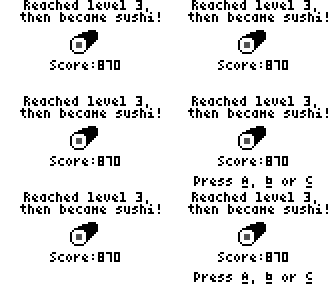
- New end screen
- Added new control system
- Adjusted enemy spawning to make it slower giving
- UI tweaks
You can try out the in-development version here: https://www.dropbox.com/sh/z8jzp0f33nnf ... ulTSa?dl=0
Controls:
A (press) - Shoot
A (hold, release) - Bomb
B (press) - Strafe toggle
B (hold, release) - Teleport
Bomb:
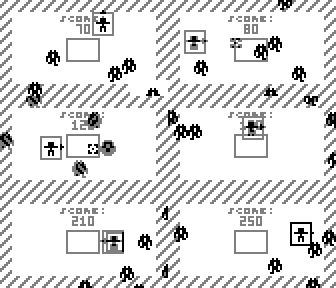
Strafe:
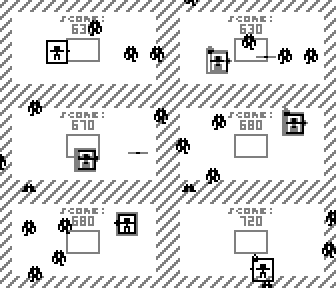
Teleport:
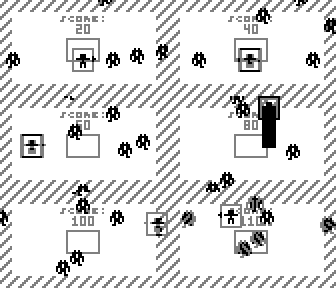
Level Up:
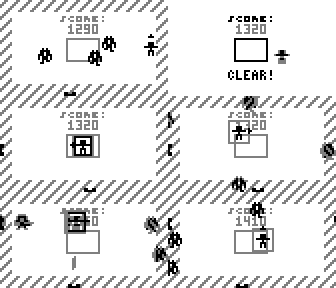
Everything:
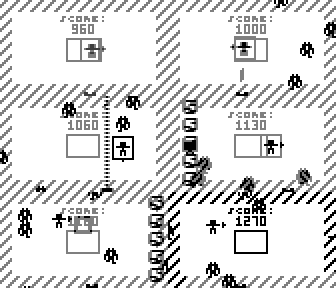
*NEW* v1.2 notes:
- New splash screen (thanks, Erico!)
- New .inf file to explain the controls better
- Grunt art and animation updated
- Added new enemy type: Sentries
- Added a paralysis status to player
- Moar UI tweaks
v1.1 notes:
- Added new enemy type: Rhinos
- Added strafe lock
- Added bombs
- Added shield for a free hit that recharges every level
- New splash screen
- New end screen
- Added new control system
- Adjusted enemy spawning to make it slower giving
- UI tweaks
You can try out the in-development version here: https://www.dropbox.com/sh/z8jzp0f33nnf ... ulTSa?dl=0
Controls:
A (press) - Shoot
A (hold, release) - Bomb
B (press) - Strafe toggle
B (hold, release) - Teleport

Bomb:

Strafe:

Teleport:

Level Up:

Everything:


Sorunome Tue Jun 23, 2015 10:12 pm
The story is....weird....humans don't consist of fish O.O
Anyways, it is looking nice so far! :D
Anyways, it is looking nice so far! :D
BurningSushi Tue Jun 23, 2015 10:48 pm
Tell the robots that......I think something went wrong with their programming XD
Thanks, and all feedback is welcome!
Thanks, and all feedback is welcome!
rodot Wed Jun 24, 2015 7:27 am
Nice, I love the transition between levels.
PS: topic moved to "game development"
PS: topic moved to "game development"
BurningSushi Thu Jun 25, 2015 3:34 pm
Cheers, wasn't sure where to put it XD
erico Thu Jun 25, 2015 7:50 pm
Quite a Berserk! ;)
frakasss Fri Jun 26, 2015 6:15 am
by erico » Thu Jun 25, 2015 7:50 pm
Quite a Berserk! ;)
INTRUDER ALERT! THE HUMANOID MUST NOT ESCAPE! :)
erico Fri Jun 26, 2015 1:11 pm
It did speak didn´t it? :D
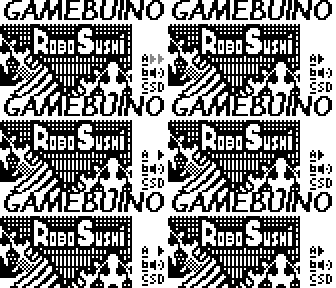
Here a mock intro.
Here the real size.
Done quite quick, so things are not that balanced, title, jagged lines, etc, bla bla.
Here a mock intro.

- ROBO SUSHI big.png (144.63 KiB) Viewed 6493 times
Here the real size.
- ROBO SUSHI.png (18.52 KiB) Viewed 6493 times
Done quite quick, so things are not that balanced, title, jagged lines, etc, bla bla.
erico Fri Jun 26, 2015 8:27 pm
Also, how does the teleport work? does it travel a fixed distance or does it go as you hold the button or does it warp auto to an empty space if there is one?
BurningSushi Fri Jun 26, 2015 10:58 pm
That intro looks awesome dude! They look kinda awesome as samurai :D
The teleport works a set distance away, a little tweak I'm going to make is that it teleports closer if you're closer than the boundaries allow. Is there something you don't get with it? It was something I did in a couple of hours really but it was so cool I wanted to do something with it ;)
The teleport works a set distance away, a little tweak I'm going to make is that it teleports closer if you're closer than the boundaries allow. Is there something you don't get with it? It was something I did in a couple of hours really but it was so cool I wanted to do something with it ;)
erico Fri Jun 26, 2015 11:09 pm
Oh no, it is fine, I just wondered about the teleport, I haven´t tried the game yet so I could not tell.
Yep, looks like a samurai (we are talking sushis right? ;) ), it is based on the illustrations on the side of the Berserk arcade machine.
I guess back at that time, all enemies on american movies looked like samurais, darth vader, cylons,etc etc. :lol:
edit: oh, the last sentence I wrote on the image post was about the art(the one I humbly attempted), not the game itself. I´m a huge fan of robotron and berserk and arena shooters.
Yep, looks like a samurai (we are talking sushis right? ;) ), it is based on the illustrations on the side of the Berserk arcade machine.
I guess back at that time, all enemies on american movies looked like samurais, darth vader, cylons,etc etc. :lol:
edit: oh, the last sentence I wrote on the image post was about the art(the one I humbly attempted), not the game itself. I´m a huge fan of robotron and berserk and arena shooters.
BurningSushi Sat Jun 27, 2015 4:25 pm
Well it looks awesome in any case dude ;D
Getting further with teh game, hopefully there will be another version I'm puttin' out soon!
Getting further with teh game, hopefully there will be another version I'm puttin' out soon!
Jerom Sat Jun 27, 2015 5:48 pm
erico wrote:Here a mock intro.
niiiiiiice!
Skyrunner65 Mon Jun 29, 2015 5:57 am
Can there be different abilities?
- The Dash, which you have already made.
- Lock View, where your shots are locked to the selected direction.
- Grenade, which if it wasn't handled correctly, could be overpowered.
BurningSushi Tue Jun 30, 2015 9:36 am
Dash is actually a pretty good name for it, I only have 4 letters available on the title screen XD
I actually already have strafe (weapon lock) coded, but when teleport came along it turned out to be much cooler!
I had a lot more to write here but then I had an idea for how to lay out the controls:
A (press): Shoot
A (hold, release): Grenade launcher/Charge shot/EMP (whatever rings best ;D)
B (press): Strafe toggle
B (hold, release): Teleport/Dash
C (press): Weapon change (if I choose to put lots of weapons in, seems nice and pure for now)
What's your thoughts?
I actually already have strafe (weapon lock) coded, but when teleport came along it turned out to be much cooler!
I had a lot more to write here but then I had an idea for how to lay out the controls:
A (press): Shoot
A (hold, release): Grenade launcher/Charge shot/EMP (whatever rings best ;D)
B (press): Strafe toggle
B (hold, release): Teleport/Dash
C (press): Weapon change (if I choose to put lots of weapons in, seems nice and pure for now)
What's your thoughts?
frakasss Wed Jul 01, 2015 9:26 am
Nice dude! :)
I think having different events for 'pressed' and 'hold/released' status is good, but since the gamebuino is quite sensitive, you'll most have 'hold/released' events.
Maybe play with duration of 'hold'.
What about having enemies randomly dropping ammo/lives/dash when killed? This would make game harder! :twisted: ;)
I think having different events for 'pressed' and 'hold/released' status is good, but since the gamebuino is quite sensitive, you'll most have 'hold/released' events.
Maybe play with duration of 'hold'.
What about having enemies randomly dropping ammo/lives/dash when killed? This would make game harder! :twisted: ;)
BurningSushi Mon Jul 06, 2015 10:59 am
Got a monster upgrade yo!
- Added new enemy type: Rhinos
- Added strafe lock
- Added bombs
- Added shield for a free hit that recharges every level
- New splash screen
- New end screen
- Added new control system
- Adjusted enemy spawning to make it slower giving
- UI tweaks
There's a lot here, so have an good play and hit me with some feedback if you guys are a little unsure about certain things, or don't if you're too busy playing! XD
p.s. splash screen is provisional, the controls are going to be in-game next time. If you want to make a splash screen for some 'cart art', post it and I'll stick it in ;)
- Added new enemy type: Rhinos
- Added strafe lock
- Added bombs
- Added shield for a free hit that recharges every level
- New splash screen
- New end screen
- Added new control system
- Adjusted enemy spawning to make it slower giving
- UI tweaks
There's a lot here, so have an good play and hit me with some feedback if you guys are a little unsure about certain things, or don't if you're too busy playing! XD
p.s. splash screen is provisional, the controls are going to be in-game next time. If you want to make a splash screen for some 'cart art', post it and I'll stick it in ;)
rodot Mon Jul 06, 2015 6:06 pm
Just a tip : too free some flash memory, you can put the controls and story in the .INF file instead of putting them in your game (pictures takes a lot of space). You can download the beta version of the .INF generator plus the new graphical loader here. Any feedback on the inf encoder and graphical loader is welcome !
BurningSushi Tue Jul 07, 2015 12:06 am
Cheers for the tip Rodot, is there any limitation for how big the file can be? If so I'll most likely look over the code to see if I can optimise things better ;)
Speaking of which I'm going to include the code on (what I consider) the finished version, which will be the next or time afterwards hopefully :)
Speaking of which I'm going to include the code on (what I consider) the finished version, which will be the next or time afterwards hopefully :)
rodot Tue Jul 07, 2015 4:43 pm
You can't put more than 255 slides in the .INF... which should be enough to explain the game controls :P
Looking forward to the final version !
Looking forward to the final version !
BurningSushi Thu Jul 09, 2015 3:35 pm
Working nice and hard on it! Speaking of .infs though, what's the maximum size for a picture that can be displayed?
rodot Thu Jul 09, 2015 4:56 pm
The logo must be 19*18px and the slides 84*32px. The .INF encoder will tell you if you input the wrong size anyway ;)
BurningSushi Sun Jul 12, 2015 3:04 pm
Got the inf files ready, but now I'm having a lot of trouble getting sound to work outside the usual gb.sound.playOK(), etc.
I've read the sound page over and over and I've implemented Yoda's FX Synth code to go into my own, which is below:
This should definitely be working and the only sound I got out of it was when I used the teleport sound on release of the B button. Would there be any reason I might be having problems getting sound fx to play?
I've read the sound page over and over and I've implemented Yoda's FX Synth code to go into my own, which is below:
- Code: Select all
const int PROGMEM soundfx[8][8] = {
  {1,20,52,3,7,12,7,9}, // sound 0: Explosion
  {1,45,75,2,2,7,5,2}, // sound 1: Shoot
  {0,48,35,2,4,2,4,1}, // sound 2: Cursor blip
  {1,5,0,0,3,2,7,1}, // sound 3: Robot footstep
  {1,45,75,2,2,7,5,2}, // sound 4: Human footstep
  {1,24,11,3,1,0,6,4}, // sound 5: Sentry fire
  {1,41,96,1,3,3,6,4}, // sound 6: Sentry fire [alt]
  {1,41,6,2,5,3,7,4}, // sound 7: Teleport
};

void PlaySoundFX(int fxno, int channel)
{
  gb.sound.command(0,soundfx[fxno][6],0,channel); // set volume
  gb.sound.command(1,soundfx[fxno][0],0,channel); // set waveform
  gb.sound.command(2,soundfx[fxno][5],-soundfx[fxno][4],channel); // set volume slide
  gb.sound.command(3,soundfx[fxno][3],soundfx[fxno][2]-58,channel); // set pitch slide
  gb.sound.playNote(soundfx[fxno][1],soundfx[fxno][7],channel); // play note
}

PlaySoundFX(1,0); //Player fires
This should definitely be working and the only sound I got out of it was when I used the teleport sound on release of the B button. Would there be any reason I might be having problems getting sound fx to play?
rodot Sun Jul 12, 2015 4:09 pm
You should use the tracker, you can download from at the download page. It's in alpha version so it only allows you to create patterns, but that's enough if you only want to make in-game sounds (no complex musics).
BurningSushi Mon Jul 13, 2015 11:11 am
New version (v1.2) is now up along with the source files!
Changes:
- New splash screen (thanks, Erico!)
- New .inf file to explain the controls better
- Grunt art and animation updated
- Added new enemy type: Sentries
- Added a paralysis status to player
- Moar UI tweaks
New enemies are called Sentries and they will freeze you in place if you are shot by them, so watch out!
Unfortunately I've been hitting the limit of what I can achieve with storage, so putting sound on will require more optimisation. The game crashed my Gamebuino a couple of times with the sound on. If anyone can see anything in the code that can be changed, let me know ;)
Enjoy the new version!
Changes:
- New splash screen (thanks, Erico!)
- New .inf file to explain the controls better
- Grunt art and animation updated
- Added new enemy type: Sentries
- Added a paralysis status to player
- Moar UI tweaks
New enemies are called Sentries and they will freeze you in place if you are shot by them, so watch out!
Unfortunately I've been hitting the limit of what I can achieve with storage, so putting sound on will require more optimisation. The game crashed my Gamebuino a couple of times with the sound on. If anyone can see anything in the code that can be changed, let me know ;)
Enjoy the new version!
erico Mon Jul 13, 2015 3:42 pm
I still have to check this out, time is weird these days.
I have the intro file as a psd with layers, won´t be much trouble to make it fit the required intro logo size.
Will update it soon.
I have the intro file as a psd with layers, won´t be much trouble to make it fit the required intro logo size.
Will update it soon.
superfreaky Sat Dec 19, 2015 6:28 am
What a fun game! I think it's a good addition to the library of gamebuino games. Why isn't it in the Games Gallery?