
Archive of the Gamebuino Classic forum (2014-2018), rebuilt from the pages kept by the Wayback Machine: only part of the topics and pages were captured. Read-only. Removal on request: hi@gamebuino.com.
Tile mapper questions
deeph Mon Jul 13, 2015 6:21 am
Hi,
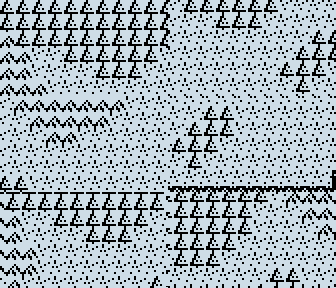
I am currently working on a tile mapper which seems to work properly, but I can't figure out why is the emu (simbuino) crashing when the Y camera reaches the lower bound of the map.
Plus I'd like to speed it up a little bit because I've seen faster ones in other games (that don't even need to speed up the frame rate). Any advice ?
Here's the code :
And a screenshot :
Thanks :)
I am currently working on a tile mapper which seems to work properly, but I can't figure out why is the emu (simbuino) crashing when the Y camera reaches the lower bound of the map.
Plus I'd like to speed it up a little bit because I've seen faster ones in other games (that don't even need to speed up the frame rate). Any advice ?
Here's the code :
- Code: Select all
#include <SPI.h>
#include <Gamebuino.h>

const byte PROGMEM map_test[]={
  1,1,1,1,1,1,1,1,1,1,1,1,0,2,2,2,2,2,2,2,0,0,0,3,
  1,1,1,1,1,1,1,1,1,1,1,0,0,0,2,2,2,2,2,0,0,0,0,3,
  2,1,1,1,1,1,1,1,1,1,1,0,0,0,0,2,2,0,0,0,0,0,0,3,
  2,2,0,0,1,1,1,1,1,1,0,0,0,0,0,0,0,0,0,0,0,0,0,3,
  2,2,0,0,0,0,1,1,1,0,0,0,0,0,0,0,0,0,0,0,0,0,0,3,
  2,2,2,0,0,0,0,0,0,0,0,0,1,1,0,0,0,0,0,0,0,0,0,3,
  2,2,2,0,0,0,0,0,0,0,0,1,1,1,0,0,0,0,0,0,0,0,3,3,
  0,2,0,0,0,0,0,0,0,0,1,1,1,0,0,0,0,0,0,0,0,0,3,3,
  3,0,0,0,0,0,0,0,0,0,0,1,0,0,0,0,0,0,0,0,0,3,3,3,
  3,3,0,0,0,0,0,0,0,0,0,0,0,0,0,0,0,0,0,0,3,3,3,3,
  3,3,3,3,3,3,3,3,3,3,3,3,3,3,3,3,3,3,3,3,3,3,3,3,
  3,3,3,3,3,3,3,3,3,3,3,3,3,3,3,3,3,3,3,3,3,3,3,3
};

const byte PROGMEM tile_0[]={ 8,8,0x80,0x84,0x10,0x41,0x00,0x20,0x02,0x00 };
const byte PROGMEM tile_1[]={ 8,8,0x10,0x30,0x28,0x60,0x54,0xC0,0xFE,0x10 };
const byte PROGMEM tile_2[]={ 8,8,0x00,0x00,0x08,0x14,0x26,0x52,0xD9,0x88 };
const byte PROGMEM tile_3[]={ 8,8,0xFA,0xDF,0xAD,0xFA,0xEF,0xD7,0xFF,0xFD };

const byte* tiles[]={ tile_0, tile_1, tile_2, tile_3 };

Gamebuino gb;

void setup(){
  gb.begin();
  gb.setFrameRate(60);
  const byte map_width = 24;
  const byte map_height = 24;
  const byte tile_width = 8;
  const byte tile_height = 8;
  byte camera_x = 0;
  byte camera_y = 0;
  byte x_v = 1;
  byte y_v = 1;
  while(1){
    if(gb.update()){
      for(byte y = 0; y <= 6; y++){
        for(byte x = 0; x <= 11; x++){
          gb.display.drawBitmap(x*tile_width-camera_x%8, y*tile_height-camera_y%8, tiles[pgm_read_byte(map_test+((camera_y/8+y)*map_width+camera_x/8+x))]);
        }
      }
      camera_y+=-gb.buttons.repeat(BTN_UP,1)*(camera_y > 0)+gb.buttons.repeat(BTN_DOWN,1)*(camera_y < map_height*tile_height-48);
      camera_x+=-gb.buttons.repeat(BTN_LEFT,1)*(camera_x > 0)+gb.buttons.repeat(BTN_RIGHT,1)*(camera_x < map_width*tile_width-84);
    }
  }
}

void loop(){
  while(1){
  }
}
And a screenshot :
Thanks :)
Myndale Mon Jul 13, 2015 11:54 am
There are a few bugs in your code that are resulting in an attempt to access an invalid Flash address. Simbuino shouldn't be crashing under any circumstances though so thanks for bringing it to my attention, I'll add a fix in the next release.
With respect to the underlying cause, map_width and map_height are both being set to 24 but the map array itself is 24x12, so the first step is to set map_height to 12. Even with this fix the drawing logic will still try to read and draw tiles outside the proper map area if you move to the bottom right, a quick check in your draw loop will fix that:
With respect to the underlying cause, map_width and map_height are both being set to 24 but the map array itself is 24x12, so the first step is to set map_height to 12. Even with this fix the drawing logic will still try to read and draw tiles outside the proper map area if you move to the bottom right, a quick check in your draw loop will fix that:
- Code: Select all
          int mapx = camera_x/8+x;
          int mapy = camera_y/8+y;
          if ((mapx>=0) && (mapx<map_width) && (mapy>=0) && (mapy<map_height))
            gb.display.drawBitmap(x*tile_width-camera_x%8, y*tile_height-camera_y%8, tiles[pgm_read_byte(map_test+mapy*map_width+mapx)]);
deeph Mon Jul 13, 2015 12:56 pm
Myndale wrote:With respect to the underlying cause, map_width and map_height are both being set to 24 but the map array itself is 24x12, so the first step is to set map_height to 12.
Yes I find it out shortly after I made this post... :oops:
Thanks ! :)
Now I'm trying to handle the player sprite :
- Code: Select all
#include <SPI.h>
#include <Gamebuino.h>

const byte PROGMEM map_test[]={
  2,2,2,2,2,2,2,2,2,2,2,2,1,3,3,3,3,3,3,3,1,1,1,4,
  2,2,2,2,2,2,2,2,2,2,2,1,1,1,3,3,3,3,3,1,1,1,1,4,
  3,2,2,2,2,2,2,2,2,2,2,1,1,1,1,3,3,1,1,1,1,1,1,4,
  3,3,1,1,2,2,2,2,2,2,1,1,1,1,1,1,1,1,1,1,1,1,1,4,
  3,3,1,1,1,1,2,2,2,1,1,1,1,1,1,1,1,1,1,1,1,1,1,4,
  3,3,3,1,1,1,1,1,1,1,1,1,2,2,1,1,1,1,1,1,1,1,1,4,
  3,3,3,1,1,1,1,1,1,1,1,2,2,2,1,1,1,1,1,1,1,1,4,4,
  1,3,1,1,1,1,1,1,1,1,2,2,2,1,1,1,1,1,1,1,1,1,4,4,
  4,1,1,1,1,1,1,1,1,1,1,2,1,1,1,1,1,1,1,1,1,4,4,4,
  4,4,1,1,1,1,1,1,1,1,1,1,1,1,1,1,1,1,1,1,4,4,4,4,
  4,4,4,4,4,4,4,4,4,4,4,4,4,4,4,4,4,4,4,4,4,4,4,4,
  4,4,4,4,4,4,4,4,4,4,4,4,4,4,4,4,4,4,4,4,4,4,4,4
};

const byte PROGMEM tile_0[]={
  8,8,0xFF,0xFF,0xFF,0xFF,0xFF,0xFF,0xFF,0xFF };
const byte PROGMEM tile_1[]={
  8,8,0x80,0x84,0x10,0x41,0x00,0x20,0x02,0x00 };
const byte PROGMEM tile_2[]={
  8,8,0x10,0x30,0x28,0x60,0x54,0xC0,0xFE,0x10 };
const byte PROGMEM tile_3[]={
  8,8,0x00,0x00,0x08,0x14,0x26,0x52,0xD9,0x88 };
const byte PROGMEM tile_4[]={
  8,8,0xFA,0xDF,0xAD,0xFA,0xEF,0xD7,0xFF,0xFD };
const byte* tiles[]={
  tile_0, tile_1, tile_2, tile_3, tile_4 };

const byte PROGMEM player[]={
  8,8,0x18,0x24,0x24,0x18,0x3C,0x5A,0x24,0x24 };

#define MAP_WIDTH 24
#define MAP_HEIGHT 12
#define TILE_WIDTH 8
#define TILE_HEIGHT 8

Gamebuino gb;

void setup(){
  gb.begin();
  gb.display.persistence = true;
  byte x = 6;
  byte y = 6;
  byte i;
  int camera_x = x*TILE_WIDTH-LCDWIDTH/2+4;
  int camera_y = y*TILE_HEIGHT-LCDHEIGHT/2+4;
  draw_map(camera_x, camera_y, MAP_WIDTH, MAP_HEIGHT);
  gb.display.drawBitmap(x*TILE_WIDTH-camera_x, y*TILE_WIDTH-camera_y, player);
  gb.display.update();
  while(1){
    if(gb.update()){
      char x_temp=-gb.buttons.repeat(BTN_LEFT, 1)*(x > 0)+gb.buttons.repeat(BTN_RIGHT, 1)*(x < MAP_WIDTH-1);
      char y_temp=-gb.buttons.repeat(BTN_UP, 1)*(y > 0)+gb.buttons.repeat(BTN_DOWN, 1)*(y < MAP_HEIGHT-1);
      if(x_temp || y_temp){
        for(i = 1; i <=8; i++){
          gb.display.clear();
          camera_x = x*TILE_WIDTH-LCDWIDTH/2+4+i*x_temp;
          camera_y = y*TILE_HEIGHT-LCDHEIGHT/2+4+i*y_temp;
          draw_map(camera_x, camera_y, MAP_WIDTH, MAP_HEIGHT);
          gb.display.drawBitmap(x*TILE_WIDTH-camera_x+i*x_temp, y*TILE_WIDTH-camera_y+i*y_temp, player);
          gb.display.update();
        }
        x+=x_temp;
        y+=y_temp;
      }
    }
  }
}

void loop(){
  while(1){
  }
}

void draw_map(int camera_x, int camera_y, byte map_width, byte map_height){
  for(byte y = 0; y <= 6; y++){
    for(byte x = 0; x <= 11; x++){
      int tile_x = camera_x/TILE_WIDTH+x;
      int tile_y = camera_y/TILE_HEIGHT+y;
      byte tile = 0;
      if(tile_x >= 0 && tile_x < map_width && tile_y >= 0 && tile_y < map_height){
        tile = pgm_read_byte(map_test+(tile_y)*map_width+tile_x);
      }
      gb.display.drawBitmap(x*TILE_WIDTH-camera_x%TILE_WIDTH, y*TILE_HEIGHT-camera_y%TILE_HEIGHT, tiles[tile]);
    }
  }
}
It seems to work, there's just one thing I haven't fixed so far : the blank tiles outside the upper bound of the map aren't properly clipped :
I think it is somewhat due to negative values of camera_x/y, but using abs() on them don't seems to work.
Marcus Mon Jul 13, 2015 6:26 pm
That looks pretty neat, what game are you working on`? :-)
deeph Mon Jul 13, 2015 6:35 pm
Nothing in particular yet, I just want to have a functionnal tile mapper first. Maybe it'll then turn into a RPG ;)
I'm wondering what's best : stop scrolling the camera on the edges of the map or continue and draw blank tiles beyond (what I'm trying to do right now) ?
And if anybody has any advice about how to optimise it more, don't hesitate :)
I'm wondering what's best : stop scrolling the camera on the edges of the map or continue and draw blank tiles beyond (what I'm trying to do right now) ?
And if anybody has any advice about how to optimise it more, don't hesitate :)
awesome101 Mon Jul 13, 2015 7:33 pm
Hey deeph, I have an optimization for how you store the numbers in the map array. If you are using less than 16 tiles, you can represent 2 tiles for every element in the array. For example:
The B stands for binary.
The 4 bits on the left, in this case 1000, can represent grass, for example, and the other 4 bits on the right could represent sand. If you do it this way there are 16 different combinations that you can make, and that's why you need under 16 tiles. Now, you might be asking, how can you get the first 4 bits on the left, and on the right? You can do that using bitwise opperators. So if you shift the number to the right(>>) by 4, you will get the first half of the number. To get the other half you have to mask(&) it by the number >> 4. p.s. it's okay if you don't get some of this, because this isn't really for beginners.
example:
for more details you can go to:
https://en.wikipedia.org/wiki/Binary_number
https://en.wikipedia.org/wiki/Bitwise_operation
Hope this helped :D
- Code: Select all
byte map[] PROGMEM = {B1000 0001...};
The B stands for binary.
The 4 bits on the left, in this case 1000, can represent grass, for example, and the other 4 bits on the right could represent sand. If you do it this way there are 16 different combinations that you can make, and that's why you need under 16 tiles. Now, you might be asking, how can you get the first 4 bits on the left, and on the right? You can do that using bitwise opperators. So if you shift the number to the right(>>) by 4, you will get the first half of the number. To get the other half you have to mask(&) it by the number >> 4. p.s. it's okay if you don't get some of this, because this isn't really for beginners.
example:
- Code: Select all
byte map[] PROGMEM = {B1000 0001...};
byte first_half = (map[0] >> 4);
byte second_half = map[0] & (map[0] >> 4);
for more details you can go to:
https://en.wikipedia.org/wiki/Binary_number
https://en.wikipedia.org/wiki/Bitwise_operation
Hope this helped :D
Marcus Mon Jul 13, 2015 7:40 pm
Looking forward to your endeavors!
I'm a big fan of RPG and hopefully I can get a game together myself soon (waiting for my Gamebuino... should be here soon :-) Also I got Simbuino running now after upgrading to Windows 8.)
I still can't make up my mind on tile sizes and sprite sizes. The constrains of the small display are both challenging and fun to design for. I think I'm going with a unconventional mix (see this 5x5 and 11x8 for the sprites)- I started with 8x8 but the tiles where too large and the characters lacked of details.
Personally, I would stop scrolling instead of showing a blank screen, though it could be done like in some games such as my beloved "Secret of Mana" where there's usually just a continuous pattern of trees or similar (see this).
The advantage of stopping at the border is that it'll show the active area (enemies and so on), the small screen resolution is already cropping it hard as it is :-)
I'm a big fan of RPG and hopefully I can get a game together myself soon (waiting for my Gamebuino... should be here soon :-) Also I got Simbuino running now after upgrading to Windows 8.)
I still can't make up my mind on tile sizes and sprite sizes. The constrains of the small display are both challenging and fun to design for. I think I'm going with a unconventional mix (see this 5x5 and 11x8 for the sprites)- I started with 8x8 but the tiles where too large and the characters lacked of details.
Personally, I would stop scrolling instead of showing a blank screen, though it could be done like in some games such as my beloved "Secret of Mana" where there's usually just a continuous pattern of trees or similar (see this).
The advantage of stopping at the border is that it'll show the active area (enemies and so on), the small screen resolution is already cropping it hard as it is :-)
deeph Mon Jul 13, 2015 8:07 pm
awesome101 > That's interesting and I'll certainly use that method for small games with only a few different tiles, thanks ;)
Marcus > Those sprites are great :) But personnaly I prefere 8*8 sprites because that's what I'm used to with other devices (TI z80). The only thing is that the screen width isn't a 8 multiple, so you have either 4 cols of pixels on one side of the screen or 2 on both sides (what I'm doing right now, but I guess it'll be less convenient if I stop the camera on edges of the map).
I think you're right, showing a blank screen may not be the smarter thing to do with such a low res :D
So I'll let the pokemon-style camera and switch to a zelda-like one.
Though I'd like to know why those blank tiles weren't properly clipped.
Marcus > Those sprites are great :) But personnaly I prefere 8*8 sprites because that's what I'm used to with other devices (TI z80). The only thing is that the screen width isn't a 8 multiple, so you have either 4 cols of pixels on one side of the screen or 2 on both sides (what I'm doing right now, but I guess it'll be less convenient if I stop the camera on edges of the map).
I think you're right, showing a blank screen may not be the smarter thing to do with such a low res :D
So I'll let the pokemon-style camera and switch to a zelda-like one.
Though I'd like to know why those blank tiles weren't properly clipped.
Marcus Mon Jul 13, 2015 8:20 pm
Thanks :-)
Yes, I can understand, it makes things. Easier. But for me it didn't quite work out.
8x8 looks more limited, especially as gray-scale is a bit wonky. With just monochrome it'll be very limited.
download/file.php?id=808 But some others on here made nice graphics in 6x6 or 8x8.
compared to ~11x8
download/file.php?id=632 - leaves a bit more freedom for design and poses.
I am not experienced enough to help you with the tile rendering, I hope you get it sorted out! :-)
Yes, I can understand, it makes things. Easier. But for me it didn't quite work out.
8x8 looks more limited, especially as gray-scale is a bit wonky. With just monochrome it'll be very limited.
download/file.php?id=808 But some others on here made nice graphics in 6x6 or 8x8.
compared to ~11x8
download/file.php?id=632 - leaves a bit more freedom for design and poses.
I am not experienced enough to help you with the tile rendering, I hope you get it sorted out! :-)
deeph Tue Jul 14, 2015 8:48 am
Well, I've seen a lot of beautiful 8*8 monochrome sprites (http://revsoft.tifreakware.net/phpBB3/viewtopic.php?f=10&t=110 for example) :)
Otherwise it was easier than I thought :
The next thing I'll do is add animations/directions to the player sprite.
Otherwise it was easier than I thought :
- Code: Select all
#include <SPI.h>
#include <Gamebuino.h>

const byte PROGMEM map_test[]={
  2,2,2,2,2,2,2,2,2,2,2,2,1,3,3,3,3,3,3,3,1,1,1,4,
  2,2,2,2,2,2,2,2,2,2,2,1,1,1,3,3,3,3,3,1,1,1,1,4,
  3,2,2,2,2,2,2,2,2,2,2,1,1,1,1,3,3,1,1,1,1,1,1,4,
  3,3,1,1,2,2,2,2,2,2,1,1,1,1,1,1,1,1,1,1,1,1,1,4,
  3,3,1,1,1,1,2,2,2,1,1,1,1,1,1,1,1,1,1,1,1,1,1,4,
  3,3,3,1,1,1,1,1,1,1,1,1,2,2,1,1,1,1,1,1,1,1,1,4,
  3,3,3,1,1,1,1,1,1,1,1,2,2,2,1,1,1,1,1,1,1,1,4,4,
  1,3,1,1,1,1,1,1,1,1,2,2,2,1,1,1,1,1,1,1,1,1,4,4,
  4,1,1,1,1,1,1,1,1,1,1,2,1,1,1,1,1,1,1,1,1,4,4,4,
  4,4,1,1,1,1,1,1,1,1,1,1,1,1,1,1,1,1,1,1,4,4,4,4,
  4,4,4,4,4,4,4,4,4,4,4,4,4,4,4,4,4,4,4,4,4,4,4,4,
  4,4,4,4,4,4,4,4,4,4,4,4,4,4,4,4,4,4,4,4,4,4,4,4
};

const byte PROGMEM tile_0[]={
  8,8,0xFF,0xFF,0xFF,0xFF,0xFF,0xFF,0xFF,0xFF };
const byte PROGMEM tile_1[]={
  8,8,0x80,0x84,0x10,0x41,0x00,0x20,0x02,0x00 };
const byte PROGMEM tile_2[]={
  8,8,0x10,0x30,0x28,0x60,0x54,0xC0,0xFE,0x10 };
const byte PROGMEM tile_3[]={
  8,8,0x00,0x00,0x08,0x14,0x26,0x52,0xD9,0x88 };
const byte PROGMEM tile_4[]={
  8,8,0xFA,0xDF,0xAD,0xFA,0xEF,0xD7,0xFF,0xFD };
const byte* tiles[]={
  tile_0, tile_1, tile_2, tile_3, tile_4 };

const byte PROGMEM player[]={
  8,8,0x18,0x24,0x24,0x18,0x3C,0x5A,0x24,0x24 };

#define MAP_WIDTH 24
#define MAP_HEIGHT 12
#define TILE_WIDTH 8
#define TILE_HEIGHT 8

Gamebuino gb;

void setup(){
  gb.begin();
  gb.display.persistence = true;
  byte player_x = 6;
  byte player_y = 6;
  byte i;
  int camera_x = player_x*TILE_WIDTH-LCDWIDTH/2+4;
  int camera_y = player_y*TILE_HEIGHT-LCDHEIGHT/2+4;
  draw_map(camera_x, camera_y, MAP_WIDTH, MAP_HEIGHT);
  gb.display.drawBitmap(player_x*TILE_WIDTH-camera_x, player_y*TILE_WIDTH-camera_y, player);
  gb.display.update();
  while(1){
    if(gb.update()){
      char x_temp = -gb.buttons.repeat(BTN_LEFT, 1)*(player_x > 0)+gb.buttons.repeat(BTN_RIGHT, 1)*(player_x < MAP_WIDTH-1);
      char y_temp = -gb.buttons.repeat(BTN_UP, 1)*(player_y > 0)+gb.buttons.repeat(BTN_DOWN, 1)*(player_y < MAP_HEIGHT-1);
      if(x_temp || y_temp){
        for(i = 1; i <=8; i++){
          gb.display.clear();
          camera_x = (player_x*TILE_WIDTH-LCDWIDTH/2+4+i*x_temp);
          camera_x = camera_x*(camera_x > 0)+(MAP_WIDTH*TILE_WIDTH-LCDWIDTH-camera_x)*(camera_x > MAP_WIDTH*TILE_WIDTH-LCDWIDTH);
          camera_y = player_y*TILE_HEIGHT-LCDHEIGHT/2+4+i*y_temp;
          camera_y = camera_y*(camera_y > 0)+(MAP_HEIGHT*TILE_HEIGHT-LCDHEIGHT-camera_y)*(camera_y > MAP_HEIGHT*TILE_HEIGHT-LCDHEIGHT);
          draw_map(camera_x, camera_y, MAP_WIDTH, MAP_HEIGHT);
          gb.display.drawBitmap(player_x*TILE_WIDTH-camera_x+i*x_temp, player_y*TILE_WIDTH-camera_y+i*y_temp, player);
          gb.display.update();
        }
        player_x += x_temp;
        player_y += y_temp;
      }
    }
  }
}

void loop(){
}

void draw_map(int camera_x, int camera_y, byte map_width, byte map_height){
  for(byte y = 0; y <= 6; y++){
    for(byte x = 0; x <= 11; x++){
      int tile_x = camera_x/TILE_WIDTH+x;
      int tile_y = camera_y/TILE_HEIGHT+y;
      if(tile_x >= 0 && tile_x < map_width && tile_y >= 0 && tile_y < map_height){
        gb.display.drawBitmap(x*TILE_WIDTH-camera_x%TILE_WIDTH, y*TILE_HEIGHT-camera_y%TILE_HEIGHT, tiles[pgm_read_byte(map_test+(tile_y)*map_width+tile_x)]);
      }
    }
  }
}
The next thing I'll do is add animations/directions to the player sprite.
Marcus Tue Jul 14, 2015 10:59 am
Looking good!
Oh yeah, that's amazing 8x8 sprite art! (Now I'm jealous :-) )
I've also seen
http://www.team-arg.org/ELV-manual.html and http://www.team-arg.org/DUN-manual.html
But at least I wasn't able to pull off the Secret of Mana enemy variety in 8x8, the weaponry, the NPC... :-) The details always end up stylized. More stick-man then character :-) But perhaps I'll doodle a bit more.
Anyway, good luck with your project, looking forward to it :-) I hope I can get it nearly as smooth and implement the "following AI" of the secondary characters :-)
Oh yeah, that's amazing 8x8 sprite art! (Now I'm jealous :-) )
I've also seen
http://www.team-arg.org/ELV-manual.html and http://www.team-arg.org/DUN-manual.html
But at least I wasn't able to pull off the Secret of Mana enemy variety in 8x8, the weaponry, the NPC... :-) The details always end up stylized. More stick-man then character :-) But perhaps I'll doodle a bit more.
Anyway, good luck with your project, looking forward to it :-) I hope I can get it nearly as smooth and implement the "following AI" of the secondary characters :-)
deeph Wed Jul 15, 2015 8:35 pm
Ok my tilemapper is almost done 8-)
I added the player masked sprite, direction, animation, collision and animated tiles. Here's the code :
I'll try to optimize it a little bit more and add a lot of comments so that hopefully it can help beginners.
And I'll do another topic when I'll have something more concrete.
I added the player masked sprite, direction, animation, collision and animated tiles. Here's the code :
- Code: Select all
#include <SPI.h>
#include <Gamebuino.h>

#define MAP_WIDTH 15
#define MAP_HEIGHT 15
const int PROGMEM map_test[]={
  5,5,7,0,7,5,5,5,8,11,11,15,5,5,5,
  5,0,7,0,7,1,1,3,9,12,12,16,1,1,5,
  5,0,0,0,0,3,1,1,10,13,14,17,1,3,5,
  5,0,6,0,0,0,0,0,0,0,0,1,1,1,5,
  5,0,0,0,0,0,0,0,0,0,0,0,1,1,5,
  5,0,0,0,0,0,0,0,0,0,0,0,0,1,5,
  5,8,11,11,15,0,0,0,0,0,0,0,0,1,5,
  5,9,12,12,16,5,5,5,5,0,0,0,0,0,5,
  5,10,13,14,17,3,1,1,1,0,0,0,0,0,5,
  5,1,0,1,1,1,1,0,0,0,0,0,0,0,5,
  5,0,0,0,0,0,0,0,0,0,0,0,0,0,5,
  5,0,0,0,0,0,0,0,0,0,0,0,6,0,5,
  5,2,2,2,2,2,2,2,2,2,0,0,0,0,5,
  5,2,2,2,2,2,2,2,2,2,7,0,7,0,5,
  5,5,5,5,5,5,5,5,5,5,7,0,7,5,5 };

#define TILE_WIDTH 8
#define TILE_HEIGHT 8
#define TILES_PASSABLE_NUM 4
#define TILES_ANIMATED_START 3
#define TILES_ANIMATED_END 3
#define ANIMATION_FREQUENCY 500 // ms
const byte PROGMEM tiles[]={
  0x00,0x00,0x00,0x00,0x00,0x00,0x00,0x00,
  0x00,0x50,0x20,0x0a,0x04,0xa0,0x40,0x00,
  0x00,0xaa,0xee,0x44,0x00,0xaa,0xee,0x44,
  0x04,0x0a,0x04,0x4e,0xa4,0x40,0xe0,0x40,
  0x02,0x05,0x02,0x2e,0x54,0x20,0xe0,0x40,
  0x66,0xff,0x99,0x99,0x99,0x99,0x99,0x66,
  0x7e,0x81,0xa9,0xb5,0x81,0x7e,0x18,0x18,
  0x3c,0x42,0xc3,0xbf,0xa7,0xa7,0xa7,0x7e,
  0x00,0x03,0x0f,0x3b,0xeb,0xab,0xab,0xab,
  0xab,0xab,0xac,0xb0,0xe0,0x20,0x20,0x20,
  0x20,0x20,0x20,0x20,0x30,0x2a,0x3d,0x1f,
  0xff,0x7e,0xbd,0xdb,0xe7,0xdb,0xbd,0x7e,
  0x00,0xff,0x00,0x00,0x00,0x00,0x00,0x00,
  0x7e,0xb9,0xc5,0xcd,0xd5,0xbb,0x83,0x81,
  0xee,0x11,0x33,0x55,0xee,0x00,0x55,0xff,
  0x00,0xc0,0xf0,0xfc,0xff,0xff,0xff,0xff,
  0xff,0xff,0x3f,0x0f,0x07,0x04,0x04,0x04,
  0x04,0x04,0x04,0x04,0x0c,0xb4,0x5c,0xf8 };

const byte PROGMEM player_down01[]={
  8,8,0x3e,0x41,0x7f,0x55,0x41,0x3e,0x5d,0x36 };
const byte PROGMEM player_down02[]={
  8,8,0x3e,0x41,0x7f,0x55,0x61,0x5f,0x7f,0x36 };
const byte PROGMEM player_down03[]={
  8,8,0x3e,0x41,0x7f,0x55,0x43,0x7d,0x7f,0x36 };
const byte PROGMEM player_left01[]={
  8,8,0x1e,0x21,0x7f,0x2b,0x21,0x1e,0x0a,0x1e };
const byte PROGMEM player_left02[]={
  8,8,0x1e,0x21,0x7f,0x2b,0x21,0x1e,0x17,0x3f };
const byte PROGMEM player_left03[]={
  8,8,0x1e,0x21,0x7f,0x2b,0x21,0x1e,0x1d,0x3f };
const byte PROGMEM player_mask01[]={
  8,8,0x3e,0x7f,0x7f,0x7f,0x7f,0x3e,0x7f,0x36 };
const byte PROGMEM player_mask02[]={
  8,8,0x3e,0x7f,0x7f,0x7f,0x7f,0x7f,0x7f,0x36 };
const byte PROGMEM player_mask03[]={
  8,8,0x1e,0x3f,0x7f,0x3f,0x3f,0x1e,0x0e,0x1e };
const byte PROGMEM player_mask04[]={
  8,8,0x1e,0x3f,0x7f,0x3f,0x3f,0x1e,0x1f,0x3f };
const byte PROGMEM player_mask05[]={
  8,8,0x3c,0x7e,0x7f,0x7e,0x7e,0x3c,0x38,0x3c };
const byte PROGMEM player_mask06[]={
  8,8,0x3c,0x7e,0x7f,0x7e,0x7e,0x3c,0x7c,0x7e };
const byte PROGMEM player_right01[]={
  8,8,0x3c,0x42,0x7f,0x6a,0x42,0x3c,0x28,0x3c };
const byte PROGMEM player_right02[]={
  8,8,0x3c,0x42,0x7f,0x6a,0x42,0x3c,0x74,0x7e };
const byte PROGMEM player_right03[]={
  8,8,0x3c,0x42,0x7f,0x6a,0x42,0x3c,0x5c,0x7e };
const byte PROGMEM player_up01[]={
  8,8,0x3e,0x41,0x7f,0x41,0x41,0x3e,0x5d,0x36 };
const byte PROGMEM player_up02[]={
  8,8,0x3e,0x41,0x7f,0x41,0x43,0x7d,0x4f,0x36 };
const byte PROGMEM player_up03[]={
  8,8,0x3e,0x41,0x7f,0x41,0x61,0x5f,0x79,0x36 };
const byte* player_sprites[]={
  player_mask05,player_right01,player_mask06,player_right02,player_mask06,player_right03,
  player_mask01,player_up01,player_mask02,player_up02,player_mask02,player_up03,
  player_mask03,player_left01,player_mask04,player_left02,player_mask04,player_left03,
  player_mask01,player_down01,player_mask02,player_down02,player_mask02,player_down03 };

Gamebuino gb;

void setup(){
  gb.begin();
  byte player_x = 2;
  byte player_y = 2;
  byte player_direction = 3;
  byte player_animation = 0;
  int camera_x = player_x*TILE_WIDTH-LCDWIDTH/2+4;
  camera_x = camera_x*(camera_x > 0)+(MAP_WIDTH*TILE_WIDTH-LCDWIDTH-camera_x)*(camera_x > MAP_WIDTH*TILE_WIDTH-LCDWIDTH);
  int camera_y = player_y*TILE_HEIGHT-LCDHEIGHT/2+4;
  camera_y = camera_y*(camera_y > 0)+(MAP_HEIGHT*TILE_HEIGHT-LCDHEIGHT-camera_y)*(camera_y > MAP_HEIGHT*TILE_HEIGHT-LCDHEIGHT);
  while(1){
    if(gb.update()){
      draw_map(camera_x, camera_y);
      draw_player(player_x*TILE_WIDTH-camera_x, player_y*TILE_WIDTH-camera_y, player_direction, player_animation);
      char x_temp = -gb.buttons.repeat(BTN_LEFT, 1)*(player_x > 0)+gb.buttons.repeat(BTN_RIGHT, 1)*(player_x < MAP_WIDTH-1);
      char y_temp = -gb.buttons.repeat(BTN_UP, 1)*(player_y > 0)+gb.buttons.repeat(BTN_DOWN, 1)*(player_y < MAP_HEIGHT-1);
      if(x_temp || y_temp){
        player_direction = (1+x_temp)*(x_temp != 0);
        player_direction = (2+y_temp)*(y_temp != 0 || player_direction == 0);
        if(TILES_PASSABLE_NUM-pgm_read_byte(map_test+(player_y+y_temp)*MAP_WIDTH+player_x+x_temp) > 0){
          for(byte i = 1; i <=8; i++){
            player_animation += 1;
            player_animation *= (player_animation < 3 && i < 8);
            camera_x = (player_x*TILE_WIDTH-LCDWIDTH/2+4+i*x_temp);
            camera_x = camera_x*(camera_x > 0)+(MAP_WIDTH*TILE_WIDTH-LCDWIDTH-camera_x)*(camera_x > MAP_WIDTH*TILE_WIDTH-LCDWIDTH);
            camera_y = player_y*TILE_HEIGHT-LCDHEIGHT/2+4+i*y_temp;
            camera_y = camera_y*(camera_y > 0)+(MAP_HEIGHT*TILE_HEIGHT-LCDHEIGHT-camera_y)*(camera_y > MAP_HEIGHT*TILE_HEIGHT-LCDHEIGHT);
            gb.display.clear();
            draw_map(camera_x, camera_y);
            draw_player(player_x*TILE_WIDTH-camera_x+i*x_temp, player_y*TILE_WIDTH-camera_y+i*y_temp, player_direction, player_animation);
            gb.display.update();
          }
          player_x += x_temp;
          player_y += y_temp;
        }
      }
    }
  }
}

void loop(){
}

void draw_tile(int x, int y, byte tile_num){
  tile_num += (tile_num >= TILES_ANIMATED_START && tile_num <= TILES_ANIMATED_END)*millis()/ANIMATION_FREQUENCY%2;
  byte i, j;
  for(i = 0; i < TILE_WIDTH; i++){
    for(j = 0; j < TILE_HEIGHT; j++) {
      if(pgm_read_byte(tiles+tile_num*TILE_HEIGHT+j)&(B10000000>>i)){
        gb.display.drawPixel(x+i,y+j);
      }
    }
  }
}

void draw_map(int camera_x, int camera_y){
  for(byte y = 0; y <= 6; y++){
    for(byte x = 0; x <= 11; x++){
      int tile_x = camera_x/TILE_WIDTH+x;
      int tile_y = camera_y/TILE_HEIGHT+y;
      if(tile_x >= 0 && tile_x < MAP_WIDTH && tile_y >= 0 && tile_y < MAP_HEIGHT){
        draw_tile(x*TILE_WIDTH-camera_x%TILE_WIDTH, y*TILE_HEIGHT-camera_y%TILE_HEIGHT, pgm_read_byte(map_test+tile_y*MAP_WIDTH+tile_x));
      }
    }
  }
}

void draw_player(int x, int y, byte direction, byte animation){
  gb.display.setColor(WHITE, BLACK);
  gb.display.drawBitmap(x, y, player_sprites[direction*6+2*animation]);
  gb.display.setColor(BLACK, WHITE);
  gb.display.drawBitmap(x, y, player_sprites[direction*6+2*animation+1]);
}
I'll try to optimize it a little bit more and add a lot of comments so that hopefully it can help beginners.
And I'll do another topic when I'll have something more concrete.
Marcus Wed Jul 15, 2015 8:38 pm
Wow. That turned out great.
Thanks for sharing!
I played around with 8x8 sprites a bit more but I think I am trying to get too many details squeezed into them :)
Your source code will come in handy when I start coding again !
Thanks for sharing!
I played around with 8x8 sprites a bit more but I think I am trying to get too many details squeezed into them :)
Your source code will come in handy when I start coding again !
erico Wed Jul 15, 2015 9:35 pm
Extremely charming! Well done job! :)
Sorunome Wed Jul 15, 2015 10:27 pm
Yes, it is looking quite awesome indeed, great job!
Drakker Wed Jul 15, 2015 10:49 pm
Looks great!
Jolly Thu Jul 16, 2015 8:04 am
Oh wow, that looks amazing. :shock: