
Archive of the Gamebuino Classic forum (2014-2018), rebuilt from the pages kept by the Wayback Machine: only part of the topics and pages were captured. Read-only. Removal on request: hi@gamebuino.com.
Fighting Fantasy gamebook engine
mougino Mon Aug 17, 2015 3:38 pm
mougino wrote:jonnection wrote:Amazingly fast work Nicolas
I downloaded the code and wanted to examine it to see if I would be able to get any ideas how to reduce memory use (in Operation Fox I had to do absolutely everything to get it to the 30kb size)
But, at least on this crappy old computer I have with me right now with Arduino ide 1.0.4 I am unable to compile the code
Are you sure that you compiled this package on your computer ? Perhaps there is some new features in Arduino IDE that make it work but at leas IDE 1.0.4 gave these errors.
Anyhow, I got it to compile by chucking everything into 1 ino file. Looking at it right now.
Hm yes you are right, it seems this happens only when you #define LNG ENG
If you keep the #define LNG FRA it compiles fine.
This must be a last minute change I made in this version with a misplaced #if or #endif somewhere. Unfortunately, I'm already sailing on new seas ;) I changed a big deal of code since yesterday and I'm a little reluctant to spend time looking for the ENG error in the old version :|
I'll make sure this doesn't happen in the new version I'm working on. Thanks for the feedback anyway!
Nicolas
Following up... I found the reason why the compilation is impossible, and a fix. But I'm not more advanced :oops:
With #define LNG ENG you need to define all the prototypes of the functions before the setup() and loop()
Not doing that, it says all functions are not in the scope of the sketch... I don't know why but anyhow that is fixed in the next version I'm working on (going well I must add :) ) let's cross fingers for a < 30 KB final sketch.
Nicolas
mougino Wed Aug 19, 2015 1:32 pm
Continuing on my Gamebuino development adventure, and the heroic fighting it represents sometimes ;)
I wanted to share my experience, and hope it can be useful to others:
I spent literally hours having an erratic behaviour in my app: variables "disappearing" i.e. printing them on screen (bytes or ints) would display nothing, not even zero! and sometimes crashes of the app at random times. I looked mainly in buffer overflows (when using strcp or strcat of char arrays), I looked and I looked, now they have no secret for me :)
One of the greatest tip I discovered against buffer overflows: use strncat(tgt, src, sizeof(tgt)-strlen(tgt)-1) instead of the simpler strcat(tgt, src) when you concatenate strings. You'll make sure to never write beyong the space allocated to tgt. Explanation: sizeof(tgt) is the number of bytes given by the system to tgt, of which strlen(tgt) are already occupied by characters, and you need to copy an additional 1 character less to keep the room for the final NULL terminator.
Anyway, back to the erratic behaviour: all in all the problem came from the SRAM usage.
Even though Arduino IDE says it uses 1,860 bytes of a 2048 limit, don't let it fool you: it doesn't mean you're ok. This is only the SRAM used by your variables (global and local to functions). It doesn't take into account the SRAM needed internally, especially when copying big char of arrays for example, the system needs a temporary buffer for that, that can take several hundreds of kilo-bytes more, thus going over the 2048 limit...
Only by drastically reducing the variables sizes, and putting some strings (read: arrays of char) into PROGMEM, and when I finally fell around 1,560 bytes of SRAM used, was my app stable at last !
Hope it helps ;)
Nicolas
I wanted to share my experience, and hope it can be useful to others:
I spent literally hours having an erratic behaviour in my app: variables "disappearing" i.e. printing them on screen (bytes or ints) would display nothing, not even zero! and sometimes crashes of the app at random times. I looked mainly in buffer overflows (when using strcp or strcat of char arrays), I looked and I looked, now they have no secret for me :)
One of the greatest tip I discovered against buffer overflows: use strncat(tgt, src, sizeof(tgt)-strlen(tgt)-1) instead of the simpler strcat(tgt, src) when you concatenate strings. You'll make sure to never write beyong the space allocated to tgt. Explanation: sizeof(tgt) is the number of bytes given by the system to tgt, of which strlen(tgt) are already occupied by characters, and you need to copy an additional 1 character less to keep the room for the final NULL terminator.
Anyway, back to the erratic behaviour: all in all the problem came from the SRAM usage.
Even though Arduino IDE says it uses 1,860 bytes of a 2048 limit, don't let it fool you: it doesn't mean you're ok. This is only the SRAM used by your variables (global and local to functions). It doesn't take into account the SRAM needed internally, especially when copying big char of arrays for example, the system needs a temporary buffer for that, that can take several hundreds of kilo-bytes more, thus going over the 2048 limit...
Only by drastically reducing the variables sizes, and putting some strings (read: arrays of char) into PROGMEM, and when I finally fell around 1,560 bytes of SRAM used, was my app stable at last !
Hope it helps ;)
Nicolas
albertinjo Wed Aug 19, 2015 11:51 pm
Are you using some method of determing the amount of free RAM on runtime? There are several arduino libraries made for this purpose.
I use this one: https://github.com/maniacbug/MemoryFree
It has proven useful to me a lot of times.
I use this one: https://github.com/maniacbug/MemoryFree
It has proven useful to me a lot of times.
mougino Sat Aug 22, 2015 7:13 am
Thanks for all the tips for analyzing memory guys!
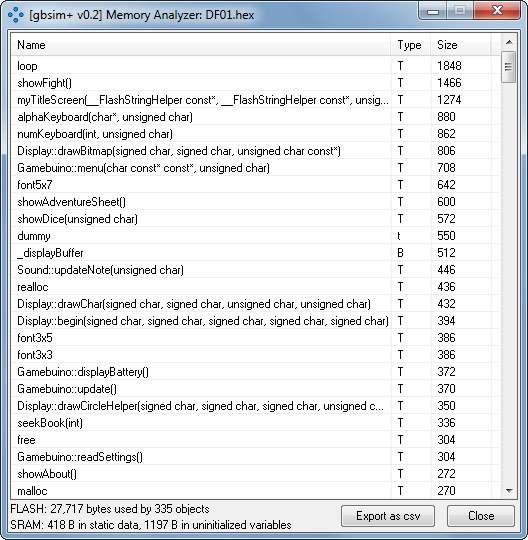
I implemented a Memory Analyzer in a new version of gbsim+ (Flash and SRAM), using the avr tool mentioned by Jonne, and it is really useful!
I have been able to drastically reduce my FF engine footprint. We are very close to a v0.2 release ;)
Nicolas
I implemented a Memory Analyzer in a new version of gbsim+ (Flash and SRAM), using the avr tool mentioned by Jonne, and it is really useful!
I have been able to drastically reduce my FF engine footprint. We are very close to a v0.2 release ;)
Nicolas
mougino Mon Aug 24, 2015 11:51 am
Ok, so I think it's ready ;) or at least it's playable enough for field testing!
My v0.2 engine sketch size is 29,172 bytes out of 30,592 max, and it uses 1,441 bytes of SRAM out of 2,048 max.
So who is interested to beta-test The Warlock of Firetop Mountain on his/her Gamebuino :?:
The working book I have is in French actually, so until I adapt the English book (I have it, just need to format it, shouldn't take long...) it would be a beta-test of Le Sorcier de la Montagne de Feu!
Next improvement I want to push before releasing the code is EEPROM save! Current engine doesn't have it, so if you want to play the book seriously, make sure to remember your last paragraph (and stats) before switching off your Gamebuino.
What you'll find in the Gamebook engine:
In the book, use RIGHT and LEFT arrows to scroll through the pages, and use UP and DOWN to move the selection, or to scroll by a single line.
Button A is used to validate, B to go to Adventure Sheet (or back to the Book), or to cancel in all other screens.
I use a modified version of the Gamebuino library with sound and keyboard stripped off to save memory, and an enhanced gb.popup() that takes a (variable) SRAM char array as a parameter (the original one only takes a PROGMEM const char[] which I find too restrictive):
I also removed the gb.keyboard() and replaced it with 2 more ergonomic keyboards (but that's only my opinion!) a numeric keyboard, already seen a few posts back, and a new Qwerty keyboard (or Azerty for French users):
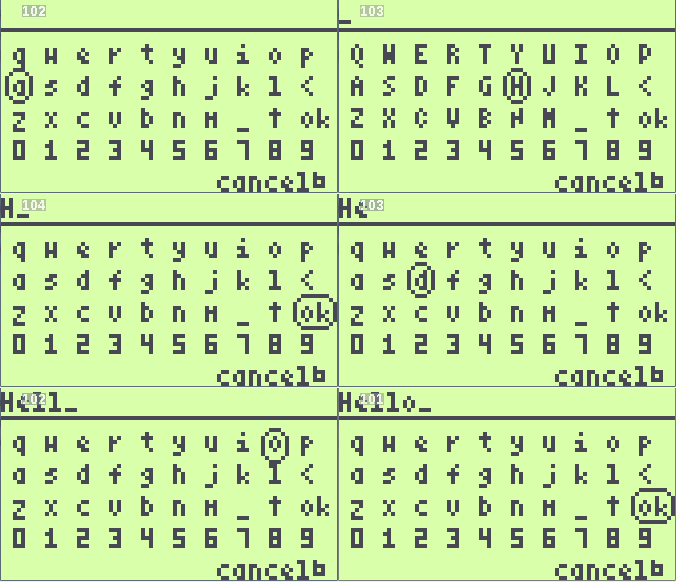
For those interested, here is the code of this keyboard (less than 70 lines):
Among other interesting things: some functions to convert a char array to an int, and an int to a char array, other functions to build a char array by concatenating other char arrays to it (either from SRAM or from PROGMEM) or also concatenate integers... And a lot of other fun stuff ;)
So I'm waiting for applicants :!:
As I'm not sure about the legality of making public a raw copy of a copyrighted gamebook, I'll just send the app (INF+HEX+LDV) by private message to people who are interested in beta-testing (remember: French-speaking people only so far! désolé!)
Cheers,
Nicolas
My v0.2 engine sketch size is 29,172 bytes out of 30,592 max, and it uses 1,441 bytes of SRAM out of 2,048 max.
So who is interested to beta-test The Warlock of Firetop Mountain on his/her Gamebuino :?:
The working book I have is in French actually, so until I adapt the English book (I have it, just need to format it, shouldn't take long...) it would be a beta-test of Le Sorcier de la Montagne de Feu!
Next improvement I want to push before releasing the code is EEPROM save! Current engine doesn't have it, so if you want to play the book seriously, make sure to remember your last paragraph (and stats) before switching off your Gamebuino.
What you'll find in the Gamebook engine:
- stats management (skill, stamina, luck): randomly calculated when you start the adventure, then totally editable, and of course actions in the book have direct incidence on your stats!
- management of gold, provisions (give +4 of stamina), and potions (choice of 3 potions at the beginning of the adventure: Potion of Skill - restores skill points ; Potion of Strength - restores stamina points ; Potion of Fortune - restores luck points and adds 1 to Initial luck)
- dynamic equipment: you start your adventure with a sword, a leather armour, a rucksack and a lantern, then you can edit (add or remove) any item to your equipment!
- special actions: roll 1 or 2 dice, test your luck, fight! and goto paragraph (can be used for cheating, but sometimes it's actually needed by the book)
In the book, use RIGHT and LEFT arrows to scroll through the pages, and use UP and DOWN to move the selection, or to scroll by a single line.
Button A is used to validate, B to go to Adventure Sheet (or back to the Book), or to cancel in all other screens.
I use a modified version of the Gamebuino library with sound and keyboard stripped off to save memory, and an enhanced gb.popup() that takes a (variable) SRAM char array as a parameter (the original one only takes a PROGMEM const char[] which I find too restrictive):
- Code: Select all
void Gamebuino::popup(const char* text, uint8_t duration){
#if (ENABLE_GUI > 0)
   popupText = (reinterpret_cast <const __FlashStringHelper*> (text));
   popupTimeLeft = duration+12;
#endif
}
I also removed the gb.keyboard() and replaced it with 2 more ergonomic keyboards (but that's only my opinion!) a numeric keyboard, already seen a few posts back, and a new Qwerty keyboard (or Azerty for French users):
For those interested, here is the code of this keyboard (less than 70 lines):
- Code: Select all
PROGMEM const char keyboard[] =
#ifdef FRENCH
"azertyuiopqsdfghjklmwxcvbn_\030<";
#else
"qwertyuiopasdfghjkl<zxcvbnm_\030";
#endif

void printAlpha(boolean caps, byte i) {
  char c=(char)pgm_read_byte(&(keyboard[i])); // read char array in PROGMEM
  if(caps && c>='a' && c<='z') c=c&~(0x20); // if(caps) convert to upper case
  gb.display.print(c); gb.display.print(F(" "));
}

void alphaKeyboard(char* tgt, byte lmax) {
  byte x=0, y=0;
  boolean caps=false;
  while(1) {
    if (gb.update()) {
      // draw input bar
      gb.display.cursorY++; if(strlen(tgt)) gb.display.print(tgt);
      gb.display.cursorY--; if((gb.frameCount/4)%2) gb.display.print(F("_"));
      gb.display.drawFastHLine(0,gb.display.fontHeight+1,LCDWIDTH);
      // draw keyboard
      moveCursor(3, gb.display.fontHeight+5);
      for(byte i=0; i<10; i++) printAlpha(caps, i);
      moveCursor(3, CURRENT+gb.display.fontHeight+2);
      for(byte i=10; i<20; i++) printAlpha(caps, i);
      moveCursor(3, CURRENT+gb.display.fontHeight+2);
      for(byte i=20; i<29; i++) printAlpha(caps, i);
      gb.display.println(F("ok"));
      moveCursor(3, CURRENT+2);
      for(char c='0'; c<='9'; c++) { gb.display.print(c); gb.display.print(F(" ")); }
      // draw select box
      gb.display.drawRoundRect(2*x*gb.display.fontWidth+1, (y+1)*(gb.display.fontHeight+2)+(y?1:2), ((x==9 && y==2)?2:1)*gb.display.fontWidth+3, gb.display.fontHeight+3, 3);
      // draw legend
      #ifdef FRENCH
      moveCursor(LCDWIDTH-7*gb.display.fontWidth-6, LCDHEIGHT-gb.display.fontHeight+1);
      gb.display.print(F("annuler"));
      #else
      moveCursor(LCDWIDTH-6*gb.display.fontWidth-6, LCDHEIGHT-gb.display.fontHeight+1);
      gb.display.print(F("cancel"));
      #endif
      gb.display.print(F("\026"));
      // handle user input
      if(gb.buttons.pressed(BTN_RIGHT)) x=(x+1)%10;
      if(gb.buttons.pressed(BTN_LEFT)) { x--; if(x==255) x=9; }
      if(gb.buttons.pressed(BTN_DOWN)) y=(y+1)%4;
      if(gb.buttons.pressed(BTN_UP)) { y--; if(y==255) y=3; }
      if(gb.buttons.pressed(BTN_B)) { tgt[0]=NULL; break; } // Cancelled by user
      if(gb.buttons.pressed(BTN_A)) {
        byte l=strlen(tgt);
        if(x==9 && y==2) { // Ok
          break;
        } else if(y==3) { // 0-9
          if(l<lmax) { tgt[l++]=(char)'0'+x; tgt[l]=NULL; }
        } else { // Other key
          char c=(char)pgm_read_byte(&(keyboard[10*y+x])); // read char array in PROGMEM
          if(c=='<') { // Del
            if(l) tgt[l-1]=NULL;
          } else if(c=='\030' || c=='\031') { // Shift
            caps=!caps;
          } else if(l<lmax) { // a-z, A-Z
            if(c=='_') c=' '; else if(caps) c=c&~(0x20); // convert space +if(caps) put in upper case
            tgt[l++]=(char)c; tgt[l]=NULL;
          } // if(l<lmax)
        } // Other key
      } // if(gb.buttons.pressed(BTN_A))
    } // if (gb.update())
  } // while(1)
} // alphaKeyboard()
Among other interesting things: some functions to convert a char array to an int, and an int to a char array, other functions to build a char array by concatenating other char arrays to it (either from SRAM or from PROGMEM) or also concatenate integers... And a lot of other fun stuff ;)
So I'm waiting for applicants :!:
As I'm not sure about the legality of making public a raw copy of a copyrighted gamebook, I'll just send the app (INF+HEX+LDV) by private message to people who are interested in beta-testing (remember: French-speaking people only so far! désolé!)
Cheers,
Nicolas
mougino Mon Aug 24, 2015 11:59 am
Oops, you'll need the accessory function moveCursor() to make use of above Qwerty keyboard! Here it is:
- Code: Select all
#define NCHRX 21    // number of characters per line with font3x5
#define NCHRY 8     // number of lines per screen with font3x5
#define CURRENT 100
#define PREVLINE 150
#define NEXTLINE 200
void moveCursor(byte x, byte y) {
  gb.display.cursorX+=
    (x>=CURRENT-NCHRX?x-CURRENT // relative CURRENT +/- n
    :x-gb.display.cursorX); // absolute
  gb.display.cursorY+=
    (y>=NEXTLINE-NCHRY?y-NEXTLINE+gb.display.fontHeight: // relative NEXTLINE +/- n
    (y>=PREVLINE-NCHRY?y-PREVLINE-gb.display.fontHeight: // relative PREVLINE +/- n
    (y>=CURRENT?y-CURRENT // relative CURRENT +/- n
    :y-gb.display.cursorY))); // absolute
}
deeph Mon Aug 24, 2015 2:00 pm
Cool :)
I'm ok to beta-test it, though I've never read/played those kind of books before.
I'm ok to beta-test it, though I've never read/played those kind of books before.
mougino Mon Aug 24, 2015 5:10 pm
Good! I sent you a link by private message ;)
Also, I was able to implement savegames! Now you can save your stats and progress in the book either from the Adventure Sheet > Save game, or by pressing C button during the game, to go back to the title screen.
Nicolas
Also, I was able to implement savegames! Now you can save your stats and progress in the book either from the Adventure Sheet > Save game, or by pressing C button during the game, to go back to the title screen.
Nicolas
deeph Mon Aug 24, 2015 7:35 pm
Thank you !
I've just sent you a quick report of my first game (and I can tell you this engine is already awesome so far :D).
As I was telling you I've been working on a custom variable-width extended ASCII font routine some weeks ago and even if it's not finished yet, it might be helpful for you to handle accents. Chars are adjoining on the memory and their widths are RLE encoded. The conversion is done using a PureBasic program.

ascii.zip
As you can see on the screenshot, some chars are not rendered correctly and I don't know if it's either the encoder or the decoder fault.
If you think it can be helpful and maybe if I can get some help, I might be able to finish it.
I've just sent you a quick report of my first game (and I can tell you this engine is already awesome so far :D).
As I was telling you I've been working on a custom variable-width extended ASCII font routine some weeks ago and even if it's not finished yet, it might be helpful for you to handle accents. Chars are adjoining on the memory and their widths are RLE encoded. The conversion is done using a PureBasic program.
ascii.zip
As you can see on the screenshot, some chars are not rendered correctly and I don't know if it's either the encoder or the decoder fault.
If you think it can be helpful and maybe if I can get some help, I might be able to finish it.
mougino Mon Aug 24, 2015 8:04 pm
Thanks Deeph!
I can see 2 problems with using a custom variable-width extended ASCII font:
1) the variable width! :) as basic as my SD text browser is so far (as you noticed, it truncates words at the end of lines), it was already hard (for me!) to implement it... So making it more complex would maybe be out of my skills I'm afraid :?
2) the size of the sketch... I didn't open your code, but I guess the font is in PROGMEM? that could be a problem, as the latest EEPROM enhancements I made pushed my engine to the almost-at-the-limit size of 29,902 bytes, which leaves 690 bytes for possible enhancements...
I'll read the rest of your remarks and reply to your private message ;)
Nicolas
I can see 2 problems with using a custom variable-width extended ASCII font:
1) the variable width! :) as basic as my SD text browser is so far (as you noticed, it truncates words at the end of lines), it was already hard (for me!) to implement it... So making it more complex would maybe be out of my skills I'm afraid :?
2) the size of the sketch... I didn't open your code, but I guess the font is in PROGMEM? that could be a problem, as the latest EEPROM enhancements I made pushed my engine to the almost-at-the-limit size of 29,902 bytes, which leaves 690 bytes for possible enhancements...
I'll read the rest of your remarks and reply to your private message ;)
Nicolas
deeph Mon Aug 24, 2015 8:12 pm
You're reading and printing each letter at a time from the sd card ? I think you'd probably better read the whole screen first (copy on memory), and then process it (remove spaces on starts of lines, avoid truncations...).
And the font is indeed currently in progmem, but i think it could be put on the sd card for example, since speed isn't on issue with this kind of app.
And the font is indeed currently in progmem, but i think it could be put on the sd card for example, since speed isn't on issue with this kind of app.
mougino Mon Aug 24, 2015 9:26 pm
Almost yes: I am buffering text from SD Card at current offset (enough characters to fill the screen i.e. 21x8 + a few more bonus characters), and then I display each character from this SRAM buffer on screen char by char, yes.
This is necessary mainly to display the blinking cursor, but I guess this could be used to detect a word going over a line, going back to the first space before the word, and inserting a "\n" instead...
Now that I think of it, since I got rid of the dynamic fonts and always use font3x5 in the book, I could do all this tedious work in my PC software that formats the book!! The CPU power there won't be a problem! Hmm this is a new horizon :roll:
I think I will share the code of my app very soon, for people to see how I have dealt with text buffer and possibly improve it...
Nicolas
This is necessary mainly to display the blinking cursor, but I guess this could be used to detect a word going over a line, going back to the first space before the word, and inserting a "\n" instead...
Now that I think of it, since I got rid of the dynamic fonts and always use font3x5 in the book, I could do all this tedious work in my PC software that formats the book!! The CPU power there won't be a problem! Hmm this is a new horizon :roll:
I think I will share the code of my app very soon, for people to see how I have dealt with text buffer and possibly improve it...
Nicolas
deeph Tue Aug 25, 2015 6:33 am
Yes you're right, this should be done on the PC side (and could even be doable with a variable-width font ;)).
As I want to end up with a new print() function with my custom font, I think you could implement it easily. Currently I don't know where fonts are stored, but I guess mine isn't bigger than two "standard" fonts. By the way, I can't locate the original print() function on the arduino folder, does anyone knows where it is ?
As I want to end up with a new print() function with my custom font, I think you could implement it easily. Currently I don't know where fonts are stored, but I guess mine isn't bigger than two "standard" fonts. By the way, I can't locate the original print() function on the arduino folder, does anyone knows where it is ?
lapin00b Tue Aug 25, 2015 11:05 am
In case you are still looking for beta-testers, I would be glad to try your gamebook engine.
I am from the french speaking part of Belgium and regarding copyright issues, I am 99% sure I still own a copy of that book in my parents house (need to find it in the library though).
Pour information, je trouve ton idée excellente. Je me suis toujours demandé pourquoi ça n'existait pas sur e-reader des livres qui te baladent au bon endroit en mémorisant ton parcours, tes actions, etc... Donc un grand bravo de l'avoir fait sur Gamebuino !
I am from the french speaking part of Belgium and regarding copyright issues, I am 99% sure I still own a copy of that book in my parents house (need to find it in the library though).
Pour information, je trouve ton idée excellente. Je me suis toujours demandé pourquoi ça n'existait pas sur e-reader des livres qui te baladent au bon endroit en mémorisant ton parcours, tes actions, etc... Donc un grand bravo de l'avoir fait sur Gamebuino !
jonnection Tue Aug 25, 2015 2:25 pm
deeph wrote:By the way, I can't locate the original print() function on the arduino folder, does anyone knows where it is ?
https://github.com/arduino/Arduino/tree ... es/arduino
hardware/arduino/avr/cores/arduino in local, files Print.h, Print.cpp
deeph Tue Aug 25, 2015 3:06 pm
Thanks, I ended up finding it too but still not the write() function :D
mougino Thu Aug 27, 2015 12:28 pm
Code to my fighting fantasy engine is now open to anyone on https://github.com/mougino/Gamebookuino
There is already a couple of issues entered in GitHub.
Nicolas
There is already a couple of issues entered in GitHub.
Nicolas
jonnection Sat Aug 29, 2015 9:12 pm
Bonjour Nicolas
J'ai essayé Gamebookuino, et en francais aussi... mais je ai eu quelques problemes (et non seulement avec la langue :lol: ).
Quand j'arrive a la fin de la premiere page (avec tous les instructions de jeu), il dit "tournez la page". Mais comment on fait ca ?
Aussi, le premiere page est trop longue. On doit appuie le bouton vingt fois a lire la page. Tu as certainement besoin d'un meilleur systeme de navigation.
Mais c'est un projet vraiment tres intressant. Continuez le travail, s'il vous plait !
J'ai essayé Gamebookuino, et en francais aussi... mais je ai eu quelques problemes (et non seulement avec la langue :lol: ).
Quand j'arrive a la fin de la premiere page (avec tous les instructions de jeu), il dit "tournez la page". Mais comment on fait ca ?
Aussi, le premiere page est trop longue. On doit appuie le bouton vingt fois a lire la page. Tu as certainement besoin d'un meilleur systeme de navigation.
Mais c'est un projet vraiment tres intressant. Continuez le travail, s'il vous plait !
jonnection Sat Aug 29, 2015 9:34 pm
Aha ! J'ai appuyé "Aller au..." dans le menu "Actions" et j'ai ouvert la page numero 2. Certainement ce n'est pas la page correcte, parce que il y a une ogre ... mais pas de probleme, je l'ai tué...
Apres quelques minutes de jeu, à mon avis, le systeme de combat et les autres pages fonctionnent très bien.
C'était le debut de la jeu - ca marché pas. C'est trop difficile.
Apres quelques minutes de jeu, à mon avis, le systeme de combat et les autres pages fonctionnent très bien.
C'était le debut de la jeu - ca marché pas. C'est trop difficile.
mougino Sun Aug 30, 2015 7:00 am
Yes sorry ;) this will be fixed in next version, you actually need to turn to paragraph 1, not 2. 1 is the beginning of the adventure.
The intro is way too long, this has already been changed too.
And I fixed the words being cut at the end of the line.
All these changes were made in the .LDV file, the engine (and so the app) stays the same.
I will push my changes to GitHub today.
Nicolas
The intro is way too long, this has already been changed too.
And I fixed the words being cut at the end of the line.
All these changes were made in the .LDV file, the engine (and so the app) stays the same.
I will push my changes to GitHub today.
Nicolas
mougino Sun Aug 30, 2015 7:47 am
Even with the intro severely reduced, it is still pretty long (~25 PGDOWN to reach the end of the paragraph), so I was thinking: should I put the Fighting Fantasy rules apart, accessible via a link, and start the adventure right away when you open the book ?
If so, where to make the link accessible ? At the beginning of the intro or in the Adventure Sheet ?
I guess you wouldn't need to read them more than once, so in the sheet wouldn't probably be the best idea... How do you guys think ?
Also, I am a little late in the English conversion of the book because I need to change my conversion tool so it takes some time.
Nicolas
If so, where to make the link accessible ? At the beginning of the intro or in the Adventure Sheet ?
I guess you wouldn't need to read them more than once, so in the sheet wouldn't probably be the best idea... How do you guys think ?
Also, I am a little late in the English conversion of the book because I need to change my conversion tool so it takes some time.
Nicolas
mougino Sun Aug 30, 2015 3:20 pm
I just released some fixes on GitHub for the French version: words are not cut at the end-of-line anymore, the intro is much shorter (gamebook rules have been moved to another paragraph) and links at the beginning of the adventure have been fixed.
Code and binaries (needed: DF01.HEX and DF01.LDV) are at https://github.com/mougino/Gamebookuino
Nicolas
Code and binaries (needed: DF01.HEX and DF01.LDV) are at https://github.com/mougino/Gamebookuino
Nicolas
mougino Sat Oct 03, 2015 4:26 pm
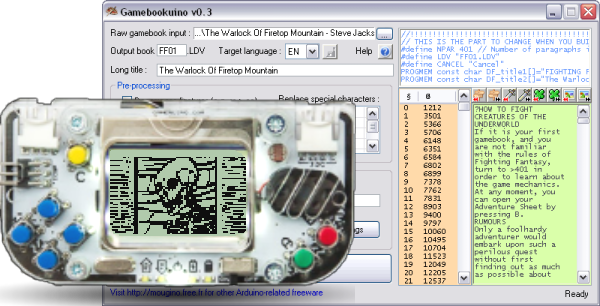
Big step: I just released the Gamebookuino Maker softare for Windows, as well as the English demo book playable on Gamebuino (Steve Jackson's "The Warlock of Firetop Mountain") and support for monochrome bitmaps in the book :mrgreen:
All of these awesome features are downloadable from http://mougino.free.fr/arduino/#gamebookuino
It is starting to be really playable now but more feedback is always welcome.
There are still some enhancements I canmake listed at https://github.com/mougino/Gamebookuino/issues
Arduino sketch in English is at https://github.com/mougino/Gamebookuino/tree/master/FF01
Arduino sketch in French is at https://github.com/mougino/Gamebookuino/tree/master/DF01
Both .HEX (and optional .INF) are at https://github.com/mougino/Gamebookuino/tree/master/bin
LDV files needed (to be placed on SD-Card) are in https://github.com/mougino/Gamebookuino/tree/master/books+LDV (respectively FF01.LDV and DF01.LDV), they are already the latest version and contain the bitmaps.
Other languages can be created (book and menus) thanks to the Windows utility.
Cheers!
Nicolas
All of these awesome features are downloadable from http://mougino.free.fr/arduino/#gamebookuino
It is starting to be really playable now but more feedback is always welcome.
There are still some enhancements I canmake listed at https://github.com/mougino/Gamebookuino/issues
Arduino sketch in English is at https://github.com/mougino/Gamebookuino/tree/master/FF01
Arduino sketch in French is at https://github.com/mougino/Gamebookuino/tree/master/DF01
Both .HEX (and optional .INF) are at https://github.com/mougino/Gamebookuino/tree/master/bin
LDV files needed (to be placed on SD-Card) are in https://github.com/mougino/Gamebookuino/tree/master/books+LDV (respectively FF01.LDV and DF01.LDV), they are already the latest version and contain the bitmaps.
Other languages can be created (book and menus) thanks to the Windows utility.
Cheers!
Nicolas
clement Sun Oct 04, 2015 7:09 am
Hy mougino,
I ve start the book in FR.
Thx for your work the boock engine is awesome !!!
BUG :
In the bottom of each page I ve a random char displayed. it s not a problem for reading.
If I got to left and i was in the last screen, I have a random text.
One time I ve freeze the game with a blank screen. (I ve got under the bottom of the page).
In the page 365, I ve 5 farfadet to kill, but the last have 255 live and die in 1 attack.
If I finish the figth nothing to do and I'm forced to return to the last page (whit the menu) and chose a another path.
Sorry for my english if you want an french repport I can do this :)
I ve start the book in FR.
Thx for your work the boock engine is awesome !!!
BUG :
In the bottom of each page I ve a random char displayed. it s not a problem for reading.
If I got to left and i was in the last screen, I have a random text.
One time I ve freeze the game with a blank screen. (I ve got under the bottom of the page).
In the page 365, I ve 5 farfadet to kill, but the last have 255 live and die in 1 attack.
If I finish the figth nothing to do and I'm forced to return to the last page (whit the menu) and chose a another path.
Sorry for my english if you want an french repport I can do this :)
mougino Sun Oct 04, 2015 12:49 pm
Thanks for the feedback Clément ;)
Random character at the bottom of each page: yes this is a known bug, already entered in GitHub as Issue #7
I didn't experience freeze but it wouldn't surprise me it can happen. Issue #7 means some memory address that shouldn't be read is read. So side effects can occur (such as random text or freeze). It will be solved when I find how to fix the issue.
Bug at page 365 with the 5 farfadets (end of paragraph is missing): thanks! This is a new bug, a regression in fact :roll: that's the result of wanting to save a few bytes by removing 2 lines in the code. I know how to fix this, meanwhile I entered it as Issue #17
Last farfadet having 255 of stamina: let me check. I think it is linked to Issue #17 but I'm not 100% sure.
Random character at the bottom of each page: yes this is a known bug, already entered in GitHub as Issue #7
I didn't experience freeze but it wouldn't surprise me it can happen. Issue #7 means some memory address that shouldn't be read is read. So side effects can occur (such as random text or freeze). It will be solved when I find how to fix the issue.
Bug at page 365 with the 5 farfadets (end of paragraph is missing): thanks! This is a new bug, a regression in fact :roll: that's the result of wanting to save a few bytes by removing 2 lines in the code. I know how to fix this, meanwhile I entered it as Issue #17
Last farfadet having 255 of stamina: let me check. I think it is linked to Issue #17 but I'm not 100% sure.
mougino Sun Oct 04, 2015 1:05 pm
Yes, I confirm: all bugs in page 365 were due to Issue #17.
I just fixed the bug, the .HEX are up-to date in https://github.com/mougino/Gamebookuino/tree/master/bin
No change to (EEPROM) savefile were made so you can flash the new HEX from the loader and continue your adventure as if nothing happened ;)
I just fixed the bug, the .HEX are up-to date in https://github.com/mougino/Gamebookuino/tree/master/bin
No change to (EEPROM) savefile were made so you can flash the new HEX from the loader and continue your adventure as if nothing happened ;)
clement Sun Oct 04, 2015 4:22 pm
I have choose another path ;).
I ve finish the game and kill the final boss, but I ve the same issu with the five farfadet, after kill the boss nothing appen.
NO more text, No final cut with the princess ;).
I don t know if is a bug or if the book ended up like this...
I ve finish the game and kill the final boss, but I ve the same issu with the five farfadet, after kill the boss nothing appen.
NO more text, No final cut with the princess ;).
I don t know if is a bug or if the book ended up like this...
mougino Sun Oct 04, 2015 8:39 pm
It's the same bug, so it will be fixed if you upgrade the HEX ;)
Quirby64 Sun Oct 04, 2015 11:21 pm
oh my god
This is amazing. Many kudos to you, man.
This is amazing. Many kudos to you, man.
mark87 Tue Oct 06, 2015 3:58 pm
Cool!
mougino Thu Oct 08, 2015 6:48 pm
I just fixed Issue #7 Random character at the bottom of each page, as well as 2 other issues (add fight exit capability: long press B button for 2s ; and scroll selection at same time as line).
HEX files have been updated in https://github.com/mougino/Gamebookuino/tree/master/bin
Nicolas
HEX files have been updated in https://github.com/mougino/Gamebookuino/tree/master/bin
Nicolas
mougino Fri Oct 09, 2015 5:11 pm
And now Issue #3 is fixed as well ;)
Keeping navigation keys pressed now scrolls the book continuously, fast for UP/DOWN, a little slower for RIGHT/LEFT (PG-UP/PG-DOWN).
Engine is pretty much stable now. Any feedback on the extraneous character particularly ? is welcome ! (I met a page displaying garbage but that was when playing with a possibly corrupted .LDV, I'm not sure it came from the engine or from a wrong address in the LDV ToC...)
Cheers!
Nicolas
Keeping navigation keys pressed now scrolls the book continuously, fast for UP/DOWN, a little slower for RIGHT/LEFT (PG-UP/PG-DOWN).
Engine is pretty much stable now. Any feedback on the extraneous character particularly ? is welcome ! (I met a page displaying garbage but that was when playing with a possibly corrupted .LDV, I'm not sure it came from the engine or from a wrong address in the LDV ToC...)
Cheers!
Nicolas