
Archive of the Gamebuino Classic forum (2014-2018), rebuilt from the pages kept by the Wayback Machine: only part of the topics and pages were captured. Read-only. Removal on request: hi@gamebuino.com.
Forum › Project Guidance & Game development
Wolfenduino 3D
jhhoward Sat Sep 26, 2015 2:35 pm
I've been developing a proof of concept port of id's Wolfenstein 3D for the Gamebuino, which I'm calling 'Wolfenduino 3D':
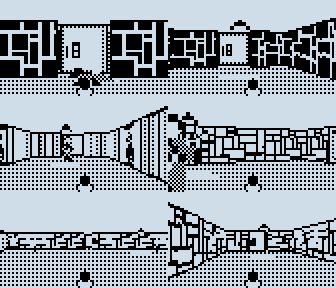
It was originally inspired by Myndale's 3d dungeon demo. I've attached a demo to this post that you can try out for yourself. It features:
- First level based on Wolfenstein 3D
- Renderer uses only integer maths (Myndale's demo uses floating point)
- Basic texture mapping for the walls
- Ordered sprite rendering
- Doors that open and close
- A gun (that currently does nothing but animate)
All of the code is on my github account here if you want to take a look:
https://github.com/jhhoward/Wolfenduino
If you want to build from source yourself, clone the repository and run 'BuildSketch.bat', which will build a subdirectory named 'WolfSketch' with the Arduino sketch inside it. (Sorry if you are not using Windows, the batch file is easy enough to figure out though!)
I still need to implement game logic, but I think it is a good start. Let me know what you think, and if you have any suggestions!
It was originally inspired by Myndale's 3d dungeon demo. I've attached a demo to this post that you can try out for yourself. It features:
- First level based on Wolfenstein 3D
- Renderer uses only integer maths (Myndale's demo uses floating point)
- Basic texture mapping for the walls
- Ordered sprite rendering
- Doors that open and close
- A gun (that currently does nothing but animate)
All of the code is on my github account here if you want to take a look:
https://github.com/jhhoward/Wolfenduino
If you want to build from source yourself, clone the repository and run 'BuildSketch.bat', which will build a subdirectory named 'WolfSketch' with the Arduino sketch inside it. (Sorry if you are not using Windows, the batch file is easy enough to figure out though!)
I still need to implement game logic, but I think it is a good start. Let me know what you think, and if you have any suggestions!
Attachments: wolf3d.zip (not archived)
mougino Sat Sep 26, 2015 6:28 pm
Wow!! Kudos jhhoward :mrgreen:
Looks very promising, I'm testing it right now.
How far are you from the 30K/2K flash/ram limit of the Gamebuino?
Are you confident to have still enough room for the game logic?
Cheers,
Nicolas
Looks very promising, I'm testing it right now.
How far are you from the 30K/2K flash/ram limit of the Gamebuino?
Are you confident to have still enough room for the game logic?
Cheers,
Nicolas
erico Sat Sep 26, 2015 10:41 pm
Gee, that is impressive!
jhhoward Sun Sep 27, 2015 4:02 pm
mougino wrote:Wow!! Kudos jhhoward :mrgreen:
Looks very promising, I'm testing it right now.
How far are you from the 30K/2K flash/ram limit of the Gamebuino?
Are you confident to have still enough room for the game logic?
Cheers,
Nicolas
Thanks! I'm running up close to the limit on flash but I think I should be able to fit the game logic in. I'm planning to offload the map data to the SD card and stream it in as you walk around the level, which should free up some extra space for code.
Sutchig Mon Sep 28, 2015 6:06 am
It looks great and playing/moving around feels great - really smooth, even at the larger areas. GREAT :)
Risike Mon Sep 28, 2015 8:16 am
Awesome !
I really want to understand this code but it's to hard for me ;)
I really want to understand this code but it's to hard for me ;)
jonnection Thu Oct 01, 2015 12:48 pm
@jhhoward: nice going, you have some serious skills. If I understood correctly, you have been coding Uzebox games.
I'd like to know what kind of environment you develop in. Is it Atmel Studio and if so, are you using a hardware debugger ?
Some experiences of trying to jam the Operation Fox code into 30k:
There is some memory waste in the Gamebuino lib and you should consider what features to use from it. For example, the font character tables in Gamebuino contain the ASCII escape characters although there is no use for them. Leaving out Print functions or strictly using just one type of Print by typecasting as well as using a CAPS ONLY char set can save program memory. Using more than 1 font size is a no-no.
Second, in real hardware you will quickly realize that in fast moving images, the quality of animation is not so critical, because motion blur due to LCD persistence kind of "spoils it" in any case. Looking at your bitmaps on your Github repo, I'd recommend simplifying characters and animations to save memory.
Third, adding streaming from SD is a double-edged thing. On the other hand, you can stream maps from SD. But on the other hand, petitFS will chomp around 3-4k of your precious program memory + RAM overhead. If you're not yet already using PetitFS, you will need to tighten your code quite a bit to make room for PetitFs. Also, my Operation Fox project got burned by the slow seek speed of the 256mb microSD cards that ship with the Gamebuinos. Streaming from SD worked well in my 2GB "Fakebuino" but didn't work at all for people who were playing on a real Gamebuino.
Fourth, re-use functions as much as possible. For example, I had a bitmap overlay function (simple OR to screenbuffer) and an alpha-channeled bitmap function. By replacing all OR overlay functions with calling the same alphabitmap function with the bitmap itself as mask, I got the same result with 1 function only and no noticeable speed hit. But you are clearly an experienced programmer, so you know this stuff.
Really looking forward to your next version !
I'd like to know what kind of environment you develop in. Is it Atmel Studio and if so, are you using a hardware debugger ?
Some experiences of trying to jam the Operation Fox code into 30k:
There is some memory waste in the Gamebuino lib and you should consider what features to use from it. For example, the font character tables in Gamebuino contain the ASCII escape characters although there is no use for them. Leaving out Print functions or strictly using just one type of Print by typecasting as well as using a CAPS ONLY char set can save program memory. Using more than 1 font size is a no-no.
Second, in real hardware you will quickly realize that in fast moving images, the quality of animation is not so critical, because motion blur due to LCD persistence kind of "spoils it" in any case. Looking at your bitmaps on your Github repo, I'd recommend simplifying characters and animations to save memory.
Third, adding streaming from SD is a double-edged thing. On the other hand, you can stream maps from SD. But on the other hand, petitFS will chomp around 3-4k of your precious program memory + RAM overhead. If you're not yet already using PetitFS, you will need to tighten your code quite a bit to make room for PetitFs. Also, my Operation Fox project got burned by the slow seek speed of the 256mb microSD cards that ship with the Gamebuinos. Streaming from SD worked well in my 2GB "Fakebuino" but didn't work at all for people who were playing on a real Gamebuino.
Fourth, re-use functions as much as possible. For example, I had a bitmap overlay function (simple OR to screenbuffer) and an alpha-channeled bitmap function. By replacing all OR overlay functions with calling the same alphabitmap function with the bitmap itself as mask, I got the same result with 1 function only and no noticeable speed hit. But you are clearly an experienced programmer, so you know this stuff.
Really looking forward to your next version !
Myndale Wed Oct 14, 2015 6:50 am
Wow! Now that is some seriously awesome work! Even the Hitler side-portrait was instantly recognizable...you're a much better pixel artist than I am! :D Looking forward to diving into the source code too.
jhhoward Wed Oct 28, 2015 1:10 pm
OK, time for an update. I've attached a ZIP which contains WOLF3D.HEX and WOLF3D.DAT. You will need to put both on your Gamebuino's SD card. Here is an overview of the new features:
- Levels stream from SD card
- Enemies are spawned and fully functional
- Weapons: knife, pistol and machine gun
- Items: ammo, health, machine gun
- Secret push walls
- Menu system with multiple skill levels
- Sound effects based on the PC speaker versions of Wolfenstein 3D sounds
I would attach a GIF like last time, but I haven't yet figure out how to make a .IMG file for Simbuino so that I can emulate the SD card
Sorry for the late reply, but better late than never! You are correct that I have also made some Uzebox games before. I made the GTA style game 'Joyrider' for the coding competition last year. When developing Wolfenduino I had it in mind that I could potentially have a Uzebox port as the architectures are so similar. However it looks like it would need a major rethink as the Gamebuino has far more CPU cycles to spare than the Uzebox. (Uzebox is clocked higher but spends most of its time generating a video signal)
I've been developing this game in Visual Studio, and I have a version that runs in Windows using SDL. Running on desktop, I can make quick iterations and debug the game logic very easily. I then have a really simple script that generates an Arduino sketch which lets me test it on the actual Gamebuino hardware.
I used some of your tips about fitting things into program memory: I slimmed down the Gamebuino library to only the most basic requirements and I created my own font and text rendering that uses less characters and less space. It has been a constant struggle to squeeze everything in!
I've been having some issues with the SD card streaming: it works for the most part, but occasionally I have a strange problem where the wrong data is loaded. I'm not sure if it is a hardware issue (i.e. my SD card or Gamebuino) or a bug in the Petit Fatfs implementation. As you move around the level, it is streamed in 'strips'. For example, if you move one tile south, a strip of 16 tiles is loaded in a horizontal pattern, in a single read. Occasionally, incorrect data is loaded and I'm not sure why. The strange thing is:
- It isn't garbage, the data loaded looks to be from elsewhere in the map
- It isn't left over from the last read, I've tried clearing the buffer
- No errors are being reported from the Petit Fatfs library
- If I seek, then load one byte at a time, then the problem still occurs
- If I seek and load for each byte (which is terribly slow) the problem disappears
It leads me to suspect either
a) It is a hardware timing problem, and performing the seek is masking the problem as it is so slow?
b) There is a bug in the seek function?
- Levels stream from SD card
- Enemies are spawned and fully functional
- Weapons: knife, pistol and machine gun
- Items: ammo, health, machine gun
- Secret push walls
- Menu system with multiple skill levels
- Sound effects based on the PC speaker versions of Wolfenstein 3D sounds
I would attach a GIF like last time, but I haven't yet figure out how to make a .IMG file for Simbuino so that I can emulate the SD card
jonnection wrote:@jhhoward: nice going, you have some serious skills. If I understood correctly, you have been coding Uzebox games.
I'd like to know what kind of environment you develop in. Is it Atmel Studio and if so, are you using a hardware debugger ?
Some experiences of trying to jam the Operation Fox code into 30k:
There is some memory waste in the Gamebuino lib and you should consider what features to use from it. For example, the font character tables in Gamebuino contain the ASCII escape characters although there is no use for them. Leaving out Print functions or strictly using just one type of Print by typecasting as well as using a CAPS ONLY char set can save program memory. Using more than 1 font size is a no-no.
Second, in real hardware you will quickly realize that in fast moving images, the quality of animation is not so critical, because motion blur due to LCD persistence kind of "spoils it" in any case. Looking at your bitmaps on your Github repo, I'd recommend simplifying characters and animations to save memory.
Third, adding streaming from SD is a double-edged thing. On the other hand, you can stream maps from SD. But on the other hand, petitFS will chomp around 3-4k of your precious program memory + RAM overhead. If you're not yet already using PetitFS, you will need to tighten your code quite a bit to make room for PetitFs. Also, my Operation Fox project got burned by the slow seek speed of the 256mb microSD cards that ship with the Gamebuinos. Streaming from SD worked well in my 2GB "Fakebuino" but didn't work at all for people who were playing on a real Gamebuino.
Fourth, re-use functions as much as possible. For example, I had a bitmap overlay function (simple OR to screenbuffer) and an alpha-channeled bitmap function. By replacing all OR overlay functions with calling the same alphabitmap function with the bitmap itself as mask, I got the same result with 1 function only and no noticeable speed hit. But you are clearly an experienced programmer, so you know this stuff.
Really looking forward to your next version !
Sorry for the late reply, but better late than never! You are correct that I have also made some Uzebox games before. I made the GTA style game 'Joyrider' for the coding competition last year. When developing Wolfenduino I had it in mind that I could potentially have a Uzebox port as the architectures are so similar. However it looks like it would need a major rethink as the Gamebuino has far more CPU cycles to spare than the Uzebox. (Uzebox is clocked higher but spends most of its time generating a video signal)
I've been developing this game in Visual Studio, and I have a version that runs in Windows using SDL. Running on desktop, I can make quick iterations and debug the game logic very easily. I then have a really simple script that generates an Arduino sketch which lets me test it on the actual Gamebuino hardware.
I used some of your tips about fitting things into program memory: I slimmed down the Gamebuino library to only the most basic requirements and I created my own font and text rendering that uses less characters and less space. It has been a constant struggle to squeeze everything in!
I've been having some issues with the SD card streaming: it works for the most part, but occasionally I have a strange problem where the wrong data is loaded. I'm not sure if it is a hardware issue (i.e. my SD card or Gamebuino) or a bug in the Petit Fatfs implementation. As you move around the level, it is streamed in 'strips'. For example, if you move one tile south, a strip of 16 tiles is loaded in a horizontal pattern, in a single read. Occasionally, incorrect data is loaded and I'm not sure why. The strange thing is:
- It isn't garbage, the data loaded looks to be from elsewhere in the map
- It isn't left over from the last read, I've tried clearing the buffer
- No errors are being reported from the Petit Fatfs library
- If I seek, then load one byte at a time, then the problem still occurs
- If I seek and load for each byte (which is terribly slow) the problem disappears
It leads me to suspect either
a) It is a hardware timing problem, and performing the seek is masking the problem as it is so slow?
b) There is a bug in the seek function?
Attachments: wolf3d.zip (not archived)
superfreaky Thu Oct 29, 2015 12:38 am
This is absolutely fantastic! When I first got my Gamebuino, I never expected it would be able to handle fps. However, after I read a little history about computers, I realized how well it could handle "2.5D"
After testing it out, I haven't got it to do much of that data glitching you talked about; the only thing I have noticed is an occasional door in the middle of one room. There is a glitch in the main menu, though. The only way to get back to the main menu is to hold 'c' during powerup.
I'm really excited to see where this goes!
[EDIT] Uhh... Apparently the menu function actually does work, it just never shows the loading screen. :oops: Other than that, now having played it a bit more, I can see things where they don't belong besides the one door.
After testing it out, I haven't got it to do much of that data glitching you talked about; the only thing I have noticed is an occasional door in the middle of one room. There is a glitch in the main menu, though. The only way to get back to the main menu is to hold 'c' during powerup.
I'm really excited to see where this goes!
[EDIT] Uhh... Apparently the menu function actually does work, it just never shows the loading screen. :oops: Other than that, now having played it a bit more, I can see things where they don't belong besides the one door.
jonnection Thu Oct 29, 2015 7:49 pm
@jhhoward:
I have seen similar things happening. In my case, it was caused by running out of RAM during program execution. What I was able to figure out was that somehow the PetitFS file stream buffer was overlapping other data. Freeing up RAM in other parts of the program solved the issues for me.
EDIT: the way I figured it out was that I was getting data from PetitFS that was actually other data structures that I recognized and I knew were in the memory.
it works for the most part, but occasionally I have a strange problem where the wrong data is loaded. I'm not sure if it is a hardware issue (i.e. my SD card or Gamebuino) or a bug in the Petit Fatfs implementation
I have seen similar things happening. In my case, it was caused by running out of RAM during program execution. What I was able to figure out was that somehow the PetitFS file stream buffer was overlapping other data. Freeing up RAM in other parts of the program solved the issues for me.
EDIT: the way I figured it out was that I was getting data from PetitFS that was actually other data structures that I recognized and I knew were in the memory.
jhhoward Sat Oct 31, 2015 3:05 pm
jonnection wrote:@jhhoward:it works for the most part, but occasionally I have a strange problem where the wrong data is loaded. I'm not sure if it is a hardware issue (i.e. my SD card or Gamebuino) or a bug in the Petit Fatfs implementation
I have seen similar things happening. In my case, it was caused by running out of RAM during program execution. What I was able to figure out was that somehow the PetitFS file stream buffer was overlapping other data. Freeing up RAM in other parts of the program solved the issues for me.
EDIT: the way I figured it out was that I was getting data from PetitFS that was actually other data structures that I recognized and I knew were in the memory.
The streaming issue is really bugging me, but I guess it is good to know that my hardware isn't faulty. I will have a look and see if I can run the game with lower RAM usage by temporarily disabling other parts. The strange thing is that when it occurs, it streams in data that makes sense for the map. There is a buffer that stores the currently loaded section of the map, but it doesn't sit next to the map streaming code in memory.
I might try writing a test program which is stripped down to just the streaming code and store a copy of the map in flash memory. That way I can perform reads and check if the result is correct, and it might give me some hints as to the exact situation that causes the bug.
Edit: just tested in Simbuino and the bug still occurs, so definitely looks like a software bug rather than being a hardware problem.
superfreaky Tue Dec 15, 2015 1:03 am
There may be a software glitch, but I swear there's still some sort of bug. I have played your demo plenty (on real hardware), and I have noticed some walls not appearing. First, it appears there's no wall, just a door. Then, when you walk through where the wall would be, it appears when you turn around and face it. If you walk far enough away that it disappears, the wall is perfectly normal when it appears again. Not a serious bug, but I did get trapped in a small room on the wrong side of the walls once.