
Archive of the Gamebuino Classic forum (2014-2018), rebuilt from the pages kept by the Wayback Machine: only part of the topics and pages were captured. Read-only. Removal on request: hi@gamebuino.com.
My Own Gamebuino Clone
inajob Sun Apr 03, 2016 3:14 pm
Thank you! :D
This utility sounds cool! I want to try this, but I can't access
http://drakker.org/gamebuino/gray_experiment/ (connection timed out) :cry:
where your source code?
This utility sounds cool! I want to try this, but I can't access
http://drakker.org/gamebuino/gray_experiment/ (connection timed out) :cry:
where your source code?
erico Sun Apr 03, 2016 4:35 pm
Yep, it was that tool I thought you tested out, I didn´t look close on the screen shot.
I get a connection off on the link too.
I get a connection off on the link too.
Drakker Sun Apr 03, 2016 7:12 pm
Sorry, router acting up again. Site should be back up now.
erico Sun Apr 03, 2016 7:20 pm
I just noticed on that thread that I said I would test it out.
I did, but I think I never came to reply to that exact thread.
Well, it will be interesting to see the oled results.
I did, but I think I never came to reply to that exact thread.
Well, it will be interesting to see the oled results.
inajob Mon Apr 04, 2016 12:26 pm
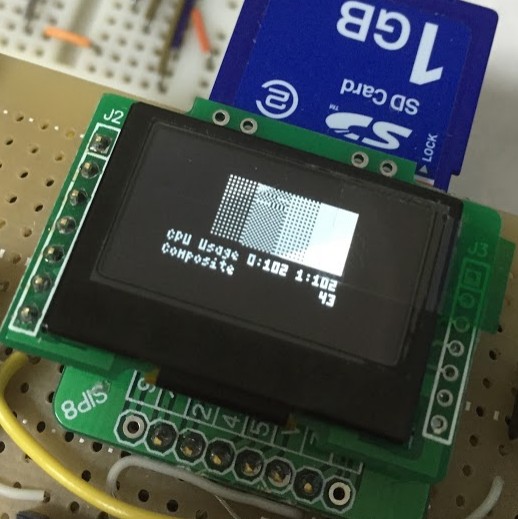
Thank you! 8-) I got your source code, re-build ,and run on my Gamebuino clone.
* filled
Flash screen, even if set max speed.
* Horizontal, Vertical stripes.
Moving stripes, in any speed. (that's like TV noise)
* Checkerd small
It's similer to default GRAY fill.
* Checkerd Learge
In high spped, it's still not looks Gray but looks like 'Tartan Check'.
* Grid
It's not looks Gray.
This is very nice effect, when something is power up state.
* Light Gray
It's not looks Gray.
That seem to shaking dots.
* Dark Gray
It's not looks Gray.
It's looks like default Gray pattern
* Composite
Any pattern is clearly different.
That's don't Gray what I expect, but that pattern is very useful to display multi-color graphics.
Conclusion.
OLED is very high response.
The way which is Blinking dots is not useful to represent Gray color.
Dither pattern is very suitable.
And some animated Dither pattern is good to represent special effect.
Thank you for your nice utility program!
(and sorry for my poor English. ;)
* filled
Flash screen, even if set max speed.
* Horizontal, Vertical stripes.
Moving stripes, in any speed. (that's like TV noise)
* Checkerd small
It's similer to default GRAY fill.
* Checkerd Learge
In high spped, it's still not looks Gray but looks like 'Tartan Check'.
* Grid
It's not looks Gray.
This is very nice effect, when something is power up state.
* Light Gray
It's not looks Gray.
That seem to shaking dots.
* Dark Gray
It's not looks Gray.
It's looks like default Gray pattern
* Composite
Any pattern is clearly different.
That's don't Gray what I expect, but that pattern is very useful to display multi-color graphics.
Conclusion.
OLED is very high response.
The way which is Blinking dots is not useful to represent Gray color.
Dither pattern is very suitable.
And some animated Dither pattern is good to represent special effect.
Thank you for your nice utility program!
(and sorry for my poor English. ;)
Attachments: 範囲を選択_135.jpg
Drakker Mon Apr 04, 2016 3:07 pm
Yeah, grid was mostly to check LCD differences... I have 4 different Gamebuino displays and they all render gray differently. Grid was interesting on some of them, as it would display in two different shades of gray, making it a gray on gray grid.
So there goes the hope for gray on the Arduboy I guess, no wonder they gave up on it. Good thing the Gamebuino display is such a blurry mess, it makes nice gray. =)
So there goes the hope for gray on the Arduboy I guess, no wonder they gave up on it. Good thing the Gamebuino display is such a blurry mess, it makes nice gray. =)
erico Mon Apr 04, 2016 3:36 pm
If the display is fast, then why shouldn´t it be possible?
I understand gamebuino takes advantage of the refresh or ghosting of the screen, but it seems to me that the on/off technique on a single pixel should work. Unfortunately, I´m not good enough on the low level of things to figure it out.
Nice testing by the way.
I understand gamebuino takes advantage of the refresh or ghosting of the screen, but it seems to me that the on/off technique on a single pixel should work. Unfortunately, I´m not good enough on the low level of things to figure it out.
Nice testing by the way.
Drakker Mon Apr 04, 2016 4:11 pm
On the Arduboy they flashed those pixels at 96+fps to get a decent gray. Doing that on small parts of the screen would use almost 100% CPU power. So can they do gray? Yes. Is it practical and doable in a game? Not at all. It's probably the exact same thing going on here.
erico Mon Apr 04, 2016 4:53 pm
Well, if the limit of such starts hitting other hardware parts, like the cpu as you described, then I agree with you.
It is just that...when one sees Myndale´s deeds, it is hard to think anything impossible. ;)
It is just that...when one sees Myndale´s deeds, it is hard to think anything impossible. ;)
Drakker Mon Apr 04, 2016 6:52 pm
Well, its worth mentioning that the Arduboy screen is much larger than the Gamebuino screen, so a small part of their's is over half of our's. =)
And there's only one Myndale... but he's on vacation. ;)
And there's only one Myndale... but he's on vacation. ;)
Leonskibeat Sat Jun 11, 2016 9:54 pm
inajob wrote:thanks for your advice!
that is nice idea!
I implement centering the image.
That is one sweet display! I have harvested a collection of beautiful displays from discarded technology, with the intent to use them for retro game projects. One day I wish to use an OLED with my home built Gamebuino, but I have a lot to learn about driving them. Thanks for your posts.
Leonskibeat :ugeek:
DLBB Sun Sep 04, 2016 11:25 am
Hi Inajob.
Thank you in advance.
EDIT²: This seems to be the repo: github.com/inajob/Gamebuino. Which oled do you use? A SSD1325 type of?
EDIT³: Just saw: it's a SSD1306. Hm... Now I've to look at the differences between these two oled displays (SSD1325 vs SSD1306)...
Work to do...
Ok. Ok. Ok. Question @Inajob: which definition is the one for SSD1306? ARDUBOY, MY_GAMEBUINO_1 or MY_GAMEBUINO_2?
I'm trying to port the Gamubuino libraries to my SSD1325 oled. Any chance to get information about your port? Is there any git repo for you port? I'm reusing a SSD1325 with 102x80 px. The Adafruit SSD1325 lib worx with Ardino 1.6.11 (the examples). But I have serious problems with the implementation of SSD to display.cpp and display.h.
Thank you in advance.
EDIT²: This seems to be the repo: github.com/inajob/Gamebuino. Which oled do you use? A SSD1325 type of?
EDIT³: Just saw: it's a SSD1306. Hm... Now I've to look at the differences between these two oled displays (SSD1325 vs SSD1306)...
Work to do...
Ok. Ok. Ok. Question @Inajob: which definition is the one for SSD1306? ARDUBOY, MY_GAMEBUINO_1 or MY_GAMEBUINO_2?
inajob Wed Sep 07, 2016 1:30 pm
ARDUBOY, MY_GAMEBUINO_1 is SSD1306 OLED display
MY_GAMEBUINO_2 is UC1701 FSTN display
I don't use SSD1325.
but probably this is useful for you.
https://github.com/olikraus/u8glib/blob ... 7oled_bw.c
u8glib is library which supports many displays.
MY_GAMEBUINO_2 is UC1701 FSTN display
I don't use SSD1325.
but probably this is useful for you.
https://github.com/olikraus/u8glib/blob ... 7oled_bw.c
u8glib is library which supports many displays.