
Archive of the Gamebuino Classic forum (2014-2018), rebuilt from the pages kept by the Wayback Machine: only part of the topics and pages were captured. Read-only. Removal on request: hi@gamebuino.com.
Forum › Project Guidance & Game development
Dune Saga RPG
Duhjoker Sat Jan 21, 2017 3:38 am
The library is really meant for teensys sized 3.1-3.2 and 3.5 to 3.6 which have 128,256,512and 1024 KB respectively. Unfortunately that will limit some people. the only thing I can do at this point is put the libraries and hope people want to join in. Maybe sometime in the future that will change. Of course you don't have to go full color. You could also take advantage of the 320x240 screen resolution and make real black and grey bitmaps.
I actually use summoner 123's tilemap routine which I added to all the libraries. then I change the aray numbers to match the tiles I want that array to display.
I actually use summoner 123's tilemap routine which I added to all the libraries. then I change the aray numbers to match the tiles I want that array to display.
Attachments: Gamebuinosummoner123.rar (not archived)
Duhjoker Sat Jan 21, 2017 10:17 am
Sorry i was irratated with myself and tiled earlier so let me elaborate my process. First i design all my tiles then i split them up into bitmaps of individual colors making sure ine color wont overlap another. Then i use an app to break them down to hex.
For using tiled i take all my bitmaps and put them all in one sheet so tiled can display them. Now make your maps, i make one then i take my tilesheet and break it down to individual colors as well. Once you are happy. Save as a jason file. Now open that and make yourself a list of the tiles for each set of colors. And number so each tile is next in line like tile one equals one and so on skipping over blank tiles and erading them of your time maps. Until all the numbers mstch the order you set them. It gets pretty frustrating after a while trying to remember what you did and didnt do.
Now change the integers in the json file to match each color line up. After that i add a blank 0 tile to my spritesheet and save it. After that you can use the tilrmap to display the array.
But its really cheap on progmem that way. As it doesnt save the tiles over and over again, it just saves the bitmap once and then display it how ever many you need
For using tiled i take all my bitmaps and put them all in one sheet so tiled can display them. Now make your maps, i make one then i take my tilesheet and break it down to individual colors as well. Once you are happy. Save as a jason file. Now open that and make yourself a list of the tiles for each set of colors. And number so each tile is next in line like tile one equals one and so on skipping over blank tiles and erading them of your time maps. Until all the numbers mstch the order you set them. It gets pretty frustrating after a while trying to remember what you did and didnt do.
Now change the integers in the json file to match each color line up. After that i add a blank 0 tile to my spritesheet and save it. After that you can use the tilrmap to display the array.
But its really cheap on progmem that way. As it doesnt save the tiles over and over again, it just saves the bitmap once and then display it how ever many you need
Duhjoker Sat Jun 03, 2017 1:47 am
Well I lost a lot of work I had done for the game. And I mean a lot. Fortunately I was able to keep my tiles for the world maps but had to create all new character sprites. I had a lil fun with them, trying to make unique looks for each character. Also made about 21 generic characters for towns and villages with a mix of fremen and plain women sprites. And a bunch of male fremen sprites.
I think I'll make a smaller worldmap this time when we get the tilemap straightened out. The old was ridiculous at over 500x500 tiles. This time I may release it parts.
Part 1 deals with the Atreades family and its people to move to Arrakis. Part 2 with the changing of the guard and hopefully by part three we can do a much bigger map. As far as the first part goes it will be pretty linear so not much dune riding. Then by the end of part two Paul has taken the water of life and proved himself a fremen by calling and riding a worm. Then we can do the full map with some kind and of worm feature.
I've been playing around with the drawBitMap from SD functions and I'm not sure it can be used for a player Sprite cursor. You can but its real slow. When I draw a bitmap from SD it's pretty instantaneous but with SD it can take up to 2 seconds which is forever in game time.
Until I can optimize it it should prolly only be used for monsters and thier backgrounds and to store NPC's and cut scenes.
Ok just wanted to update and say I'm still working on the game at least part time.
I think I'll make a smaller worldmap this time when we get the tilemap straightened out. The old was ridiculous at over 500x500 tiles. This time I may release it parts.
Part 1 deals with the Atreades family and its people to move to Arrakis. Part 2 with the changing of the guard and hopefully by part three we can do a much bigger map. As far as the first part goes it will be pretty linear so not much dune riding. Then by the end of part two Paul has taken the water of life and proved himself a fremen by calling and riding a worm. Then we can do the full map with some kind and of worm feature.
I've been playing around with the drawBitMap from SD functions and I'm not sure it can be used for a player Sprite cursor. You can but its real slow. When I draw a bitmap from SD it's pretty instantaneous but with SD it can take up to 2 seconds which is forever in game time.
Until I can optimize it it should prolly only be used for monsters and thier backgrounds and to store NPC's and cut scenes.
Ok just wanted to update and say I'm still working on the game at least part time.
Duhjoker Tue Jul 25, 2017 8:01 am
Omg!!!! Spent the last two days encoding 60+ tiles for an updated graphics version of what ve been posting in my videos. I wanted less Dragonwarrior/LOZnes and more links awakening/Pokemon type bitmaps. Looks so much better and I have the room. Had a hard time with the bones bitmaps that looks like a giant carcass due to the sand tiles.
I had an idea today. I was thinking I could do a bunch of different towns/dungeons then I can make a minimap to connect them. That way I can keep the idea of riding worms and stuff like I wanted between mountainous out croppings. I would make map icons using the older tiles that look near like the expanded version.
I have a question about development though. Since I'm doing an RPG and so far I have to make extra copies of bitmaps to trigger different rooms or what ever. Do I add the NPC's to my tiles and collision routine? Or do I right them in later somehow?
I had an idea today. I was thinking I could do a bunch of different towns/dungeons then I can make a minimap to connect them. That way I can keep the idea of riding worms and stuff like I wanted between mountainous out croppings. I would make map icons using the older tiles that look near like the expanded version.
I have a question about development though. Since I'm doing an RPG and so far I have to make extra copies of bitmaps to trigger different rooms or what ever. Do I add the NPC's to my tiles and collision routine? Or do I right them in later somehow?
Duhjoker Wed Jul 26, 2017 2:40 am
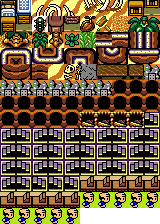
ok so I thought every thing out for the game and counted all the villages, caves, registermachine, stairs and exits. check out my terrain sprite list.....
The clerks are not action tiles I just wanted every register machine to have a stationary person sprite. I haven't added the exits yet but heres the tile sheet....
- Code: Select all
const byte *spritesheet[] = {blank_tile, bedtop, bedbot, bones11, bones12, bones13,          ///6
bones21, bones22, bones23, bookstop, booksbot, cabtop, cabbot, cactus, chimneytop,           ///14
chimneybot, coconut, debris, floort, palmtl, palmtr, palmbl, palmbr, ptreetop,               ///23
ptreebot, plant1, plant2, rocktopcap, rockbotcap, rockleftcap, rockrightcap         ,        ///30
rockcornertl, rockcornertr, rockcornerbl, rockcornerbr, rockcornersharptl,                   ///35
rockcornersharptr, rockcornersharpbl, rockcornersharpbr, rockendl, rockendr,                 ///40
rockwalllc, rockwallrc, rockwall, sand, skeleton, stonewall, tablel, tabler, tablesm,        ///49
seitch1, seitch2, seitch3, seitch4, seitch5, seitch6, seitch7, seitch8, cave1, cave2,        ///59
cave3, cave4, cave6, cave7, cave8, cave9, cave10, cave11, cave12, cave13, cave14, cave15,    ///71
cave16, cave17, cave18, stepsleft1, stepsleft2, stepsleft3, stepsleft4, stairsl1, stairsr1,  ///80
stairsl2, stairsr2, stairsl3, stairsr3, stairsl4, stairsr4, stairsl5, stairsr5, stairsl6,    ///89
stairsr16, stairsl7, stairsr7, stairsl8, stairsr8, stairsl9, stairsr9, stairsl10, stairsr10, ///98
stairsl11, stairsr11,stairsl12, stairsr12, stairsl13, stairsr13, stairsl14, stairsr14,       ///106
stairsl15, stairsr15, stairsl16,stairsr16, stairsl17, stairsl18, stairsl19, stairsl20,       ///114
register1,register2, register3, register4, register5, register6, register7, register8,       ///122
register9, register10, clerk1, clerk2, clerk3, clerk4, clerk5, clerk6, clerk7, clerk8,       ///132
clerk9, clerk10, exit1, exit2, exit3, exit4, exit5, exit6, exit7, exit8, exit9, exit10,      ///144
exit11, exit12, exit13, exit14, exit15, exit16, exit17, exit18, exit19, exit20, exit21,      ///155
exit22, exit23, exit24};                                                                     ///158
The clerks are not action tiles I just wanted every register machine to have a stationary person sprite. I haven't added the exits yet but heres the tile sheet....
Attachments: dunetiles.png
awesome101 Wed Jul 26, 2017 2:41 am
sorry I haven't been on the forum for a while. I actually am making my own game based on a movie too hehe :D. Anyways, its based on Bahubali 2, an Indian mythological battle movie (https://en.wikipedia.org/wiki/Baahubali ... Conclusion and trailer here: https://www.youtube.com/watch?v=qD-6d8Wo3do). Still working on the sprites but I think the story should begin when he's climbing the waterfall and then should lead into the whole kingdom war and stuff.
Duhjoker Wed Jul 26, 2017 3:15 am
Im having alot of fun doing this but it gets a lil tedious making the bitmaps. But at least we only have to make 1 bitmap and not several. I actually have all my mains, all the tiles and 7 monsters out of 36. And i still need to do my generic NPC's so i have villagers.
Im would like to build a program that allows you to set your palette in it then read your full color bitmaps and turn them into hex but i dont know where to start.
Right now we are having popup issues. I re-wrote the function to the updated code and it compiles but i cant get it to work. I even added an A button program to display a message when the a button is hot but no luck.
Edit:::
better to start small and expand out. Every thing got a lil confusing. So now I started with a central land mass then listed at the rear just what I need for that land mass. Stairs, steps exits and caves just for that. Then I can add more later and I'll know what does what as I go.
Im would like to build a program that allows you to set your palette in it then read your full color bitmaps and turn them into hex but i dont know where to start.
Right now we are having popup issues. I re-wrote the function to the updated code and it compiles but i cant get it to work. I even added an A button program to display a message when the a button is hot but no luck.
Edit:::
better to start small and expand out. Every thing got a lil confusing. So now I started with a central land mass then listed at the rear just what I need for that land mass. Stairs, steps exits and caves just for that. Then I can add more later and I'll know what does what as I go.
awesome101 Wed Jul 26, 2017 11:00 pm
Just make a python script to do it. I'm using a python script to parse my cutscene scripting code (which is kind of like assembly) and then turn it into bytecode. For example, in my scripting code, I may have "FADE BLACK WHITE 1" (which means fade the screen from black to white with a duration of 1 second). This is converted into "1, 1, 0, 1" which is the bytecode equivelant. I then take the bytecode file and put it on my sd card and then the teensy reads the sd card to interpret it.
Duhjoker Thu Jul 27, 2017 12:52 am
So your using sd? Hows that working? Have you been able to display any thing? Im using the writerect4bpp method and havent touched but 4% of my total flash space. Just a few kb
Do you mind sharing your function?
Do you mind sharing your function?
awesome101 Thu Jul 27, 2017 1:10 am
No I use the sd to store scripts not bitmaps
Also, what do you mean by "how is that working" because there is multiple spi ports on Teensy I think you spent too many pins on buttons cause I have a PISO shift register that handles button input
Also, what do you mean by "how is that working" because there is multiple spi ports on Teensy I think you spent too many pins on buttons cause I have a PISO shift register that handles button input
awesome101 Thu Jul 27, 2017 1:19 am
- Code: Select all
    bool Parse(int start = 0) {
        if (commands == null) return false;

        int index = 5;
        if (start == 0) index = 5;
        else {
            int j = 0;
            for (int i = 5; i < commands.Length; i++) {
                if (int.Parse(commands[i]) == 255 || int.Parse(commands[i]) == 254) { j++; }
                if (j == start) {
                    index = i + 1;
                    break;
                }
            }
        }

        for (index = index; index < commands.Length; index++) {
            switch (int.Parse(commands[index])) {
                case SCRIPT_NOP:
                    continue;
                case SCRIPT_FADE:
                    if (fadePlane != null) { StartCoroutine(Fade(int.Parse(commands[index + 1]), int.Parse(commands[index + 2]), int.Parse(commands[index + 3]))); }
                    index += 3;
                    continue;
                case SCRIPT_SET_MAP:
                    index++;
                    continue;
                case SCRIPT_SET_PLAYER_TILE:
                    index++;
                    continue;
                case SCRIPT_SET_PLAYER_X:
                    index++;
                    continue;
                case SCRIPT_SET_PLAYER_Y:
                    index++;
                    continue;
                case SCRIPT_IF:
                    if (Condition(index)) {
                        index += 2;
                        continue;
                    }
                    index += 16;
                    continue;
                case SCRIPT_NOT_IF:
                    if (!Condition(index)) {
                        index += 2;
                        continue;
                    }
                    index += 16;
                    continue;
                case SCRIPT_MOVE_PLAYER:
                    continue;
                case SCRIPT_BRANCH_FORWARD:
                    int offset = 0;
                    for (int j = 0; j < int.Parse(commands[index + 1]); j++) {
                        offset += cycles[int.Parse(commands[index + 2 + offset])];
                    }
                    index += offset + 1;
                    continue;
                case SCRIPT_RETURN_TRUE:
                    return true;
                case SCRIPT_RETURN_FALSE:
                    return false;
            }
        }


        return false;
    }

    bool Condition(int index) {
        switch(int.Parse(commands[index + 1])) {
            case SCRIPT_PLAYER_X_CHECK:
                return false;
            case SCRIPT_PLAYER_Y_CHECK:
                return false;
            case SCRIPT_PLAYER_TILE_CHECK:
                return false;
            case SCRIPT_MAP_INDEX_CHECK:
                return false;
            case SCRIPT_PLAYER_TILE_NUMBER_CHECK:
                return false;
        }
        return false;
    }
Here is my code
awesome101 Thu Jul 27, 2017 1:26 am
This is the basic plot that I have so far:
The game begins with a cutscene of Shivudu (Mahendra Bahubali and the main character) under the huge waterfall and then he sees Avantika. The cutscene ends and then the person playing has to climb the waterfall. Then, Shivudu learns of the guerilla warfare against Bhallaladeva and then there's another cutscene showing Bhallaladeva fighting with the bull in Maahismati (just like the movie). Shivudu then takes on the quest of saving Devasena and then leaves out for Maahismati. There is another cutscene of the 150 feet statue of Bhallaladeva being lifted. Then the fight with Bhallaladeva's son Bhadra begins and then the following events of Kattappa telling the story of Amarendra Baahbubali begins as a cutscene
The game begins with a cutscene of Shivudu (Mahendra Bahubali and the main character) under the huge waterfall and then he sees Avantika. The cutscene ends and then the person playing has to climb the waterfall. Then, Shivudu learns of the guerilla warfare against Bhallaladeva and then there's another cutscene showing Bhallaladeva fighting with the bull in Maahismati (just like the movie). Shivudu then takes on the quest of saving Devasena and then leaves out for Maahismati. There is another cutscene of the 150 feet statue of Bhallaladeva being lifted. Then the fight with Bhallaladeva's son Bhadra begins and then the following events of Kattappa telling the story of Amarendra Baahbubali begins as a cutscene
awesome101 Thu Jul 27, 2017 1:30 am
I need to convert the following images:

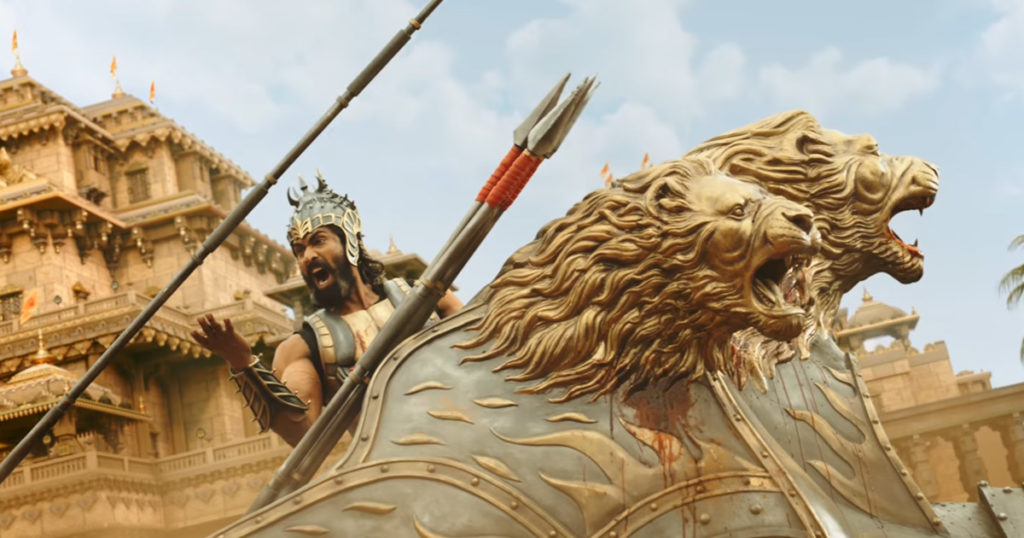
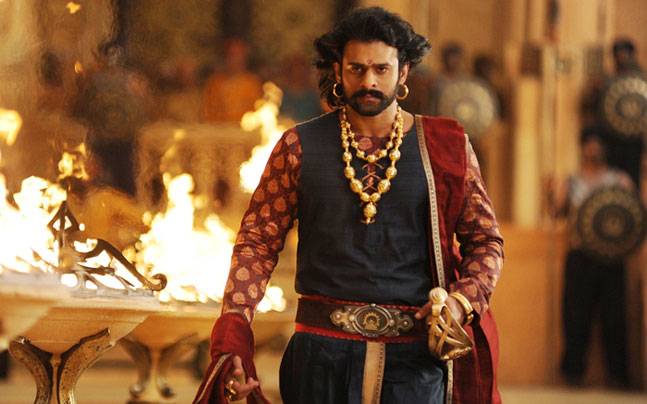
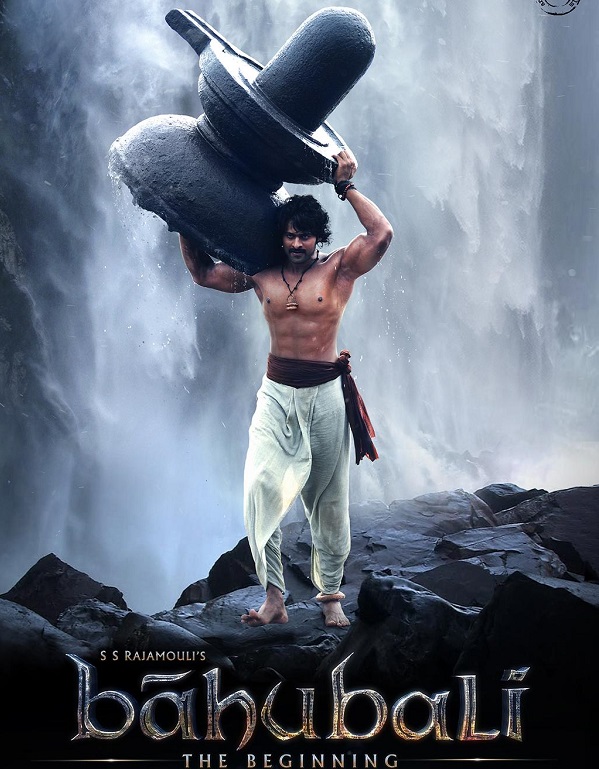
man this gonna be epic
man this gonna be epic
Duhjoker Thu Jul 27, 2017 1:37 am
Well i tried a few things with the sd on my t3.6 but couldnt ever get it to work so thats why i was asking. Wasnt triying to be rude or any thing. Just curious.
Wow those images are gonna look great on the screen.
Wow those images are gonna look great on the screen.
awesome101 Thu Jul 27, 2017 1:41 am
No no i didnt mean to imply that you were being rude. Im just saying that it works on mine cause I have ashift register managing my button inputs and then I have SD Card connected to SPI Bus 1 while Display is connected to SPI Bus 0
Duhjoker Thu Jul 27, 2017 1:43 am
Ohhhhhh ok i got you
awesome101 Thu Jul 27, 2017 1:43 am
Im gonna create a python script to make the graphics work easier.
Ive got to create some tiles for myself for my game too so let me start on that and then ill make the script to convert everything to palette indices
Ive got to create some tiles for myself for my game too so let me start on that and then ill make the script to convert everything to palette indices
Duhjoker Thu Jul 27, 2017 8:41 am
Would love to see and use that.
I cant tell you how many times I had to change my tile sheet today. I kept getting confused about the amounts of stairs and steps down needed to make the dungeon levels when traversing an outcropping of rock. I ended up doing every thing one at a time then adding one at a time. Worked in reverse for the cave that starts at top and leads to the bottom.
im still debating on how to do seitch villages. The villages are set deep in the rock with carved paasages and rooms. Cant figure out wether to do a small map of out door formations with cave entrances or try to make it all look like its indoors.
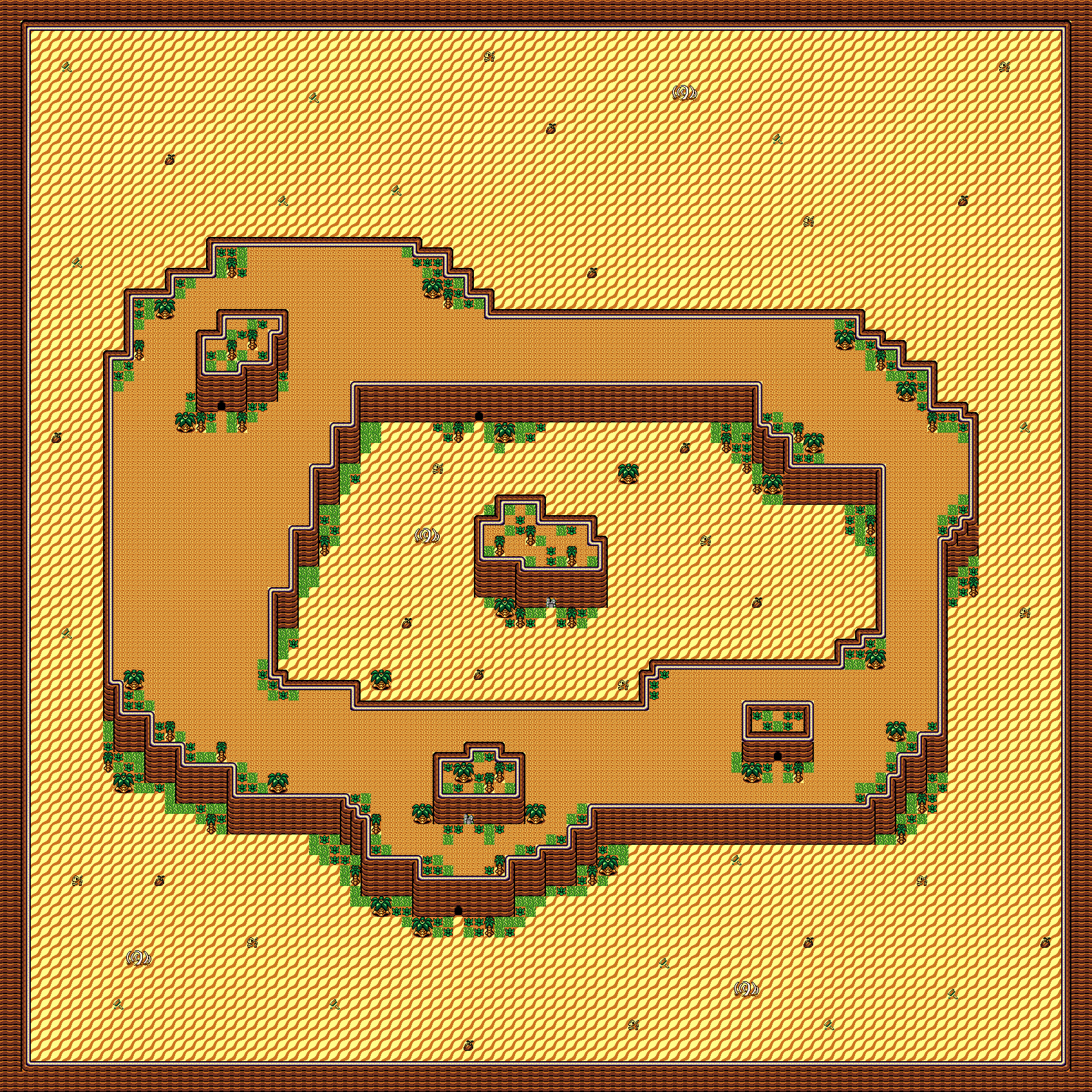
Here is my current 106 x 106 map that I will expand out with......
I cant tell you how many times I had to change my tile sheet today. I kept getting confused about the amounts of stairs and steps down needed to make the dungeon levels when traversing an outcropping of rock. I ended up doing every thing one at a time then adding one at a time. Worked in reverse for the cave that starts at top and leads to the bottom.
im still debating on how to do seitch villages. The villages are set deep in the rock with carved paasages and rooms. Cant figure out wether to do a small map of out door formations with cave entrances or try to make it all look like its indoors.
Here is my current 106 x 106 map that I will expand out with......
Attachments: dune32.png
awesome101 Thu Jul 27, 2017 2:17 pm
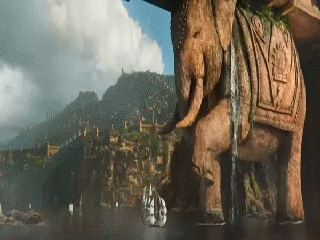
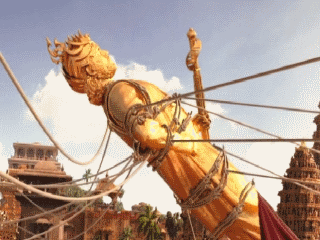
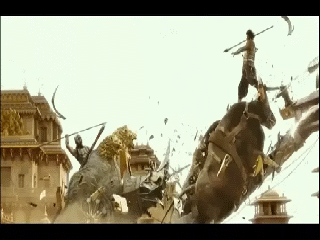
I got my images converted to 320x240 in 8 bit so now I can load them off the sd card during cutscenes. Wont be too fast but it doesn't have to be since they're cutscenes anyway. Here are some of them with Baahu fighting with Bhalla:
Duhjoker Sat Jul 29, 2017 6:39 am
What a long day!!!! Last night I realized I was missing some kind of machines since the saga starts in the year 10,191ad. I didn't want it to look to techy after all the machine jihad or Butlerian jihad which ended the legality of thinking machines after a machine murdered a colleagues child out of curiosity. So the story goes so technology is rather low tech but amazing.
I also wanted to create something that could be construed as a 3D printer since the fremen natives on the planet make plastics from Spice. This also makes it possible to do a build system with dropped items and spice that be used to fashion any thing from armor to items to weapons. I also needed a water tile for the cisterns in each village plus a water tunnel from a cave tile so it looks like it's flowing into canals or what ever. I made a potted plant but it looked like crap. Nothing to sit on though but it's not needed. The rooms are pretty busy but the seitch village caves have only sparse grass and plants since there's lil light. So now I'm looking for a cart or something I can place in the seitch village outsides to look less plain and a lil more busy.
Also I need to make some back drops for planets. just need 4. Caladan the native home of house Atreades, Kaitan home of imperial house Corrino and Geidi prime home of house harkonnen and last but not least Arrakis Itself also known as dune.
So to save space with NPC's I'm just gonna copy out single sides and make most of them stationary. Then I can just add them to the game as needed. But to add NPCs what I will do is make a Sprite sheet with an empty tile and add just the NPCs. After that I just add them on top of the other maps. That means double rooms though. One for terrain one for people.
So far I have 2 seitch villages 4 cave exit/entrances 3 levels for both cave dungeons, a total of 8 rooms for seitch 1 and 4 for seitch 2. 7% used so far on t36. So now I have every thing done on the spritesheets now I have to add the rooms to my sketch to switch them out.
21 rooms if worldmap is counted as a room
55 action tiles to do the switching back and fourth with two registers included.
Looks like I can make it as big as I want but I'm going to try and keep it so a t3.2 can still play shouldn't be a problem.
I made the seitch villages like lil pueblos inside the cave. Preview soon
I also wanted to create something that could be construed as a 3D printer since the fremen natives on the planet make plastics from Spice. This also makes it possible to do a build system with dropped items and spice that be used to fashion any thing from armor to items to weapons. I also needed a water tile for the cisterns in each village plus a water tunnel from a cave tile so it looks like it's flowing into canals or what ever. I made a potted plant but it looked like crap. Nothing to sit on though but it's not needed. The rooms are pretty busy but the seitch village caves have only sparse grass and plants since there's lil light. So now I'm looking for a cart or something I can place in the seitch village outsides to look less plain and a lil more busy.
Also I need to make some back drops for planets. just need 4. Caladan the native home of house Atreades, Kaitan home of imperial house Corrino and Geidi prime home of house harkonnen and last but not least Arrakis Itself also known as dune.
So to save space with NPC's I'm just gonna copy out single sides and make most of them stationary. Then I can just add them to the game as needed. But to add NPCs what I will do is make a Sprite sheet with an empty tile and add just the NPCs. After that I just add them on top of the other maps. That means double rooms though. One for terrain one for people.
So far I have 2 seitch villages 4 cave exit/entrances 3 levels for both cave dungeons, a total of 8 rooms for seitch 1 and 4 for seitch 2. 7% used so far on t36. So now I have every thing done on the spritesheets now I have to add the rooms to my sketch to switch them out.
21 rooms if worldmap is counted as a room
55 action tiles to do the switching back and fourth with two registers included.
Looks like I can make it as big as I want but I'm going to try and keep it so a t3.2 can still play shouldn't be a problem.
I made the seitch villages like lil pueblos inside the cave. Preview soon
awesome101 Sun Jul 30, 2017 10:47 pm
Decided to watch Bahubali The Beginning and Bahubali The Conclusion again to refresh my memory. What amazing movies. I need to create sprites now
Duhjoker Mon Jul 31, 2017 6:24 am
Have you had a chance to look at and test the popup function. I cant seem to get it to work. Do you mind taking a look? The update is in my github for t3. I would really appreciate it.
awesome101 Mon Jul 31, 2017 9:34 pm
Will look at now. No worries
awesome101 Mon Jul 31, 2017 10:02 pm
This shouldn't be working. You set the duration of the popup to "12 + duration" which may work on the gamebuino but since you are using teensy or esp32 which is way faster, the popup will be gone in the blink of an eye. Use millis() or some other way to track the time and display the popup. Also, I recommend you don't use FlashStringHelper. Just use const char * because the Teensy doesn't have the same architecture as the Arduino and the const char * will be placed in flash memory anyway.
awesome101 Mon Jul 31, 2017 10:17 pm
Try this:
Pass in 1 for the duration in popup() function
- Code: Select all
  void GrafxT3::popup(const __FlashStringHelper* text, uint8_t duration){

   popupText = text;

   popupTimeLeft = millis() + duration * 1000;

}


void GrafxT3::updatePopup(){

   if (millis() < popupTimeLeft){

      int yOffset = 0;

      setTextSize(1);

//      setColor(WHITE);

      fillRoundRect(0,GrafxT3_TFTHEIGHT-textsize+yOffset-3,320,textsize+3,3,WHITE);

//      setColor(BLACK);

      drawRoundRect(0,GrafxT3_TFTHEIGHT-textsize+yOffset-3,320,textsize+3,3,BLACK);

      setCursor( 4, GrafxT3_TFTHEIGHT-textsize+yOffset-1);

      print(popupText);

   }

}
Pass in 1 for the duration in popup() function
awesome101 Mon Jul 31, 2017 10:49 pm
Then call the updatePopup() function in the main loop.
Edit: Did it work?
Edit: Did it work?
Duhjoker Mon Jul 31, 2017 11:30 pm
Sorry, Youll have to give me a minute please. Just got back from the dentist and i cant concentrate to work just yet. Ill also need to make a set color functiin but thats the easy part.
Duhjoker Mon Jul 31, 2017 11:43 pm
Ok just checked and nothing yet.
awesome101 Mon Jul 31, 2017 11:46 pm
So its not working? Can you post your full code
your sketch
your sketch
Duhjoker Tue Aug 01, 2017 2:47 am
Sorry I passed out and just woke back up
- Code: Select all
/*This is the Main function file for the GameR-Iot Multiple MCU Arduino driven
 * game system and DIY console. This is a demo game RPG set in the Dune Universe
 * created by Frank Herbert.
 */
#include <GrafxT3.h>
#include <SPIN.h>
#include "SPI.h"
#include <Bounce.h>
#include "Player.h"
#include "World.h"
#include "Monsters.h"
//////////////////////////////////////////////////////////////////////////////
//////////////////////////////////////////////////////////////////////////////
#define TFT_DC  9
#define TFT_CS 10
#define TFT_RST 7
#define TFT_SCK 13
#define TFT_MISO 12
#define TFT_MOSI 11
//////////////////////////////////////////////////////////////////////////////
//////////////////////////////////////////////////////////////////////////////
uint8_t use_fb = 1;
uint8_t use_clip_rect = 0;
uint8_t use_set_origin = 0;
//////////////////////////////////////////////////////////////////////////////
//////////////////////////////////////////////////////////////////////////////
GrafxT3 tft = GrafxT3(TFT_CS, TFT_DC, TFT_RST, TFT_MOSI, TFT_SCK, TFT_MISO, &SPIN);
///////////////////////////////////////////////////////////////////////////////
///////////////////////////////////////////////////////////////////////////////
 int player_x = 160;     //player position on screen x
 int player_y = 176;     //player position on screen y
 int player_direction = 2;
 int x=-0,y=0;
///////////////////////////////////////////////////////////////////////////////
///////////////////////////////////////////////////////////////////////////////
// Camera offset
int cameraX = -544;  /////starting position X 0f camera on tilemap
int cameraY = -1344;  /////starting position Y of camera on tilemap

// Camera speed in pixels per update
int cameraXSpeed = 3;
int cameraYSpeed = 3;

// Camera offset boundaries
int cameraXMin = -1376;   /////// -320 0f total tilemap pixels left >>>>
int cameraXMax = 0;
int cameraYMin = -1440;   /////// -256 0f total tilemap pixels down VVVV
int cameraYMax = 0;

// Player offset boundaries
int playerXMin = 80;
int playerXMax = 240;
int playerYMin = 80;
int playerYMax = 160;

int animTransition;
int room = 1;
int co_ords = 1;
///////////////////////////////////////////////////////////////////////////////
///////////////////////////Pixel Color Includes////////////////////////////////
///////////////////////////////////////////////////////////////////////////////
///////////////////////////////////////////////////////////////////////////////
uint16_t palette[16];  // Should probably be 256, but I don't use many colors...
uint16_t pixel_data[2500];

//Extra integers for color palette
int a = 0xa; int b = 0xb; int c = 0xc;
int d = 0xd; int e = 0xe; int f = 0xf;

/////////////////////////////////////////////////////////////////////////////
/////////////////////////////Button assignments//////////////////////////////
/////////////////////////////////////////////////////////////////////////////
//////dpad + select buttons
const int buttonUp = 33; //up button
Bounce ButtonUp = Bounce(buttonUp, 10);  // 10 ms debounce
const int buttonDown = 38; //down_button
Bounce ButtonDown = Bounce(buttonDown, 10);  // 10 ms debounce
const int buttonLeft = 35; //left button
Bounce ButtonLeft = Bounce(buttonLeft, 10);  // 10 ms debounce
const int buttonRight = 17; //right button
Bounce ButtonRight = Bounce(buttonRight, 10);  // 10 ms debounce
const int buttonS = 21; //select button
Bounce ButtonS = Bounce(buttonS, 10);  // 10 ms debounce

//////action + start buttons
const int buttonX = 32; // X button up
Bounce ButtonX = Bounce(buttonX, 10);  // 10 ms debounce
const int buttonY = 26; // Y button left
Bounce ButtonY = Bounce(buttonY, 10);  // 10 ms debounce
const int buttonA = 21; // A button right
Bounce ButtonA = Bounce(buttonA, 10);  // 10 ms debounce
const int buttonB = 28; // B buttun down
Bounce ButtonB = Bounce(buttonB, 10);  // 10 ms debounce
const int buttonT = 4; // Start button
Bounce ButtonT = Bounce(buttonT, 10);  // 10 ms debounce

///////////////////////////////////////////////////////////////////////////////
///////////////////////////////Set-up//////////////////////////////////////////
///////////////////////////////////////////////////////////////////////////////

void setup() {
  while (!Serial && (millis() < 4000)) ;
  Serial.begin(115200);
  tft.begin();
  tft.setRotation(1);
  tft.fillScreen(BLACK);
  //tft.setFrameRate(60);
  tft.persistence = false;
   pinMode(buttonUp, INPUT_PULLUP);
   pinMode(buttonDown, INPUT_PULLUP);
   pinMode(buttonLeft, INPUT_PULLUP);
   pinMode(buttonRight, INPUT_PULLUP);
   pinMode(buttonS, INPUT_PULLUP);
   pinMode(buttonX, INPUT_PULLUP);
   pinMode(buttonY, INPUT_PULLUP);
   pinMode(buttonA, INPUT_PULLUP);
   pinMode(buttonB, INPUT_PULLUP);
   pinMode(buttonT, INPUT_PULLUP);

   tft.useFrameBuffer(use_fb);
     uint32_t start_time = millis();

}
///////////////////////////////////////////////////////////////////////////////
///////////////////////////////////Loop////////////////////////////////////////
///////////////////////////////////////////////////////////////////////////////
void loop(void) {

///////////////////////////////////////////////////////////////////////////////
////////////////////////////////camera controls////////////////////////////////
///////////////////////////////////////////////////////////////////////////////
// Clamp cameraX
if(cameraX < cameraXMin)
{
  cameraX = cameraXMin;
}
else if(cameraX > cameraXMax)
{
   cameraX = cameraXMax;
}

// Clamp cameraY
if(cameraY < cameraYMin)
{
  cameraY = cameraYMin;
}
else if(cameraY > cameraYMax)
{
   cameraY = cameraYMax;
}

// Check if player is beyond X boundary
if(player_x < playerXMin)
{
  cameraX += cameraXSpeed;
  if(cameraX > cameraXMin && cameraX < cameraXMax)
  {
    player_x = playerXMin;
  }
}
else if(player_x > playerXMax)
{
  cameraX -= cameraXSpeed;
  if(cameraX > cameraXMin && cameraX < cameraXMax)
  {
    player_x = playerXMax;
  }
}

// Check if player is beyond Y boundary
if(player_y < playerYMin)
{
  cameraY += cameraYSpeed;
  if(cameraY > cameraYMin && cameraY < cameraYMax)
  {
    player_y = playerYMin;
  }
}
else if(player_y > playerYMax)
{
  cameraY -= cameraYSpeed;
  if(cameraY > cameraYMin && cameraY < cameraYMax)
  {
    player_y = playerYMax;
  }
}
//////////////////////////////////////////////////////////////////////////////
///////////////////////////////Palette////////////////////////////////////////
//////////////////////////////////////////////////////////////////////////////
 palette[0] = 0;
       palette[1] = BLACK;
             palette[2] = BLUE;
                   palette[3] = BROWN;
                         palette[4] = DARKGREEN;
                              palette[5] = GREY;
                                    palette[6] = PINK;
                                          palette[7] = RED;
//////////////////////////////////////////////////////////////////////////////
//////////////////////////////////////////////////////////////////////////////
                                           palette[8] = BEIGE;
                                     palette[9] = GREEN;
                               palette[a]= DARKGREY;
                         palette[b] = LIGHTGREY;
                   palette[c] = YELLOW;
             palette[d] = PURPLE;
       palette[e] = WHITE;
 palette[f] = ORANGE;
///////////////////////////////////////////////////////////////////////////////
///////////////////////////////Tilemap/////////////////////////////////////////
///////////////////////////////////////////////////////////////////////////////
     if(room == 1){
  tft.drawTilemap(cameraX, cameraY, duneworld, spritesheet, palette);}
else if(room == 2){
  tft.drawTilemap(cameraX, cameraY, dungeon1l1, spritesheet, palette);}
else if(room == 3){
  tft.drawTilemap(cameraX, cameraY, dungeon1l2, spritesheet, palette);}
else if(room == 4){
  tft.drawTilemap(cameraX = 0, cameraY = 0, dungeon1l3, spritesheet, palette);}
     if(room == 5){
  tft.drawTilemap(cameraX = 0, cameraY = 0, dungeon2l3, spritesheet, palette);}
     if(room == 6){
  tft.drawTilemap(cameraX = 0, cameraY = 0, dungeon2l2, spritesheet, palette);}
     if(room == 7){
  tft.drawTilemap(cameraX = 0, cameraY = 0, dungeon2l1, spritesheet, palette);}
     if(room == 8){
  tft.drawTilemap(cameraX = 0, cameraY = 0, seitch1v, spritesheet, palette);}
     if(room == 9){
  tft.drawTilemap(cameraX = 0, cameraY = 0, seitch1r1, spritesheet, palette);}
     if(room == 10){
  tft.drawTilemap(cameraX = 0, cameraY = 0, seitch1r2, spritesheet, palette);}
     if(room == 11){
  tft.drawTilemap(cameraX = 0, cameraY = 0, seitch1r3, spritesheet, palette);}
     if(room == 12){
  tft.drawTilemap(cameraX = 0, cameraY = 0, seitch1r4l1, spritesheet, palette);}
     if(room == 13){
  tft.drawTilemap(cameraX = 0, cameraY = 0, seitch1r4l2, spritesheet, palette);}
     if(room == 14){
  tft.drawTilemap(cameraX = 0, cameraY = 0, seitch1r5l1, spritesheet, palette);}
     if(room == 15){
  tft.drawTilemap(cameraX = 0, cameraY = 0, seitch1r5l2, spritesheet, palette);}
     if(room == 16){
  tft.drawTilemap(cameraX = 0, cameraY = 0, seitch1r6, spritesheet, palette);}
     if(room == 17){
  tft.drawTilemap(cameraX = 0, cameraY = 0, seitch2v, spritesheet, palette);}
    if(room == 18){
  tft.drawTilemap(cameraX = 0, cameraY = 0, seitch2r1, spritesheet, palette);}
    if(room == 19){
  tft.drawTilemap(cameraX = 0, cameraY = 0, seitch2r2, spritesheet, palette);}
    if(room == 20){
  tft.drawTilemap(cameraX = 0, cameraY = 0, seitch2r3, spritesheet, palette);}
    if(room == 21){
  tft.drawTilemap(cameraX = 0, cameraY = 0, seitch2r4, spritesheet, palette);}
///////////////////////////////////////////////////////////////////////////////
///////////////////////////Buttons/////////////////////////////////////////////
///////////////////////////////////////////////////////////////////////////////
       if (ButtonUp.update());
               if (ButtonDown.update());
                       if (ButtonLeft.update());
                             if (ButtonRight.update());
                                       if (ButtonA.update());
///////////////////////////////////////////////////////////////////////////////
///////////////////////////////////////////////////////////////////////////////
                                       ButtonUp.rebounce(10);
                               ButtonDown.rebounce(10);
                       ButtonLeft.rebounce(10);
            ButtonRight.rebounce(10);
     ButtonA.rebounce(10);
///////////////////////////////////////////////////////////////////////////////
////////////////////////////Up/////////////////////////////////////////////////
///////////////////////////////////////////////////////////////////////////////
 if (ButtonUp.fallingEdge()){
     tft.writeRectNBPP(player_x, player_y,16,16,4,paulrearw,palette);
     player_direction = 1;
     player_y -= 4;
     if(checkcolision())
     {
      player_y += 4;}
     }
     if(player_y <= 16){
        player_y = 16;}
//////////////////////////////////////////////////////////////////////////////
///////////////////////////////Down///////////////////////////////////////////
//////////////////////////////////////////////////////////////////////////////
 if (ButtonDown.fallingEdge()){
   tft.writeRectNBPP(player_x, player_y,16,16,4,paulfrontw,palette);
   player_direction = 2;
   player_y += 4;
    if(checkcolision())
    {
    player_y -=4;}
    }
    if(player_y >= 224){
       player_y = 224;}
//////////////////////////////////////////////////////////////////////////////
//////////////////////////Left////////////////////////////////////////////////
//////////////////////////////////////////////////////////////////////////////
 if (ButtonLeft.fallingEdge()){
   tft.writeRectNBPP(player_x, player_y,16,16,4,paulleftw,palette);
   player_direction = 3;
   player_x -= 4;
   if(checkcolision())
   {
      player_x += 4;}
   }
   if(player_x >= 304){
      player_x = 304;}
//////////////////////////////////////////////////////////////////////////////
////////////////////////////Right////////////////////////////////////////////
/////////////////////////////////////////////////////////////////////////////
if (ButtonRight.fallingEdge()){
  tft.writeRectNBPP(player_x, player_y,16,16,4,paulrightw,palette);
  player_direction = 4;
  player_x += 4;
  if(checkcolision())
  {
    player_x -= 4;}
  }
            if(player_x <= 16){
              player_x = 16;}
///////////////////////////////////////////////////////////////////////////////
//////////////////////////////PLAYER DIRECTION/////////////////////////////////
///////////////////////////////////////////////////////////////////////////////
if (player_direction == 1){
  tft.writeRectNBPP(player_x, player_y,16,16,4,paulrear,palette);
}
/////////////////////////////////////////////////////////////////////////////////////
/////////////////////////////////////////////////////////////////////////////////////
else if (player_direction == 2){
   tft.writeRectNBPP(player_x, player_y,16,16,4,paulfront,palette);
}
/////////////////////////////////////////////////////////////////////////////////////
/////////////////////////////////////////////////////////////////////////////////////
else if (player_direction == 3){
    tft.writeRectNBPP(player_x, player_y,16,16,4,paulleft,palette);
}
/////////////////////////////////////////////////////////////////////////////////////
/////////////////////////////////////////////////////////////////////////////////////
else if (player_direction == 4){
     tft.writeRectNBPP(player_x, player_y,16,16,4,paulright,palette);
        }
        tft.updatePopup();
       tft.updateScreen();
}
/////////////////////////////////////////////////////////////////////////////////////
///////////////////////////////collision/////////////////////////////////////////////
/////////////////////////////////////////////////////////////////////////////////////
/////////////////////////////////////////////////////////////////////////////////////
bool checkcolision(void) // Transformed it into a function
{
  for(uint16_t i=0; i < tft.numcolision + 1; i++)
  {
    if(tft.collideRectRect(player_x, player_y,16,16,tft.solid[i].x,tft.solid[i].y,16,16))
    {
        if(tft.solid[i].spritecol == bedtop)return true;
   else if(tft.solid[i].spritecol == bedbot)return true;
   else if(tft.solid[i].spritecol == bones11)return true;
   else if(tft.solid[i].spritecol == bones12)return true;
   else if(tft.solid[i].spritecol == bones13)return true;
   else if(tft.solid[i].spritecol == bones21)return true;
   else if(tft.solid[i].spritecol == bones22)return true;
   else if(tft.solid[i].spritecol == bones23)return true;
   else if(tft.solid[i].spritecol == bookstop )return true;
   else if(tft.solid[i].spritecol == booksbot)return true;
   else if(tft.solid[i].spritecol == cabtop)return true;
   else if(tft.solid[i].spritecol == cabbot)return true;
   else if(tft.solid[i].spritecol == cactus)return true;
   else if(tft.solid[i].spritecol == chimneytop)return true;
   else if(tft.solid[i].spritecol == chimneybot)return true;
   else if(tft.solid[i].spritecol == coconut)return false;
   else if(tft.solid[i].spritecol == debris)return false;
   else if(tft.solid[i].spritecol == floort)return false;
   else if(tft.solid[i].spritecol == palmtl)return true;
   else if(tft.solid[i].spritecol == palmtr)return true;
   else if(tft.solid[i].spritecol == palmbl)return true;
   else if(tft.solid[i].spritecol == palmbr)return true;
   else if(tft.solid[i].spritecol == ptreetop)return true;
   else if(tft.solid[i].spritecol == ptreebot)return true;
   else if(tft.solid[i].spritecol == plant1)return false;
   else if(tft.solid[i].spritecol == plant2)return false;
   else if(tft.solid[i].spritecol == rocktopcap)return true;
   else if(tft.solid[i].spritecol == rockbotcap)return true;
   else if(tft.solid[i].spritecol == rockleftcap)return true;
   else if(tft.solid[i].spritecol == rockrightcap)return true;
   else if(tft.solid[i].spritecol == rockcornertl)return true;
   else if(tft.solid[i].spritecol == rockcornertr)return true;
   else if(tft.solid[i].spritecol == rockcornerbl)return true;
   else if(tft.solid[i].spritecol == rockcornerbr)return true;
   else if(tft.solid[i].spritecol == rockcornersharptl)return true;
   else if(tft.solid[i].spritecol == rockcornersharptr)return true;
   else if(tft.solid[i].spritecol == rockcornersharpbl)return true;
   else if(tft.solid[i].spritecol == rockcornersharpbr)return true;
   else if(tft.solid[i].spritecol == rockendl)return true;
   else if(tft.solid[i].spritecol == rockendr)return true;
   else if(tft.solid[i].spritecol == rockwalllc)return true;
   else if(tft.solid[i].spritecol == rockwallrc)return true;
   else if(tft.solid[i].spritecol == rockwall){tft.popup(F(" ""Rock"" "),1); return true;}
   else if(tft.solid[i].spritecol == sand)return false;
   else if(tft.solid[i].spritecol == skeleton)return false;
   else if(tft.solid[i].spritecol == stonewall)return false;
   else if(tft.solid[i].spritecol == tablel)return true;
   else if(tft.solid[i].spritecol == tabler)return true;
   else if(tft.solid[i].spritecol == tablesm)return true;
   else if(tft.solid[i].spritecol == water)return true;
   else if(tft.solid[i].spritecol == machinet)return true;
   else if(tft.solid[i].spritecol == machineb)return true;
   else if(tft.solid[i].spritecol == printerl)return true;
   else if(tft.solid[i].spritecol == printerr)return true;
   else if(tft.solid[i].spritecol == machine2t)return true;
   else if(tft.solid[i].spritecol == machine2b)return true;
   else if(tft.solid[i].spritecol == watergate)return true;
////////////////////////////////////////////////////////////////////////////////////////////
////////////////////////////////////////////////////////////////////////////////////////////
///////////////////////////////Action Tiles/////////////////////////////////////////////////
////////////////////////////////////////////////////////////////////////////////////////////
////////////////////////////////////////////////////////////////////////////////////////////
   else if((tft.solid[i].spritecol == cave1)&& room == 1){room = 2; playerYMax = 320; playerYMin = -16; player_x = 160; player_y = 320; cameraX = 0; cameraY = -400; cameraXMin = 0;}
   else if((tft.solid[i].spritecol == exit1)&& room == 2){room = 1; player_x = 160, player_y = 176; cameraX = -544; cameraY = -1280;}
   else if((tft.solid[i].spritecol == stairsl1)&& room == 2){room = 3; player_x = 32; player_y = 48;}
   else if((tft.solid[i].spritecol == stepsleft1)&& room == 3){room = 2; player_x = 272;}
   else if((tft.solid[i].spritecol == stairsl2)&& room == 3){room = 4;}
   else if((tft.solid[i].spritecol == stepsleft2)&& room == 4){room = 3;}
   else if((tft.solid[i].spritecol == exit2)&& room == 4){room = 1;}
   else if((tft.solid[i].spritecol == cave2)&& room == 1){room = 4;}
   else if((tft.solid[i].spritecol == cave3)&& room == 1){room = 5;}
   else if((tft.solid[i].spritecol == exit3)&& room == 5){room = 1;}
   else if((tft.solid[i].spritecol == stepsleft3)&& room == 5){room = 6;}
   else if((tft.solid[i].spritecol == stairsl3)&& room == 6){room = 5;}
   else if((tft.solid[i].spritecol == stepsleft4)&& room == 6){room = 7;}
   else if((tft.solid[i].spritecol == stairsl4)&& room == 7){room = 6;}
   else if((tft.solid[i].spritecol == exit4)&& room == 7){room = 1;}
   else if((tft.solid[i].spritecol == cave4)&& room == 1){room = 7;}
/////////////////////////////////////////////////////////////////////////////////////////////
/////////////////////////////////////////////////////////////////////////////////////////////
///////////seitch 1
   else if((tft.solid[i].spritecol == seitch1)&& room == 1){room = 8;}
   else if((tft.solid[i].spritecol == exit5)&& room == 8){room = 1;}
   else if((tft.solid[i].spritecol == cave5)&& room == 8){room = 9;}
   else if((tft.solid[i].spritecol == exit6)&& room == 9){room = 8;}
   else if((tft.solid[i].spritecol == cave6)&& room == 8){room = 10;}
   else if((tft.solid[i].spritecol == exit7)&& room == 10){room = 8;}
   else if((tft.solid[i].spritecol == cave7)&& room == 8){room = 11;}
   else if((tft.solid[i].spritecol == exit8)&& room == 11){room = 8;}
   else if((tft.solid[i].spritecol == stairsl5)&& room ==11){room = 8;}
   else if((tft.solid[i].spritecol == stepsleft5)&& room ==8){room = 11;}
   else if((tft.solid[i].spritecol == cave8)&& room ==8){room = 12;}
   else if((tft.solid[i].spritecol == exit9)&& room ==12){room = 8;}
   else if((tft.solid[i].spritecol == stairsl6)&& room ==12){room = 13;}
   else if((tft.solid[i].spritecol == stepsleft6)&& room ==13){room = 12;}
   else if((tft.solid[i].spritecol == exit10)&& room ==13){room = 8;}
   else if((tft.solid[i].spritecol == cave9)&& room ==8){room = 13;}
   else if((tft.solid[i].spritecol == cave10)&& room ==8){room = 14;}
   else if((tft.solid[i].spritecol == exit11)&& room ==14){room = 8;}
   else if((tft.solid[i].spritecol == stairsl7)&& room ==14){room = 15;}
   else if((tft.solid[i].spritecol == stepsleft7)&& room ==15){room = 14;}
   else if((tft.solid[i].spritecol == exit12)&& room ==15){room = 8;}
   else if((tft.solid[i].spritecol == cave11)&& room ==8){room = 15;}
   else if((tft.solid[i].spritecol == cave12)&& room ==8){room = 16;}
   else if((tft.solid[i].spritecol == exit13)&& room ==16){room = 8;}
//////////////////////////////////////////////////////////////////////////////////////////////
//////////////////////////////////////////////////////////////////////////////////////////////
/////////////seitch 2
   else if((tft.solid[i].spritecol == seitch2)&& room ==1){room = 17;}
   else if((tft.solid[i].spritecol == exit14)&& room ==17){room = 1;}
   else if((tft.solid[i].spritecol == cave13)&& room ==17){room = 18;}
   else if((tft.solid[i].spritecol == exit15)&& room ==18){room = 17;}
   else if((tft.solid[i].spritecol == cave14)&& room ==17){room = 19;}
   else if((tft.solid[i].spritecol == exit16)&& room ==19){room = 17;}
   else if((tft.solid[i].spritecol == cave15)&& room ==17){room = 20;}
   else if((tft.solid[i].spritecol == exit17)&& room ==20){room = 17;}
   else if((tft.solid[i].spritecol == stairsl8)&& room ==20){room = 17;}
   else if((tft.solid[i].spritecol == stepsleft8)&& room ==17){room = 20;}
   else if((tft.solid[i].spritecol == cave16)&& room ==17){room = 21;}
   else if((tft.solid[i].spritecol == exit18)&& room ==21){room = 17;}
   else if((tft.solid[i].spritecol == stairsr1)&& room ==17){room = 21;}
   else if((tft.solid[i].spritecol == stepsright1)&& room ==21){room = 17;}
   else if(tft.solid[i].spritecol == register1)return true;
   else if(tft.solid[i].spritecol == register2)return true;
       }
   }
   //tft.updatePopup();
   return false; // Return false if don't touch anything
  }


////////////////////////////////////////////////////////////////////////////////////////////
////////////////////////////////////////////////////////////////////////////////////////////
////////////////////////////////////////////////////////////////////////////////////////////
////////////////////////////////////////////////////////////////////////////////////////////
////////////////////////////////////////////////////////////////////////////////////////////
Duhjoker Tue Aug 01, 2017 8:43 pm
Ok so every now and then there's a glitch where you can see a couple horizontal pixels bars and the screen will freeze for a moment. Other times just the player will freeze for a few seconds.
I'm pretty sure it's doing something just not what it's supposed to do.
I'm pretty sure it's doing something just not what it's supposed to do.
awesome101 Tue Aug 01, 2017 10:16 pm
What is happening is that when you are saying tft.popup(F(" ""Rock"" "),1); in an if statement that popup function is being called consecutively frame after frame because the if statement is true when you touch the rock. You have to call the popup function only ONCE and then wait for the updatePopup to finish drawing the popup. To prevent this, change your popup functions to the below:
- Code: Select all
void GrafxT3::popup(const __FlashStringHelper* text, uint8_t duration){

   if (popupTimeLeft < millis()) {
   popupText = text;

   popupTimeLeft = millis() + duration * 1000;
   }

}


void GrafxT3::updatePopup(){

   if (millis() < popupTimeLeft){

      int yOffset = 0;

      setTextSize(1);

//      setColor(WHITE);

      fillRoundRect(0,GrafxT3_TFTHEIGHT-textsize+yOffset-3,320,textsize+3,3,WHITE);

//      setColor(BLACK);

      drawRoundRect(0,GrafxT3_TFTHEIGHT-textsize+yOffset-3,320,textsize+3,3,BLACK);

      setCursor( 4, GrafxT3_TFTHEIGHT-textsize+yOffset-1);

      print(popupText);

   }
Duhjoker Sat Aug 12, 2017 9:22 am
Connecting rooms is painfully tedious!!! But... Im starting to get the hang of it getting quicker. Still i havent done half the rooms yet. But its cool being able to run around the dungeons and map.
Gonna try to connect some village rooms tomorrow and post a vid. Ive got some tiles that i did in my head so im curious to see how they look.
I ended up adding a couch and a stool type chair.
Gonna try to connect some village rooms tomorrow and post a vid. Ive got some tiles that i did in my head so im curious to see how they look.
I ended up adding a couch and a stool type chair.
Duhjoker Wed Aug 23, 2017 9:54 pm
I've added a crap ton of e tar tile sprites. The total is 100 for just back ground stuff another handful or so of action tiles. I can't believe how much this game has changed. It started out with basic NES type graphics then very few tiles to now this world is gonna look busy.
I'm really digging the new shop method I'm trying to develop. I was thinking of drops that would be basic items like spice or water and even excrememt. Every thing on dune is recycled. Every thing!!!!!! Any way you can refine these ingredients using any of the plentiful recycling machines then using shops to turn those objects into 3D prints.
Now each shop will have basic items for health and so on but for more advanced weaponry and armor and so on you will have to find .stl files. Once turned in the STL files are uploaded to a cloud in game so all shops can then print the item out.
For in game puzzles look up the game boy game Quirk.
https://youtu.be/atHSwFCLgo0
It's a puzzle game where you have to move blocks or fill holes and even rotate them to find the path, some aspects might include having to use a buddy to get through.
I'm really digging the new shop method I'm trying to develop. I was thinking of drops that would be basic items like spice or water and even excrememt. Every thing on dune is recycled. Every thing!!!!!! Any way you can refine these ingredients using any of the plentiful recycling machines then using shops to turn those objects into 3D prints.
Now each shop will have basic items for health and so on but for more advanced weaponry and armor and so on you will have to find .stl files. Once turned in the STL files are uploaded to a cloud in game so all shops can then print the item out.
For in game puzzles look up the game boy game Quirk.
https://youtu.be/atHSwFCLgo0
It's a puzzle game where you have to move blocks or fill holes and even rotate them to find the path, some aspects might include having to use a buddy to get through.
Duhjoker Sat Sep 16, 2017 8:15 am
Well I've been doing a lot reading for c++ and I've made some progress with the dune RPG but let's see what I've changed so far.
The over world for convenience and because it's different is divided into 9x 150x150 tile maps with a total of 17 villages. Villages consist of 5-7 rooms or houses instead of 14-15 rooms. The total regular tile count is now at 102. Found a lot of neat stuff for tiles.
I've made a draw battle function that brings up a monster and displays a lil menu that can select three to four options. But I'm stuck on the turn based damage parts.
Looks awesome with the new Zelda-ish Pokemon graphics.
I'm also trying to learn how to move blocks for puzzles if any one has any hints or suggestions. Ok back to work
The over world for convenience and because it's different is divided into 9x 150x150 tile maps with a total of 17 villages. Villages consist of 5-7 rooms or houses instead of 14-15 rooms. The total regular tile count is now at 102. Found a lot of neat stuff for tiles.
I've made a draw battle function that brings up a monster and displays a lil menu that can select three to four options. But I'm stuck on the turn based damage parts.
Looks awesome with the new Zelda-ish Pokemon graphics.
I'm also trying to learn how to move blocks for puzzles if any one has any hints or suggestions. Ok back to work
Duhjoker Fri Nov 03, 2017 6:27 am
Ok so ive almost got my map down for the Dune Chronicles RPG. I really want this huge map that can be explored. I mean big. But space constraints have stopped me from making the map this game really needs. I lost my work a couple weeks ago so ive been playing around with bigger than the 308. I did 358x358 then realized i need to section everything off in true RPG style and went up to 408x408. For a 16bit game its 3x larger than Dragonwarrior is for nes.
Any way i was wanting a few oppinions on cave system dungeons. I want to drop some space which can be done by making smaller cave system dungeons. But i wanted to know what the users wamt.
Long cave systems to get to places on the map or short? Long meaning 20 x 40 and 30 x 35 and such.
I was planning on also doing a dungeon system where there are 8 dungeons and each dungeon has as many levels as its number. Then have a boss at the end. Upon completing the dungeon the player is awarded an stl file for special weapon or piece of armor or item and maybe a comic.
All items in game will be made from stl files. So very few its placed around. The questing will be more about story amd collecting stl files.
Any way i was wanting a few oppinions on cave system dungeons. I want to drop some space which can be done by making smaller cave system dungeons. But i wanted to know what the users wamt.
Long cave systems to get to places on the map or short? Long meaning 20 x 40 and 30 x 35 and such.
I was planning on also doing a dungeon system where there are 8 dungeons and each dungeon has as many levels as its number. Then have a boss at the end. Upon completing the dungeon the player is awarded an stl file for special weapon or piece of armor or item and maybe a comic.
All items in game will be made from stl files. So very few its placed around. The questing will be more about story amd collecting stl files.
Duhjoker Tue Nov 14, 2017 8:07 am
I just can't stop upgrading the graphics and changing the style!!!!
The Zelda dirt/rock tiles mixed with the light brown floor tiles and the sand tiles were just too much brown and there wasn't any real contrast except for some green here and there. Plus they just didn't look orthogonal enough for me. I started looking at Pokemon and drew some inspiration from a few game pics and added some grey stone tiles which look awesome and allow me to give the game a more 3D like feel.
I would post some pics but the site will not allow attachments any more. You will just have to stay tuned
The Zelda dirt/rock tiles mixed with the light brown floor tiles and the sand tiles were just too much brown and there wasn't any real contrast except for some green here and there. Plus they just didn't look orthogonal enough for me. I started looking at Pokemon and drew some inspiration from a few game pics and added some grey stone tiles which look awesome and allow me to give the game a more 3D like feel.
I would post some pics but the site will not allow attachments any more. You will just have to stay tuned
Duhjoker Sun Feb 04, 2018 5:36 am