
Archive of the Gamebuino Classic forum (2014-2018), rebuilt from the pages kept by the Wayback Machine: only part of the topics and pages were captured. Read-only. Removal on request: hi@gamebuino.com.
T-Rex Quest
Awot Sat Jan 21, 2017 8:45 pm
Hello,
My first game for Gamebuino,
made with my son who likes T-Rex :) whitin an afternoon,
i am not a pro coder so i made what i could, thank for your feedback
Features are :
- Score counter
- Health bar
- Fire bar
- add a hitbox on the TREX and the TANK
- Sometimes a random chily appears instead of an apple (chance : 1/10) the chily allow the TREX to fire with a mega ray blaster all over the screen.
- i used Split H function on the "fire" sprite, instead of a different sprite of fire splited on the left
- intro and logo at the starting page
- Level 1 / Level 2 / Level x according to the score, 100 = next level
- The tanks speedup at each level
- Add a game over screen at the end, with the score
[update : 07/02/2017 : v1.1] : add the possibility to get back to the title screen (by pressing 'C'),
[update : 03/03/2017 : v1.2] : add logo and tile : INF file,
.hex and .elf files attached + ino file.
My first game for Gamebuino,
made with my son who likes T-Rex :) whitin an afternoon,
i am not a pro coder so i made what i could, thank for your feedback

- trexq.gif (206.22 KiB) Viewed 6417 times
Features are :
- Score counter
- Health bar
- Fire bar
- add a hitbox on the TREX and the TANK
- Sometimes a random chily appears instead of an apple (chance : 1/10) the chily allow the TREX to fire with a mega ray blaster all over the screen.
- i used Split H function on the "fire" sprite, instead of a different sprite of fire splited on the left
- intro and logo at the starting page
- Level 1 / Level 2 / Level x according to the score, 100 = next level
- The tanks speedup at each level
- Add a game over screen at the end, with the score
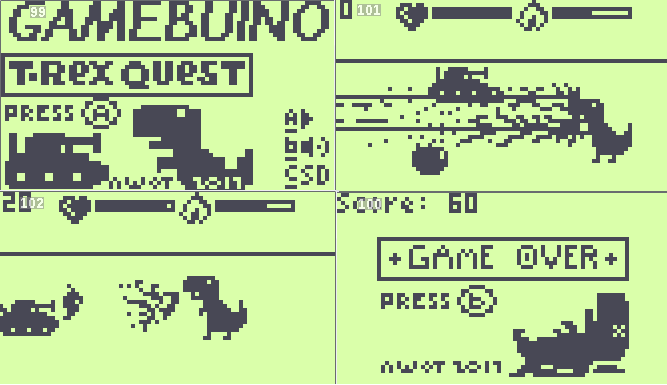
- TREX_QUEST_sc4.png (8.34 KiB) Viewed 6360 times
[update : 07/02/2017 : v1.1] : add the possibility to get back to the title screen (by pressing 'C'),
[update : 03/03/2017 : v1.2] : add logo and tile : INF file,
.hex and .elf files attached + ino file.
Attachments: TRES_QUEST_v1.2.zip (not archived)
Sorunome Sat Jan 21, 2017 9:05 pm
Hello there, welcome to the gamebuino forums!
Looking at the screenshot the game is looking quite nice, however, while you did provide the source it'd require us to compile it.....would you mind to upload the .hex file? You'll need to put it into a zip archive to be able to add it as an attachment
EDIT: Looking briefly at the code you use "void setup();" to call the function after you die, however just "setup();" is sufficiant. On that point, i don't know how good it is to call gb.begin(); multiple times, what you do with that. You might want to split the title screen and that "GO TREX" thing into a new function and call that one instead.
Looking at the screenshot the game is looking quite nice, however, while you did provide the source it'd require us to compile it.....would you mind to upload the .hex file? You'll need to put it into a zip archive to be able to add it as an attachment
EDIT: Looking briefly at the code you use "void setup();" to call the function after you die, however just "setup();" is sufficiant. On that point, i don't know how good it is to call gb.begin(); multiple times, what you do with that. You might want to split the title screen and that "GO TREX" thing into a new function and call that one instead.
naed Sat Jan 21, 2017 9:14 pm
I like the look of this :D good work
Any plans to add to this game?
Any plans to add to this game?
Awot Fri Feb 03, 2017 3:48 pm
Hello,
Yes, I still work on it, i have some ideas to improve it :
Update done :
- add a hitbox on the TREX and the TANK, on the plan of their foot (and not on the sprite, it was not "realistic" )
- Sometimes a random chily appears instead of an apple (chance : 1/10) the chily allow the TREX to fire with a mega ray blaster all over the screen.
- i used Split H function on the "fire" sprite, instead of a different sprite of fire splited on the left
- add : intro and logo at the starting page :
[img]intrologo.png[/img]
Todo :
- Add : Level 1 / Level 2 / Level x according to the score. (e.g : score > 500 => level 2, and level 2 has more tanks )
- More than 1 tank at every level (=> how to do ? : array of tank ? )
- Add a game over screen at the end, with the score (how to do it ? can't find how to pause game easily )
I would appreciate if you have any ideas, or sample of code to help me with my todo list,
I would like to post a new hex version when i'll finish the Todo list.
Yes, I still work on it, i have some ideas to improve it :
Update done :
- add a hitbox on the TREX and the TANK, on the plan of their foot (and not on the sprite, it was not "realistic" )
- Sometimes a random chily appears instead of an apple (chance : 1/10) the chily allow the TREX to fire with a mega ray blaster all over the screen.
- i used Split H function on the "fire" sprite, instead of a different sprite of fire splited on the left
- add : intro and logo at the starting page :
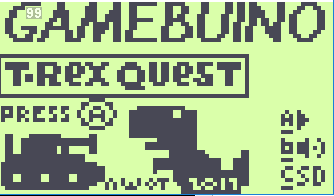
- intrologo.png (5.06 KiB) Viewed 6465 times
Todo :
- Add : Level 1 / Level 2 / Level x according to the score. (e.g : score > 500 => level 2, and level 2 has more tanks )
- More than 1 tank at every level (=> how to do ? : array of tank ? )
- Add a game over screen at the end, with the score (how to do it ? can't find how to pause game easily )
I would appreciate if you have any ideas, or sample of code to help me with my todo list,
I would like to post a new hex version when i'll finish the Todo list.
Awot Sat Feb 04, 2017 9:20 am
i will focus on the Game over screen:
My problem is to stop the program while the game over screen.
Here is my last part of my program :
My problem here :
whith the while loop : the program freeze, no game over texte ect
whitout the while loop : the game over screen is ok but the program still runs and i can't go back to title screen
i don't understand why my while loop freeze the program, and why it doesn't work.
My problem is to stop the program while the game over screen.
Here is my last part of my program :
- Code: Select all
 // GAME OVER
    if (barredevie > 59) {   // when i have no more life bar
      gb.display.clear();
      gb.display.print(F("GAME OVER"));       // all my game over text
      gb.display.print(F("\nScore: "));            // score
      gb.display.print(score);                           //score
      gb.display.print("\n");                              // empty line
      gb.display.print("\nPress \25");                  // buton A char
         while(1){                                                 // while, while is TRUE loop
         if (gb.buttons.repeat(BTN_A, 1)) {          // if press A, this should break
            break;
         }                                                              //loop while
       }                                                              // end if
setup();
My problem here :
whith the while loop : the program freeze, no game over texte ect
whitout the while loop : the game over screen is ok but the program still runs and i can't go back to title screen
i don't understand why my while loop freeze the program, and why it doesn't work.
Sorunome Sat Feb 04, 2017 9:56 am
Your loop needs to be something like
That is because gb.update also takes care of refreshing the screen and thelike ^.^
- Code: Select all
while(1) {
  if (gb.update()) {
    // your code goes here
  }
}
That is because gb.update also takes care of refreshing the screen and thelike ^.^
wuuff Sat Feb 04, 2017 10:24 am
Awot wrote:i will focus on the Game over screen:
My problem is to stop the program while the game over screen.
Here is my last part of my program :
- Code: Select all
 // GAME OVER
    if (barredevie > 59) {   // when i have no more life bar
      gb.display.clear();
      gb.display.print(F("GAME OVER"));       // all my game over text
      gb.display.print(F("\nScore: "));            // score
      gb.display.print(score);                           //score
      gb.display.print("\n");                              // empty line
      gb.display.print("\nPress \25");                  // buton A char
         while(1){                                                 // while, while is TRUE loop
         if (gb.buttons.repeat(BTN_A, 1)) {          // if press A, this should break
            break;
         }                                                              //loop while
       }                                                              // end if
setup();
My problem here :
whith the while loop : the program freeze, no game over texte ect
whitout the while loop : the game over screen is ok but the program still runs and i can't go back to title screen
i don't understand why my while loop freeze the program, and why it doesn't work.
Like Sorunome said, gb.update() performs drawing and input updating stuff, so you can't have an infinite loop waiting for input. But you don't need to if you think about what you're trying to do in a different way! You can still keep waiting for input by not doing any game logic and instead perform the "game over" screen logic. Here's an example of what I mean:
- Code: Select all
#define MODE_GAME 0
#define MODE_GAME_OVER 1
int mode = MODE_GAME

void loop() {
  if(gb.update()){
    switch( mode ){
      case MODE_GAME:
        stepGame();
        break;

      case MODE_GAME_OVER:
        stepGameOver();
        break;

    }
  }
}
Then you would move all the code you wrote for the game to stepGame() and the game over code to stepGameOver(), except when the player dies in game mode you change the mode to game over (and when the player presses A in game over mode you switch it back to game mode). This isn't the only way to do things, but it's how I handle the logic with my projects. You can take a look at the code for my game, Armageddon, as an example if you want. That game has a game over screen with a flashing "Press A" prompt.
Awot Sun Feb 05, 2017 1:34 pm
Thanks guys
I managed to do the Game over and the Level screen.
I just can't make multiple tanks yet, but the tanks double speed at each level.
I updated the first post with the last version.
I consider this as the v1.0 version. :)
My High score so far : Level 5 [575]
I managed to do the Game over and the Level screen.
I just can't make multiple tanks yet, but the tanks double speed at each level.
I updated the first post with the last version.
I consider this as the v1.0 version. :)
My High score so far : Level 5 [575]
Awot Tue Jun 13, 2017 5:32 pm
Hello
i have updated T-REX QUEST with :
- differential scrolling,
- cars,
- background city,
- no transparency. :)
- and changed some others things
Please find the .ino and .hex here :
i have updated T-REX QUEST with :
- differential scrolling,
- cars,
- background city,
- no transparency. :)
- and changed some others things
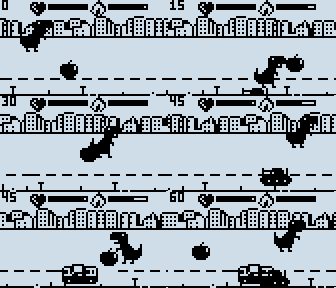
- TREX_QUEST_V2.0small.gif (246.31 KiB) Viewed 6002 times
Please find the .ino and .hex here :
Attachments: TREX_QUEST_v2.0.zip (not archived)
Sorunome Wed Jun 14, 2017 9:06 am