
Archive of the Gamebuino Classic forum (2014-2018), rebuilt from the pages kept by the Wayback Machine: only part of the topics and pages were captured. Read-only. Removal on request: hi@gamebuino.com.
Gamebuino battery data
inversesandwich Sun Jul 27, 2014 9:57 am
I've published the data captured by the batterylogger sketch to an interactive graph! Click here to view it. I might post more in the future to see if battery performance changes.
gamebox13 Fri Dec 23, 2016 10:00 pm
I've tried to compile this sketch and run, but had some problem with output txt file. On gamebuino it runs without errors, txt file created but on PC it not opens, because it is corrupt (says filesize is not ok). After chkdsk the file is empty. Tried many times, runs about 9 hours before battery discharge or 10 min and got same result with corrupt file.
Sorunome Sat Dec 24, 2016 10:22 am
Which SD library do you use?
gamebox13 Sat Dec 24, 2016 4:12 pm
This sketch was in gamebuino's examples and uses tinyfat.
Sorunome Sat Dec 24, 2016 10:58 pm
Yeah, somehow that one doesn't work anymore for writing files, only for reading them. IIRC SdFat works fine for reading&writing files, so use that one instead
gamebox13 Tue Jan 03, 2017 9:49 am
I made script, which plot voltage's graph on screen. There are max,min voltage and time. It has 512 size of array and can storage about 17 hours graph with every 2 minutes records.
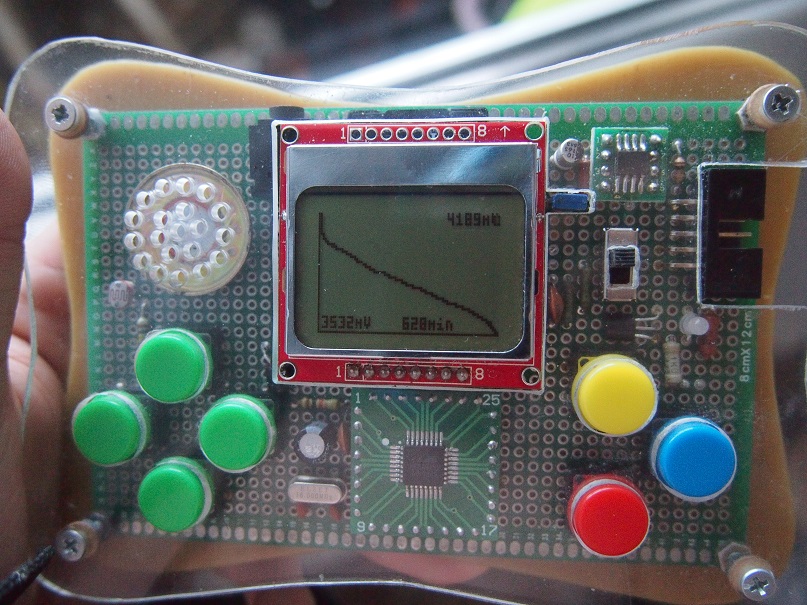
- PC250295.JPG (236.13 KiB) Viewed 4290 times
- Code: Select all
#include <Gamebuino.h>
#include <SPI.h>
Gamebuino gb;
unsigned int tm=0;
int i;
int t;
unsigned long x,y,xt,yt;
unsigned int bmax;
unsigned int bmin;
unsigned int bat;
unsigned int data[512]={};
void setup() {
  // put your setup code here, to run once:
  gb.begin();
  gb.titleScreen(F("Battery Monitor"));
  gb.backlight.automatic = false;
  gb.backlight.set(0);
  gb.display.clear();
  gb.display.persistence = true;
  gb.battery.show = false;
  gb.display.textWrap = false;

  data[0]=int(gb.battery.voltage);
}

void loop() {

  if(gb.update()){
  if(gb.buttons.pressed(BTN_C)){
      gb.titleScreen(F("Battery Monitor"));
      //reset();
    }
  t++;

  if (t>=1200*2){
    t=0;
    if (tm<511){
      tm++;

      bat=gb.battery.voltage;
      data[tm]=bat;
      bmin=4500;
      bmax=0;
      for (i=0; i<tm; i++)
      {
        if (data[i]<bmin) bmin=data[i];
        if (data[i]>bmax) bmax=data[i];
      }

    }
  }


  if((gb.frameCount%20) == 0){
   gb.display.clear();
   xt=0;
   yt=0;
    for (i=0; i<tm; i++)
      {
        x=1+i*83/(tm);
        y=int(long(47)*(bmax-data[i])/(bmax-bmin));
        gb.display.drawLine(xt,yt, x,y);
        xt=x;
        yt=y;
      }
  gb.display.drawFastVLine(0,0,48);
  gb.display.drawFastHLine(0,47,84);
  gb.display.cursorX = 40;
  gb.display.cursorY = 41;
  gb.display.print(tm*2);
  gb.display.println(F("min"));
  gb.display.cursorX = 60;
  gb.display.cursorY = 0;
  gb.display.print(bmax);
  gb.display.println(F("mV"));
  gb.display.cursorX = 2;
  gb.display.cursorY = 41;
  gb.display.print(bmin);
  gb.display.println(F("mV"));

  if (gb.battery.level<=1) gb.sound.playTick();
  }
  }
}