
Archive of the Gamebuino Classic forum (2014-2018), rebuilt from the pages kept by the Wayback Machine: only part of the topics and pages were captured. Read-only. Removal on request: hi@gamebuino.com.
UFO-Race
rodot Wed Aug 06, 2014 4:28 pm
Description
A fast paced racing game where you have to finish a lap as fast as possible while avoiding obstacles.
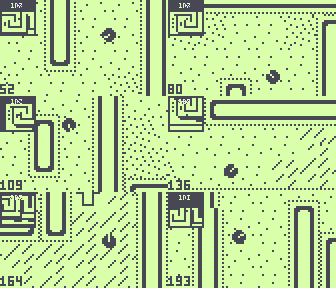
Controls
L/R Arrows: turn
A: Thrust
B: Brake
C: Exit
Download & source
Download .zip containing source, hex, elf
GitHub repository
Features
Easily create your own map by editing world.ino
Fast and smooth driving
Smooth camera which looks in the direction you're going depending on your speed
Minimap
Accepts large maps (the provided maps is 32*32, 128*64 tiles should fit)
Different obstacles: ice, sand, etc.
5 best scores saved in EEPROM along with their name
To do
More maps
Read maps from SD card
Map editor
Multiplayer
A fast paced racing game where you have to finish a lap as fast as possible while avoiding obstacles.
Controls
L/R Arrows: turn
A: Thrust
B: Brake
C: Exit
Download & source
Download .zip containing source, hex, elf
GitHub repository
Features
Easily create your own map by editing world.ino
Fast and smooth driving
Smooth camera which looks in the direction you're going depending on your speed
Minimap
Accepts large maps (the provided maps is 32*32, 128*64 tiles should fit)
Different obstacles: ice, sand, etc.
5 best scores saved in EEPROM along with their name
To do
More maps
Read maps from SD card
Map editor
Multiplayer
erico Wed Aug 06, 2014 4:36 pm
That is super! Oh my! mini map and all! :D
Matrix828 Wed Aug 06, 2014 4:58 pm
Just spotted this while having a look through your GitHub, very cool, can't wait to play it and see how you've coded it!
treflip Wed Aug 06, 2014 5:57 pm
Very fun. Thanks!
and I like that I can use it for examples with movement speed.. terrain effecting speed and map making!
and I like that I can use it for examples with movement speed.. terrain effecting speed and map making!
rodot Wed Aug 06, 2014 6:06 pm
treflip wrote:and I like that I can use it for examples with movement speed.. terrain effecting speed and map making!
Yeah that was initially intended as an example an ended up being a games few hours later :lol:
DFX2KX Wed Aug 06, 2014 7:48 pm
Oh, Nice! (Now the first song from F-zero is stuck in my head, and I haven't even tried loading this game up yet)
rotyler Thu Aug 07, 2014 4:36 am
trying to make a map (harder that I thought) and I got a record of 628 on the deafault map. later today, I played again and the crabator high acore data showed up. any idea of why?
rodot Thu Aug 07, 2014 9:23 am
My record is 608 ;)
If Crabator is on your Gamebuino and you upload UFO-Game via USB, the loader don't know that the game changed, and the EEPROM isn't erased (so it still contains Crabator's high scores). You should always get back to the loader by pressing 'C' in the main menu to backup you EEPROM and avoiding messing up you saved games.
What didn't you understand in making your own map? You only have to change the values in the array "world". Each "0x" is followed by 2 characters each representing one tile. For example 0xDC represents a "block_up" and a "block_left". If you change the size of the world don't forget to change WORLD_W and WORLD_H accordingly.
To know which value correspond to which tile you can see it just above the variable "world" :
If Crabator is on your Gamebuino and you upload UFO-Game via USB, the loader don't know that the game changed, and the EEPROM isn't erased (so it still contains Crabator's high scores). You should always get back to the loader by pressing 'C' in the main menu to backup you EEPROM and avoiding messing up you saved games.
What didn't you understand in making your own map? You only have to change the values in the array "world". Each "0x" is followed by 2 characters each representing one tile. For example 0xDC represents a "block_up" and a "block_left". If you change the size of the world don't forget to change WORLD_W and WORLD_H accordingly.
- Code: Select all
#define WORLD_W 32
#define WORLD_H 32
const byte world[WORLD_W*WORLD_H/2] PROGMEM = {
  0xDC,0xEE,0xEE,0xEE,0xEE,0xEE,0xEE,0xEE,0xEE,0xEE,0xEE,0xEE,0xEE,0xEE,0xEE,0xAD,
  0xF0,0x01,0x71,0x00,0x00,0x00,0x00,0xD0,0x00,0x00,0x0D,0xD0,0x00,0x00,0x05,0x5F,
  0xF0,0x0C,0xEE,0xEE,0xEE,0xEA,0x00,0xF0,0x0D,0x00,0x0F,0xF0,0x00,0x00,0x00,0x5F,
  0xF0,0x00,0xD5,0x55,0x00,0x5D,0x00,0xF0,0x0F,0xD0,0x0F,0xF0,0x0D,0x50,0x00,0x0F,
  0xF0,0x80,0xF5,0x00,0x00,0x0F,0x00,0xF0,0x0F,0xF0,0x0F,0xF0,0x0F,0xCA,0x80,0x0F,
  0xF0,0x00,0xF0,0x00,0xD0,0x0B,0x00,0xF0,0x4F,0xF0,0x0F,0xF0,0x0F,0x55,0x00,0x0F,
  0xF0,0x80,0xF0,0xD0,0xF5,0x00,0x05,0xF4,0x4F,0xF0,0x0B,0xB0,0x0F,0x50,0x00,0x5F,
  0xF0,0x00,0xF0,0xB0,0xF5,0x55,0x55,0xF4,0x6F,0xF0,0x00,0x00,0x0F,0x00,0x00,0x5F,
  0xF0,0x80,0xF0,0x00,0xBC,0xEE,0xEA,0xB6,0x6F,0xF0,0x00,0x00,0x0F,0x00,0x8C,0xAF,
  0xF0,0x00,0xF5,0x00,0x00,0x00,0x66,0x66,0x6F,0xBC,0xEE,0xEE,0xAF,0x50,0x00,0x5F,
  0xF0,0x40,0xB5,0x55,0x00,0x06,0x66,0x66,0x6F,0x00,0x00,0x00,0x0B,0x55,0x00,0x0F,
  0xF5,0x00,0x0C,0xEE,0xEE,0xEE,0xEE,0xEE,0xAB,0x00,0x00,0x00,0xCE,0xEA,0x00,0x0F,
  0xF5,0x50,0x00,0xCE,0xEE,0xEE,0xEE,0xEE,0xEE,0xEE,0xEE,0xEE,0xEE,0xEA,0x00,0x5F,
  0xF5,0x55,0x00,0x00,0x00,0x00,0x55,0xCE,0xEA,0x55,0x08,0x88,0x88,0x00,0x00,0x5F,
  0xF5,0x55,0x50,0x00,0x00,0x00,0x00,0x03,0x30,0x00,0x00,0x00,0x00,0x00,0x05,0x5F,
  0xBC,0xEE,0xEE,0xEE,0xEE,0xEE,0xEE,0xEE,0xEE,0xEE,0xA8,0x88,0x88,0xCE,0xEE,0xAB,
};
To know which value correspond to which tile you can see it just above the variable "world" :
- Code: Select all
// array containing the different sprites
#define NUM_SPRITES 16
const byte* sprites[NUM_SPRITES] = {
  road,              //0
  power_right,       //1
  power_down,        //2
  power_left,        //3
  power_up,          //4
  sand,              //5
  ice,               //6
  start,             //7
  block_bouncer,     //8
  block_single,      //9
  block_right,       //A
  block_down,        //B
  block_left,        //C
  block_up,          //D
  block_horizontal,  //E
  block_vertical     //F
};
DFX2KX Thu Aug 07, 2014 9:38 pm
I was wondering how the level was encoded, that's pretty neat. Is the ability to save the highscore list a part of the stock library I'm assuming so.
rodot Thu Aug 07, 2014 10:45 pm
Nope, the highscore saving to EEPROM is not part of the library. It's all in the file highscore.ino so you can copy/past it to your own game. Although mind that here the highest score is the lowest value here, so you might have to reverse it for your game.
The fact the the EEPROM (containing the high scores) is saved and backed up from the micro SD card when you switch between games is part of the loader.
The fact the the EEPROM (containing the high scores) is saved and backed up from the micro SD card when you switch between games is part of the loader.
Drakker Tue Jul 07, 2015 7:42 pm
I just found out that you can win the race by braking on the start line. I'm pretty sure this is not an intended feature. ;)
rodot Thu Jul 16, 2015 5:38 pm
Arrrh, people were not supposed to brake on the start tile, it was surrounded by accelerators to avoid this... but thanks for pointing this out, I just corrected that bug by making the start tile an accelerator itself, so you can no longer stop on it :P
Drakker Thu Jul 16, 2015 5:43 pm
Ha! But I still get to keep my high scores on my Gamebuino. :lol: