
Archive of the Gamebuino Classic forum (2014-2018), rebuilt from the pages kept by the Wayback Machine: only part of the topics and pages were captured. Read-only. Removal on request: hi@gamebuino.com.
New emulator: Simbuino (Windows)
Myndale Sat Aug 16, 2014 1:03 am
Now that Rodot has started shipping official hardware I'm happy to release the emulator I was working on a few months back. This isn't really a proper "release" per se, more like a sneak peek for anyone that wants to see how it's coming along:
https://github.com/Myndale/Simbuino/blob/master/binaries/Simbuino-Install.zip?raw=true
I'll warn you right now, you'll need a fast machine to run it at full speed. I haven't started optimization yet and the entire thing has been developed in .NET and WPF/MVVM...technologies not exactly renowned for high performance! So far I've been concentrating on implementing the features needed by the official Gamebuino library, if you use that then you should be fine but if you start messing around with register settings then things will probably break. The main components that are still missing entirely are SD emulation and bootloader support i.e. you can't call the game loading or page write functions (LOADER.HEX won't run either). HEX files can be loaded from the menu, hit F8 to run them. Screen persistance is disabled by default but you can enable it via the menu to get greyscale support.
I started occasional work on this emulator the same week that Rodot announced the campaign and it's been solely for the purpose of my own personal education, so please don't expect too much. I do plan to continue developing it though, I've found the debugging functions particularly helpful with the graphics optimizations I've been working on this past week.
As always, feedback is greatly welcome. Enjoy!
EDIT: Simbuino is now open source and hosted on GitHub at https://github.com/Myndale/Simbuino, the above download link has been updated to reflect the new location of the compiled installer.
https://github.com/Myndale/Simbuino/blob/master/binaries/Simbuino-Install.zip?raw=true
I'll warn you right now, you'll need a fast machine to run it at full speed. I haven't started optimization yet and the entire thing has been developed in .NET and WPF/MVVM...technologies not exactly renowned for high performance! So far I've been concentrating on implementing the features needed by the official Gamebuino library, if you use that then you should be fine but if you start messing around with register settings then things will probably break. The main components that are still missing entirely are SD emulation and bootloader support i.e. you can't call the game loading or page write functions (LOADER.HEX won't run either). HEX files can be loaded from the menu, hit F8 to run them. Screen persistance is disabled by default but you can enable it via the menu to get greyscale support.
I started occasional work on this emulator the same week that Rodot announced the campaign and it's been solely for the purpose of my own personal education, so please don't expect too much. I do plan to continue developing it though, I've found the debugging functions particularly helpful with the graphics optimizations I've been working on this past week.
As always, feedback is greatly welcome. Enjoy!
EDIT: Simbuino is now open source and hosted on GitHub at https://github.com/Myndale/Simbuino, the above download link has been updated to reflect the new location of the compiled installer.
Minest Sat Aug 16, 2014 4:18 am
Cool! I'll try it out
Minest Sat Aug 16, 2014 4:37 am
It seems to be lagging for me. That could be because I'm on a laptop though.
Myndale Sat Aug 16, 2014 4:49 am
How many cycles per second is it running? You can see it in the bottom right hand corner of the window, should be hovering around 16,000,000. If it's lower then try disabling sound from the menu...sound support literally went in over the past 24 hours so I might still have some threading issues to resolve.
Minest Sat Aug 16, 2014 5:14 am
I tried disabling sound and it didn't work.
Anyway i think my laptop just sucks since it's working fine on my desktop, except for an annoying buzzing.
Anyway i think my laptop just sucks since it's working fine on my desktop, except for an annoying buzzing.
Myndale Sat Aug 16, 2014 5:34 am
Minest wrote:I tried disabling sound and it didn't work. Anyway i think my laptop just sucks since it's working fine on my desktop, except for an annoying buzzing.
Actually I think I know what that might be, it's an unfortunate side effect of the way I'm doing the sound streaming. At least I should be able to fix it.
Thanks for the feedback.
erico Sat Aug 16, 2014 6:46 am
I got a similar result, a strong stuttering sound going on, even disabling it.
Myndale Sat Aug 16, 2014 6:56 am
Hmm...thanks erico. I've made a few changes to the thread priorities and increased the mix buffer size, if that doesn't fix it I think I'll have to switch to a different streaming method.
DFX2KX Sat Aug 16, 2014 7:40 am
I'll have to take a look at it when I'm not tired. I've been wanting to see this version sense you stuck up a screenshot of it on the original Emulator thread
microgamer Sat Aug 16, 2014 7:49 am
Well it installed fine, which is always a good start!
went to write some code and saw there's only an option to load file... it wanted a HEX File (I can't just load a C script in there right) - so does that mean I need to compile code elsewhere to produce a HEX file? Should I use Codebender first?
Also could someone please tell me the equivalent commands for these microview graphics calls, so I can try a small game
1) uView.setColor (WHITE) - sets draw color to white (1) or BLACK (0)
2) uView.pixel(x,y) (plots a pixel at x,y)
went to write some code and saw there's only an option to load file... it wanted a HEX File (I can't just load a C script in there right) - so does that mean I need to compile code elsewhere to produce a HEX file? Should I use Codebender first?
Also could someone please tell me the equivalent commands for these microview graphics calls, so I can try a small game
1) uView.setColor (WHITE) - sets draw color to white (1) or BLACK (0)
2) uView.pixel(x,y) (plots a pixel at x,y)
Myndale Sat Aug 16, 2014 8:27 am
microgamer wrote:so does that mean I need to compile code elsewhere to produce a HEX file? Should I use Codebender first?
Yes. Gamebuino games are compiled into HEX files for storage on the SD card, it's these that my emulator loads. If you open the Arduino IDE and select File -> Preferences you'll find a checkboxe for "Show verbose output" for "compilation"; turn this on. From that point compiling your Arduino program will then show you where the HEX file is being generated on your local machine, e.g. C:\Users\YOURUSERNAME\AppData\Local\Temp\build1234567tmp\YourGameName.cpp.hex
microgamer Sat Aug 16, 2014 9:14 am
Re Codebender - sorry if this is a basic question ..
In Codebender, there is not "Gamebuino" in the drop down menu'to compile for - like there is for Microview. Let's hope they will add that.
In the meantime how to set it up so the script can find the Gamebuino Header file?
Is there a way to upload the Header files to a central place so the compiler can find them, has that already been done?
In Codebender, there is not "Gamebuino" in the drop down menu'to compile for - like there is for Microview. Let's hope they will add that.
In the meantime how to set it up so the script can find the Gamebuino Header file?
Is there a way to upload the Header files to a central place so the compiler can find them, has that already been done?
rodot Sat Aug 16, 2014 9:41 am
Hey Myndale,
Impressive :shock: (as usual :roll:)
It runs at full speed with sound and persistence enable using 32% of my i5-3337U @1.8Ghz. As it's an ultrabook CPU it's not very demanding! Although I have some stuttering too, but it's still playable. They main difficulty to play though is the key binding with all the keys for the left hand :P
As soon as I start the program, even before I start a game, there is a continuous high pitch tone, I don't know if you noticed it?
The sound rendering is very faithful, do you directly update the sound output at 16Mhz?
Impressive :shock: (as usual :roll:)
It runs at full speed with sound and persistence enable using 32% of my i5-3337U @1.8Ghz. As it's an ultrabook CPU it's not very demanding! Although I have some stuttering too, but it's still playable. They main difficulty to play though is the key binding with all the keys for the left hand :P
As soon as I start the program, even before I start a game, there is a continuous high pitch tone, I don't know if you noticed it?
The sound rendering is very faithful, do you directly update the sound output at 16Mhz?
Myndale Sat Aug 16, 2014 11:46 am
rodot wrote:They main difficulty to play though is the key binding with all the keys for the left hand
Easy enough to change, I'll add a user configuration dialog box for it.
rodot wrote:As soon as I start the program, even before I start a game, there is a continuous high pitch tone
Given the feedback I've been getting here I think it's becoming fairly evident that I'll need to use a different sound playback method. Currently I'm using native winmm functions but there's always the balancing problem of getting the size of the playback buffers just right. Too large and your sound starts to noticeably lag the rest of the game, too small and you get artifacts like stuttering. I think I might have to blow the dust off some of my old DirectSound code.
rodot wrote:The sound rendering is very faithful, do you directly update the sound output at 16Mhz?
No! I got about halfway through implementing the code to do it properly before realizing it was completely unnecessary. The eureka moment for me was when I saw this line of code in your library and realized it was ultimately responsible for every sample being sent to the speaker:
- Code: Select all
OCR2B = output; //60x faster than analogOutput() !
My architecture is designed such that if Timer2 is set for PWM mode then I can easily calculate when it will toggle the speaker port, and my plan was to actually do the full emulation of this and integrate the result. But when I saw that line I instantly realized that if I do it with 100% accuracy the value I get will be exactly the same as the byte stored in OCR2B. Dennith was absolutely correct when he suggested this as a possibility for adding sound support to his emulator in the other thread. You don't even need to modify it in any way, you just create an 8-bit unsigned mono sound channel and you fill it with whatever is in OCR2B and what comes out your speaker will be an exact match.
Well, sort of. The next logical step would be to play a range of frequencies into the speaker, capture them with a very high quality microphone and generate a response curve which could then be fed into a digital equalizer to mimic what it will actually sound like coming from a real Gamebuino speaker.....but that's a project for a rainy day when I'm bored. :lol:
Skyrunner65 Sat Aug 16, 2014 5:54 pm
Well, it sounds great, but for now I'm stuck with Deneth's Emulator (no offense, but you haven't made sound work yet).
I'll start looking for something that can run .net applications in linux... (Wine isn't out for fedora 20 yet)
Also, I put a fix to that on the "Getting Started" page.
I'll start looking for something that can run .net applications in linux... (Wine isn't out for fedora 20 yet)
Myndale wrote:Yes. Gamebuino games are compiled into HEX files for storage on the SD card, it's these that my emulator loads. If you open the Arduino IDE and select File -> Preferences you'll find a checkboxe for "Show verbose output" for "compilation"; turn this on. From that point compiling your Arduino program will then show you where the HEX file is being generated on your local machine, e.g. C:\Users\YOURUSERNAME\AppData\Local\Temp\build1234567tmp\YourGameName.cpp.hex
Also, I put a fix to that on the "Getting Started" page.
rodot Sat Aug 16, 2014 6:54 pm
Skyrunner65 wrote:Also, I put a fix to that on the "Getting Started" page.
It's already on the getting started page...
Vraister Sat Aug 16, 2014 9:31 pm
Hi,
I just had a brief run with the emulator and finally signed up for the forum.
The emulator runs well on my Lenovo T410 laptop. I have only tested it with a few of the examples but everything seems to work. It uses about a third of the CPU and sound works. Great work, thanks!
Best,
Vraister
I just had a brief run with the emulator and finally signed up for the forum.
The emulator runs well on my Lenovo T410 laptop. I have only tested it with a few of the examples but everything seems to work. It uses about a third of the CPU and sound works. Great work, thanks!
Best,
Vraister
DFX2KX Sun Aug 17, 2014 9:39 pm
Just finally sat down and tried it. It works fine! Nice to be able to see memory usage. though it doesn't like my dark windows theme much XD.
Uses a good chunk of my CPU, but still have some to burn. Same with Ram. Wasn't expecting the sound to work, that was suprising! :D staring at the memory output has already given me some sense of the space I've got to work with on these games, and that's pretty helpful (also points out how inefficient my code is)
Uses a good chunk of my CPU, but still have some to burn. Same with Ram. Wasn't expecting the sound to work, that was suprising! :D staring at the memory output has already given me some sense of the space I've got to work with on these games, and that's pretty helpful (also points out how inefficient my code is)
Myndale Tue Aug 19, 2014 1:14 am
DFX2KX wrote:staring at the memory output has already given me some sense of the space I've got to work with on these games, and that's pretty helpful
Cheers DFX2KX, just remember that on the real hardware the space available for games only goes up to 7780 which is where the settings page sits, the bootloader takes up everything after that. Maybe I should have the emulator pop up a warning if people load a game that's too big and tries to corrupt this area?
Myndale Tue Aug 19, 2014 1:25 am
Thanks for the feedback everyone. I've made a number of changes including sound optimizations, fixing that buzzing that people were hearing, a greatly optimized graphics pipeline, fixing a number of bugs and proper support for timer 1 (so my original 3d demo and greyscale demos now work...don't forget to turn on screen persistence). I also added a Reload-And-Rerun option which makes development turnaround much faster...you just compile your app in the IDE with Control-R, tab back to the emulator (assuming you've already loaded your game in it) and hit Contrtol-F8. There's still work to be done in some of the interface panes but hopefully with all theses changes it's now a tool that's actually useful for proper development. I've uploaded the latest version of the emulator, it's at the same link as before i.e. http://www.ppl-pilot.com/files/Simbuino.zip.
I'm going to keep putting occasional work in this project but for the time being I'll be turning my attention back exclusively to graphics optimization...
I'm going to keep putting occasional work in this project but for the time being I'll be turning my attention back exclusively to graphics optimization...
jonnection Tue Aug 19, 2014 8:01 am
Myndale wrote: I'm going to keep putting occasional work in this project but for the time being I'll be turning my attention back exclusively to graphics optimization...
Are you planning to optimize the Gamebuino lib core gfx routines as well ?
Myndale Tue Aug 19, 2014 10:05 am
jonnection wrote:Are you planning to optimize the Gamebuino lib core gfx routines as well ?
Some of them, yes. It's one of the reasons I've been wanting to get the emulator to a workable state, with an embedded debugger and breakpoints it's possible to profile functions down to the clock cycle!
Myndale Wed Aug 20, 2014 11:16 am
Just a quick update...I've added an animated gif capture feature to the latest version of Simbuino, this should hopefully make it a bit easier for people to make tear-free animations of their titles for the games download page:

- greyscale.gif (715.58 KiB) Viewed 4881 times
rodot Wed Aug 20, 2014 11:28 am
Awesome, once again!
Suggestion: a keyboard shortcut to start/stop the recording and a blinking red dot when recording?
Suggestion: a keyboard shortcut to start/stop the recording and a blinking red dot when recording?
Myndale Wed Aug 20, 2014 11:35 am
rodot wrote:Suggestion: a keyboard shortcut to start/stop the recording and a blinking red dot when recording?
Excellent suggestion, I'll get right on it! :)
rodot Wed Aug 20, 2014 12:43 pm
Thanks for taking my suggestion into account. Here is another one (haha sorry)
I noticed that if I save your gif with 3 indexed colors with no transparency the file size drops from 715KB to 300KB. It would be useful for the games gallery page to load faster, and it might just be one line of code to edit on your side.
Original, 256 colors
3 colors, no transparency
PS: there is a star which doesn't move in the sky?
I noticed that if I save your gif with 3 indexed colors with no transparency the file size drops from 715KB to 300KB. It would be useful for the games gallery page to load faster, and it might just be one line of code to edit on your side.
Original, 256 colors
- original.gif (715.58 KiB) Viewed 4868 times
3 colors, no transparency
- indexed.gif (299.83 KiB) Viewed 4868 times
PS: there is a star which doesn't move in the sky?
Myndale Wed Aug 20, 2014 1:18 pm
rodot wrote:I noticed that if I save your gif with 3 indexed colors with no transparency the file size drops from 715KB to 300KB. It would be useful for the games gallery page to load faster, and it might just be one line of code to edit on your side.
Thanks for the tip! And yeah, that's a very easy change to make.
rodot wrote:PS: there is a star which doesn't move in the sky?
Man, that pixel has been bugging the CRAP out of me for the past 24 hours! :lol: Must be a bug in the original demo because it appears on the hardware as well...at least it shows the emulator is working properly!
Myndale Wed Aug 20, 2014 1:23 pm
Wait, no, I know exactly what that is. I wanted the bar at the top to be stationary so I'm not scrolling the first byte in every column i.e. the top 8 pixels. That star pixel is much harder to spot on the Gamebuino hardware so I obviously just didn't notice there was one in those top 8 rows. I'll have to go remove it from the background image now. :D
erico Wed Aug 20, 2014 4:13 pm
rodot wrote:Thanks for taking my suggestion into account. Here is another one (haha sorry)
...
PS: there is a star which doesn't move in the sky?
It is a surveillance satellite of course :D
Good to hear about the non-tearing anim export, it makes it more comfortable to watch, at least for me (nitpick a lot about these stuff because I work with videos :P).
I still have to give the latest emu version a go though.
DFX2KX Sun Aug 24, 2014 11:45 pm
Myndale wrote:DFX2KX wrote:staring at the memory output has already given me some sense of the space I've got to work with on these games, and that's pretty helpful
Cheers DFX2KX, just remember that on the real hardware the space available for games only goes up to 7780 which is where the settings page sits, the bootloader takes up everything after that. Maybe I should have the emulator pop up a warning if people load a game that's too big and tries to corrupt this area?
That seems like a good idea, yeah!
Maybe a way to change text color on the various windows, too, that might be helpful, but not necessary by far.
Fantastic work, Myndale. The emulator responds more or less as you'd expect from the real thing.
Myndale Mon Aug 25, 2014 1:22 am
Cheers DFX2KX. I've uploaded a new version with a number of extra features including customizable LCD colors and Landscape/Portrait modes for both LCD and export (so Tetrino can now be played right-way-up). I've also made changes to the key mappings and provided support for customization. Finally I've changed the default scheme to match gbsim's for more consistancy across emulators (Denith's mapping was better than mine anyway).
rodot Mon Aug 25, 2014 7:43 am
Awesome :D Given the speed at which this emulator is improving it'll soon be better than the Gamebuino itself :lol:
In the options, the screen orientation is out of the frame, I have to re-size the window to see it (people might miss it). It's a fix that should take you 5 s. top to fix. Sorry I always pick what's wrong... but that's really a minor thing.
Is the backlight emulation implemented yet? I tried Crabator, it which the backlight is supposed to flickers when you're hit, but it doesn't?
Thanks again Myndale, keep up the great work :D
In the options, the screen orientation is out of the frame, I have to re-size the window to see it (people might miss it). It's a fix that should take you 5 s. top to fix. Sorry I always pick what's wrong... but that's really a minor thing.
Is the backlight emulation implemented yet? I tried Crabator, it which the backlight is supposed to flickers when you're hit, but it doesn't?
Thanks again Myndale, keep up the great work :D
Myndale Tue Aug 26, 2014 4:45 am
rodot wrote:Given the speed at which this emulator is improving it'll soon be better than the Gamebuino itself
Not a chance :lol:
rodot wrote:Sorry I always pick what's wrong... but that's really a minor thing.
Totally appreciate it, I've fixed the options dialog font size in the latest version so hopefully this won't happen anymore.
rodot wrote:Is the backlight emulation implemented yet? I tried Crabator, it which the backlight is supposed to flickers when you're hit, but it doesn't?
Try it now. I was emulating digital output only, the latest version supports PWM as well.
rodot Tue Aug 26, 2014 8:15 am
The backlight PWM emulating works like a charm now :)
Once again, thanks!
Once again, thanks!
DFX2KX Tue Aug 26, 2014 10:04 pm
Hey, Myndale, all of these new versinos are at the same link, right?
Myndale Tue Aug 26, 2014 10:16 pm
DFX2KX wrote:Hey, Myndale, all of these new versinos are at the same link, right?
Yep: http://www.ppl-pilot.com/files/Simbuino.zip
Once I fix up the panes I'll add proper versioning and a download page with a change list etc.
DFX2KX Tue Aug 26, 2014 10:27 pm
Myndale wrote:DFX2KX wrote:Hey, Myndale, all of these new versinos are at the same link, right?
Yep: http://www.ppl-pilot.com/files/Simbuino.zip
Once I fix up the panes I'll add proper versioning and a download page with a change list etc.
Awesome, thanks!
rodot Fri Aug 29, 2014 4:32 pm
Random idea: that would be great if simbuino would support windows file association like gbsim does, so you would only have to double click your hex files to start simbuino and load the game :)
Myndale Tue Oct 07, 2014 4:00 am
New version of Simbuino now available, this one supports direct uploading of HEX files to the Gamebuino hardware once they've been loaded into the emulator. Thanks ripper121 for the suggestion.
Rodot I tried adding command line arguments to this version but for some weird reason it causes sound to turn off by default in-game. I'll have to track that down and release that feature in the next version.
Rodot I tried adding command line arguments to this version but for some weird reason it causes sound to turn off by default in-game. I'll have to track that down and release that feature in the next version.
rodot Tue Oct 07, 2014 5:05 am
Thanks Myndale for that update! :)
With this one I had to uninstall the previous version of Simbuino first. With the previous version I could just install the updates directly and it would update the older version. Did you change the installer? But well, that's doesn't really matter.
Also I noticed that the key binding option is not working, it seems to loose the settings as soon as you close the options window.
Your emulator is a really great tool!
PS: I look forward playing lunar lander hehe
With this one I had to uninstall the previous version of Simbuino first. With the previous version I could just install the updates directly and it would update the older version. Did you change the installer? But well, that's doesn't really matter.
Also I noticed that the key binding option is not working, it seems to loose the settings as soon as you close the options window.
Your emulator is a really great tool!
PS: I look forward playing lunar lander hehe
Myndale Tue Jan 13, 2015 12:19 am
No, it happens instantly. Adding throttling would be easy enough, I just didn't bother putting it in since I don't know what the actual speeds are and they'd vary considerably between different manufacturers.
Don't quote me on this but I'm guessing the real-time speed wouldn't be too different anyway, the majority of time is spent streaming 512-byte blocks across the SPI bus which is already being throttle back for the sake of the slow LCD displays. Anyone doing time-critical SD streaming might want to take this into account, I don't see why you couldn't set SPI back to full-speed for SD transfers.
Rodot, have you done any tests with the SD cards running at full speed?
Don't quote me on this but I'm guessing the real-time speed wouldn't be too different anyway, the majority of time is spent streaming 512-byte blocks across the SPI bus which is already being throttle back for the sake of the slow LCD displays. Anyone doing time-critical SD streaming might want to take this into account, I don't see why you couldn't set SPI back to full-speed for SD transfers.
Rodot, have you done any tests with the SD cards running at full speed?
Muessigb Tue Jan 13, 2015 12:36 am
Thanks for adding SD. But could you please provide a standalone version of the programm (w/o installer).
I know you can patch it to be usable w/o one (and in fact i did for myself with the last version) but i think it would be handy for anyone.
I know you can patch it to be usable w/o one (and in fact i did for myself with the last version) but i think it would be handy for anyone.
DFX2KX Wed Jan 14, 2015 7:43 am
Muessigb wrote:Thanks for adding SD. But could you please provide a standalone version of the programm (w/o installer).
I know you can patch it to be usable w/o one (and in fact i did for myself with the last version) but i think it would be handy for anyone.
I can back that, the installer is... a touch messy, it seems. Though Simbuino itself is a very useful program (though it and my dark windows skin don't get along, lol)
cyberic Thu Jan 22, 2015 9:14 am
Myndale wrote:Cyberic if you (or anyone else for that matter) want to have a hand in the design of the app or be involved in the development and testing then pls msg me. I've got the technical ability to develop it but my composition skills are non-existent. I've already developed the underlying architecture and now it's time to work on the front-end, which I'm basically trying to piece together from trackers I played with in the mid-90s. Could definitely use some help in that regard...
Hello again, Myndale.
I've got no news...
did you get my PM?
Thx
Myndale Fri Jan 23, 2015 10:35 pm
[quote="cyberic"I've got no news... did you get my PM?[/quote]
Strange, I thought I emailed you. I'll go check and mail you again, thanks!
Strange, I thought I emailed you. I'll go check and mail you again, thanks!
rodot Sat Jan 24, 2015 8:36 am
I've been using Simbuino a lot the past two days, it's really a great tool for development.
A few bugs I stumbled upon :
When Ctrl+U is used to upload instead of clicking in the menu, it doesn't seem to refresh the COM port list, so if you just plugged your Gamebuino it won't work, your have to do it through the menu once first.
It doesn't close the port once the upload is complete so you have to close Simbuino to be able to upload using Arduino for example.
The application stops working pretty often when re-loading a game using Ctrl+F5, and sometimes when opening a .hex file. Is there a log I could share to help ?
I don't know if you did it on purpose, but when you reload the hex file with Ctlr+F5, the Gamebuino it muted. Pretty handy to avoid the annoying startup sound :P
It's really a great tool, thanks again Myndale :)
A few bugs I stumbled upon :
When Ctrl+U is used to upload instead of clicking in the menu, it doesn't seem to refresh the COM port list, so if you just plugged your Gamebuino it won't work, your have to do it through the menu once first.
It doesn't close the port once the upload is complete so you have to close Simbuino to be able to upload using Arduino for example.
The application stops working pretty often when re-loading a game using Ctrl+F5, and sometimes when opening a .hex file. Is there a log I could share to help ?
I don't know if you did it on purpose, but when you reload the hex file with Ctlr+F5, the Gamebuino it muted. Pretty handy to avoid the annoying startup sound :P
It's really a great tool, thanks again Myndale :)
Myndale Sat Jan 24, 2015 8:57 am
Thanks for these bug reports Rodot, it makes development a lot easier for me.
This sounds like new one, thx. I'll investigate it over the weekend
I've been trying to track this down for weeks and it appears to be a bug in the windowing library I'm using. As much as I'd like to keep it I think I'm going to have to ditch it. Unfortunately this will mean that the window layout will have to remain fixed, at least until I find an alternative.
This will be fixed in the next version I upload. I was forgetting to reset the registers that the buttons are connected to, so the emulator effectively thought they were all being pressed after a reset. The boot loader support isn't in yet so the game is still being launched but then your library sees that the B button is pressed and it mutes the sound.
Thanks again, I'll do another upload tomorrow and post here.
rodot wrote:When Ctrl+U is used to upload instead of clicking in the menu, it doesn't seem to refresh the COM port list, so if you just plugged your Gamebuino it won't work, your have to do it through the menu once first.
This sounds like new one, thx. I'll investigate it over the weekend
rodot wrote:The application stops working pretty often when re-loading a game using Ctrl+F5, and sometimes when opening a .hex file.
I've been trying to track this down for weeks and it appears to be a bug in the windowing library I'm using. As much as I'd like to keep it I think I'm going to have to ditch it. Unfortunately this will mean that the window layout will have to remain fixed, at least until I find an alternative.
rodot wrote:I don't know if you did it on purpose, but when you reload the hex file with Ctlr+F5, the Gamebuino it muted.
This will be fixed in the next version I upload. I was forgetting to reset the registers that the buttons are connected to, so the emulator effectively thought they were all being pressed after a reset. The boot loader support isn't in yet so the game is still being launched but then your library sees that the B button is pressed and it mutes the sound.
Thanks again, I'll do another upload tomorrow and post here.
Jamish Sun Jan 25, 2015 2:19 am
One bug I've noticed:
It seems like the EEPROM window isn't showing all of the EEPROM. I wrote the following code to put sequential values in all the EEPROM slots:
And confirmed that it worked in the emulator with
which printed 0-255 four times (for the full 1024 bytes of the EEPROM).
But, looking at the ouput window, it looks like the values don't quite make sense. I thought the addresses would increase left-right, top-bottom like they do in the SRAM window.
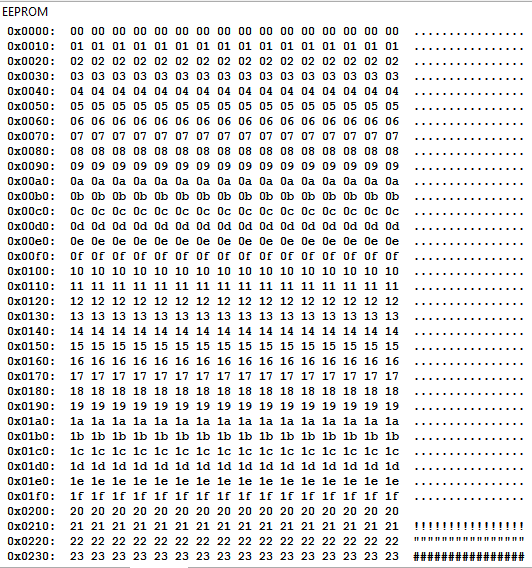
It looks like you're losing the last 4 bits of the address when displaying them. That is, for the row that's "0x0210", the addresses are 0x0210, 0x0211, 0x0212, etc. but you're losing the last hex digit and are printing the addresses 0x0021, 0x0021, 0x0021, etc. for the entire row.
Also, this is a nice-to-have, but since the Arduino site says it takes 3.3 ms to write an EEPROM byte, could you add that delay to the emulator?
It seems like the EEPROM window isn't showing all of the EEPROM. I wrote the following code to put sequential values in all the EEPROM slots:
- Code: Select all
uint8_t byte = 0;
    for (int i = 0; i < 1024; i++) {
        EEPROM.write(i, byte);
        byte++;
    }
And confirmed that it worked in the emulator with
- Code: Select all
    for (int i = 0; i < 1024; i++) {
        Serial.println(EEPROM.read(i));
    }
which printed 0-255 four times (for the full 1024 bytes of the EEPROM).
But, looking at the ouput window, it looks like the values don't quite make sense. I thought the addresses would increase left-right, top-bottom like they do in the SRAM window.
It looks like you're losing the last 4 bits of the address when displaying them. That is, for the row that's "0x0210", the addresses are 0x0210, 0x0211, 0x0212, etc. but you're losing the last hex digit and are printing the addresses 0x0021, 0x0021, 0x0021, etc. for the entire row.
Also, this is a nice-to-have, but since the Arduino site says it takes 3.3 ms to write an EEPROM byte, could you add that delay to the emulator?
Myndale Sun Jan 25, 2015 2:27 am
Thx Jamish, by coincidence I discovered and fixed the EEPROM display bug last week so it'll appear on the next version as well.
Jamish Sun Jan 25, 2015 2:29 am
Myndale wrote:Thx Jamish, by coincidence I discovered and fixed the EEPROM display bug last week so it'll appear on the next version as well.
I prefer to think that you have the power to read minds in the future.
Keep up the fantastic job!
cyberic Sun Jan 25, 2015 10:01 am
Myndale wrote:[quote="cyberic"I've got no news... did you get my PM?
Strange, I thought I emailed you. I'll go check and mail you again, thanks![/quote]
No, no mail and nothing in spam folder...
Jamish Sun Jan 25, 2015 8:35 pm
Myndale, it appears as if the EEPROM you programmed doesn't support writing all 1024 bytes. It only supports writing the first 256 bytes. Or, perhaps the EEPROM.read only supports *reading* the first 256 bytes.
It should print 0 to 255, followed by a bunch of 255s (uninitialized EEPROM should be 255). Instead, it prints 0-255 four times. Meaning your simulated EEPROM.read takes an argument of a byte instead of an int16_t or uint16_t.
I ran code on the Gamebuino to confirm the improper behavior of the emulator.
In other news, have you considered open-sourcing it :3
- Code: Select all
// Write 0 to 255
for (uint16_t i = 0; i < 256; i++) {
    EEPROM.write(i, i);
}

// Read everything.
for (uint16_t i = 0; i < 1024; i++) {
    Serial.print(EEPROM.read(i));
    Serial.print(", ");
}
It should print 0 to 255, followed by a bunch of 255s (uninitialized EEPROM should be 255). Instead, it prints 0-255 four times. Meaning your simulated EEPROM.read takes an argument of a byte instead of an int16_t or uint16_t.
I ran code on the Gamebuino to confirm the improper behavior of the emulator.
In other news, have you considered open-sourcing it :3
Myndale Sun Jan 25, 2015 9:53 pm
Jamish wrote:Myndale, it appears as if the EEPROM you programmed doesn't support writing all 1024 bytes. It only supports writing the first 256 bytes. Or, perhaps the EEPROM.read only supports *reading* the first 256 bytes.
Wow, I'm surprised that one hasn't manifested itself sooner, thx Jamish! As it turns out it wasn't anything to do with EEPROM at all, it was a bug in one of the assembly branch instructions that caused an extra instruction to be skipped under certain circumstances. Your code exposed it though so thanks again.
Jamish wrote:In other news, have you considered open-sourcing it
TBH I had a bad experience with open source and I've been a bit wary of opening up any of my serious projects ever since. Not ruling it out permanently, just saying "not at this time".
Jamish Sun Jan 25, 2015 10:00 pm
Yay, you already know the fix! Good work.
As far as open source goes, I can respect that.
As far as open source goes, I can respect that.
Myndale Sun Jan 25, 2015 10:05 pm
New version of Simbuino uploaded with the following change list:
- Added port refresh prior to hardware upload.
- Fixed a bug where all buttons were appearing as pressed after a ctrl-f5.
- Fixed an eeprom display bug.
- Fixed a logic bug in sbic instruction.
Skyrunner65 Tue Jan 27, 2015 4:14 am
Just had a crazy (but useful) idea for a Feature: emulation of MULTIPLE Gamebuinos.
I know it would be hard to implement, but this could help make a lot more multiplayer games.
Do you think it needs real time connections, or is the delay so small that it's not even worth it?
I know it would be hard to implement, but this could help make a lot more multiplayer games.
Do you think it needs real time connections, or is the delay so small that it's not even worth it?
Myndale Tue Jan 27, 2015 5:54 am
Good idea, but the emulation code is currently too slow to run multiple simulations. There is one major speed-up I'm planning to make at some point in future which should hopefully make it feasible, I'll re-visit the idea then.
Jamish Tue Jan 27, 2015 6:10 am
Start another thread for multi core processors? Unless that's your major plan!
Myndale Tue Jan 27, 2015 11:01 am
Jamish wrote:Start another thread for multi core processors? Unless that's your major plan!
The simulation already runs in its own thread but the state variables are all static, OOP purists would be shaking their heads in disbelief but the reduction in the number of the pointer deferences results in a significant performance increase. Each simulation would therefore have to be run in its own process, probably doable but I'd need to look into it. It might be easier to just provide i2c support using named pipes or something between two instances of the simulator running simultaneously.
Muessigb Tue Jan 27, 2015 1:32 pm
Hey Myndale,
I have a new idea for your Simbuino.
How about implementing plugins (very easy on .NET) to e.g. allow to simulate different I²C devices.
So that users can easily add functionality to Simbuino and share that in the community.
I did that earlier and it is very easy.
Just load all plugins from a folder on start, call their init() function, pass them your objects like cpu classes and stuff and make events, so that they can do stuff e.g. on I²C read.
And the plugins can spawn windows, to configure them and read their output.
I have a new idea for your Simbuino.
How about implementing plugins (very easy on .NET) to e.g. allow to simulate different I²C devices.
So that users can easily add functionality to Simbuino and share that in the community.
I did that earlier and it is very easy.
Just load all plugins from a folder on start, call their init() function, pass them your objects like cpu classes and stuff and make events, so that they can do stuff e.g. on I²C read.
And the plugins can spawn windows, to configure them and read their output.
Myndale Tue Jan 27, 2015 9:11 pm
Muessigb wrote:How about implementing plugins (very easy on .NET) to e.g. allow to simulate different I²C devices.
Definitely something I'd be happy to implement if there was interest. I'd probably use the MEF plugin architecture though, I've used it to implement plugin support in a number of commercial projects I've worked on in the past and it's very easy to use. Plays nicely with WPF/MVVM too, which is what Simbuino uses.
Myndale Wed Feb 04, 2015 7:07 am
A new version of Simbuino is available for download. I've spent the past week rewriting the sound code from scratch to use the SharpDX library in preparation for migrating the whole thing over to the tracker project. I've also re-balanced the threading and made various other improvements to stability and timing e.g. replacing cycle-hungry loops with sleeps. In addition to fixing the sporadic control-f5 crash bug it resulted in the simulation code running a whopping 2.5 times faster(!). Finally there's a new "Filter" option in audio settings which throws a simple low-pass filter over the output stream in an effort to make it sound a bit more like the real thing.
The installer problems some people are seeing might be due to .NET requiring that installations be done from the same location each time (no idea why, I'll look into it). If it keeps making you uninstall first then try doing that, and try running as administrator. Also what do people think about making the installer automatically check for online updates? Convenient or too intrusive?
Latest version available at the usual location, enjoy!
The installer problems some people are seeing might be due to .NET requiring that installations be done from the same location each time (no idea why, I'll look into it). If it keeps making you uninstall first then try doing that, and try running as administrator. Also what do people think about making the installer automatically check for online updates? Convenient or too intrusive?
Latest version available at the usual location, enjoy!
Drakker Wed Feb 04, 2015 11:54 am
Automatic updates? I'd say incredibly convenient. Since your code is closed source, you could be as intrusive as you'd like and we'd probably never know anyway. This means the only thing left is convenience, which would be quite welcome.
cyberic Wed Feb 04, 2015 2:18 pm
Myndale wrote:Also what do people think about making the installer automatically check for online updates? Convenient or too intrusive?
I think there could be a popup or a small icon somewher, telling that there is a new version.
The best installer would be... no installer at all, it possible.
Just unzip, overwrite the files, and run!
About the tracker, will it be windows-based?
jprules10 Thu Feb 05, 2015 6:17 am
Great i use it! :D
but it crashes alot
but it crashes alot
Myndale Fri Feb 06, 2015 7:20 am
cyberic wrote:The best installer would be... no installer at all, it possible.
I'll look into this further and see if there's a way for a standalone app to automate the .NET download if it isn't present, or at least throw an error msg or something. It's a bit tricky because if you try to run a .NET app and .NET isn't installed then the program doesn't even start so you can't display an error.
cyberic wrote:About the tracker, will it be windows-based?
'Fraid so. And for the same reason as Simbuino: it saves a huge amount of development time.
Myndale Fri Feb 06, 2015 7:22 am
jprules10 wrote:Great i use it! :D but it crashes alot
Heya jprules10, would you mind elaborating on this a bit for me? Is it just the control-f5 crash or is it crashing in other places as well? If so where? And how about the new version with the overhauled sound engine, same problem?
Myndale Thu Feb 19, 2015 3:03 am
Another version of Simbuino released today, this one contains read support for the petit_fatfs and the standard SD card libraries (previously only tinyfat was supported).
erico Thu Feb 19, 2015 3:07 am
Great advancement! :)
Myndale Fri Mar 06, 2015 7:15 am
[Continuing discussion with treflip started in another thread over problem running in Win8.1....]
treflip would you mind running Simbuino after you've installed it and then looking in your event log? To check the event log press the windows key, type "event" into the search bar, select "View event logs" and then select Windows Logs -> Application on the left. If Simbuino is crashing on launch then you should see a couple of Errors along with a bunch of Information entries, if you post the error logs here it will probably give a clue as to what's going on.
treflip would you mind running Simbuino after you've installed it and then looking in your event log? To check the event log press the windows key, type "event" into the search bar, select "View event logs" and then select Windows Logs -> Application on the left. If Simbuino is crashing on launch then you should see a couple of Errors along with a bunch of Information entries, if you post the error logs here it will probably give a clue as to what's going on.
treflip Fri Mar 06, 2015 11:31 am
Sure. I'm afraid I haven't debugged a program using windows event logs so I just took out any reference to my username and posted the results in a text file for viewing. Let me know if you need anything else from me. I'll get back to this after work today.
Thanks,
Tre
From 'View event logs' -> Windows Logs -> Application
Thanks,
Tre
From 'View event logs' -> Windows Logs -> Application
- Code: Select all
=============================================================================================
.NET Runtime
---------------------------------------------------------------------------------------------
General:
Application: Simbuino.exe
Framework Version: v4.0.30319
Description: The process was terminated due to an unhandled exception.
Exception Info: System.Windows.Markup.XamlParseException
Stack:
   at System.Windows.Markup.WpfXamlLoader.Load(System.Xaml.XamlReader, System.Xaml.IXamlObjectWriterFactory, Boolean, System.Object, System.Xaml.XamlObjectWriterSettings, System.Uri)
   at System.Windows.Markup.WpfXamlLoader.LoadBaml(System.Xaml.XamlReader, Boolean, System.Object, System.Xaml.Permissions.XamlAccessLevel, System.Uri)
   at System.Windows.Markup.XamlReader.LoadBaml(System.IO.Stream, System.Windows.Markup.ParserContext, System.Object, Boolean)
   at System.Windows.Application.LoadBamlStreamWithSyncInfo(System.IO.Stream, System.Windows.Markup.ParserContext)
   at System.Windows.Application.LoadComponent(System.Uri, Boolean)
   at System.Windows.Application.DoStartup()
   at System.Windows.Application.<.ctor>b__1(System.Object)
   at System.Windows.Threading.ExceptionWrapper.InternalRealCall(System.Delegate, System.Object, Int32)
   at MS.Internal.Threading.ExceptionFilterHelper.TryCatchWhen(System.Object, System.Delegate, System.Object, Int32, System.Delegate)
   at System.Windows.Threading.DispatcherOperation.InvokeImpl()
   at System.Windows.Threading.DispatcherOperation.InvokeInSecurityContext(System.Object)
   at System.Threading.ExecutionContext.RunInternal(System.Threading.ExecutionContext, System.Threading.ContextCallback, System.Object, Boolean)
   at System.Threading.ExecutionContext.Run(System.Threading.ExecutionContext, System.Threading.ContextCallback, System.Object, Boolean)
   at System.Threading.ExecutionContext.Run(System.Threading.ExecutionContext, System.Threading.ContextCallback, System.Object)
   at System.Windows.Threading.DispatcherOperation.Invoke()
   at System.Windows.Threading.Dispatcher.ProcessQueue()
   at System.Windows.Threading.Dispatcher.WndProcHook(IntPtr, Int32, IntPtr, IntPtr, Boolean ByRef)
   at MS.Win32.HwndWrapper.WndProc(IntPtr, Int32, IntPtr, IntPtr, Boolean ByRef)
   at MS.Win32.HwndSubclass.DispatcherCallbackOperation(System.Object)
   at System.Windows.Threading.ExceptionWrapper.InternalRealCall(System.Delegate, System.Object, Int32)
   at MS.Internal.Threading.ExceptionFilterHelper.TryCatchWhen(System.Object, System.Delegate, System.Object, Int32, System.Delegate)
   at System.Windows.Threading.Dispatcher.LegacyInvokeImpl(System.Windows.Threading.DispatcherPriority, System.TimeSpan, System.Delegate, System.Object, Int32)
   at MS.Win32.HwndSubclass.SubclassWndProc(IntPtr, Int32, IntPtr, IntPtr)
   at MS.Win32.UnsafeNativeMethods.DispatchMessage(System.Windows.Interop.MSG ByRef)
   at System.Windows.Threading.Dispatcher.PushFrameImpl(System.Windows.Threading.DispatcherFrame)
   at System.Windows.Threading.Dispatcher.PushFrame(System.Windows.Threading.DispatcherFrame)
   at System.Windows.Threading.Dispatcher.Run()
   at System.Windows.Application.RunDispatcher(System.Object)
   at System.Windows.Application.RunInternal(System.Windows.Window)
   at System.Windows.Application.Run(System.Windows.Window)
   at Simbuino.App.Main()
---------------------------------------------------------------------------------------------
Details:
Application: Simbuino.exe Framework Version: v4.0.30319 Description: The process was
terminated due to an unhandled exception. Exception Info:
System.Windows.Markup.XamlParseException Stack: at
System.Windows.Markup.WpfXamlLoader.Load(System.Xaml.XamlReader,
System.Xaml.IXamlObjectWriterFactory, Boolean, System.Object,
System.Xaml.XamlObjectWriterSettings, System.Uri) at
System.Windows.Markup.WpfXamlLoader.LoadBaml(System.Xaml.XamlReader, Boolean, System.Object,
System.Xaml.Permissions.XamlAccessLevel, System.Uri) at
System.Windows.Markup.XamlReader.LoadBaml(System.IO.Stream,
System.Windows.Markup.ParserContext, System.Object, Boolean) at
System.Windows.Application.LoadBamlStreamWithSyncInfo(System.IO.Stream,
System.Windows.Markup.ParserContext) at System.Windows.Application.LoadComponent(System.Uri,
Boolean) at System.Windows.Application.DoStartup() at
System.Windows.Application.<.ctor>b__1(System.Object) at
System.Windows.Threading.ExceptionWrapper.InternalRealCall(System.Delegate, System.Object,
Int32) at MS.Internal.Threading.ExceptionFilterHelper.TryCatchWhen(System.Object,
System.Delegate, System.Object, Int32, System.Delegate) at
System.Windows.Threading.DispatcherOperation.InvokeImpl() at
System.Windows.Threading.DispatcherOperation.InvokeInSecurityContext(System.Object) at
System.Threading.ExecutionContext.RunInternal(System.Threading.ExecutionContext,
System.Threading.ContextCallback, System.Object, Boolean) at
System.Threading.ExecutionContext.Run(System.Threading.ExecutionContext,
System.Threading.ContextCallback, System.Object, Boolean) at
System.Threading.ExecutionContext.Run(System.Threading.ExecutionContext,
System.Threading.ContextCallback, System.Object) at
System.Windows.Threading.DispatcherOperation.Invoke() at
System.Windows.Threading.Dispatcher.ProcessQueue() at
System.Windows.Threading.Dispatcher.WndProcHook(IntPtr, Int32, IntPtr, IntPtr, Boolean
ByRef) at MS.Win32.HwndWrapper.WndProc(IntPtr, Int32, IntPtr, IntPtr, Boolean ByRef) at
MS.Win32.HwndSubclass.DispatcherCallbackOperation(System.Object) at
System.Windows.Threading.ExceptionWrapper.InternalRealCall(System.Delegate, System.Object,
Int32) at MS.Internal.Threading.ExceptionFilterHelper.TryCatchWhen(System.Object,
System.Delegate, System.Object, Int32, System.Delegate) at
System.Windows.Threading.Dispatcher.LegacyInvokeImpl(System.Windows.Threading.DispatcherPriori
ty, System.TimeSpan, System.Delegate, System.Object, Int32) at
MS.Win32.HwndSubclass.SubclassWndProc(IntPtr, Int32, IntPtr, IntPtr) at
MS.Win32.UnsafeNativeMethods.DispatchMessage(System.Windows.Interop.MSG ByRef) at
System.Windows.Threading.Dispatcher.PushFrameImpl(System.Windows.Threading.DispatcherFrame)
at System.Windows.Threading.Dispatcher.PushFrame(System.Windows.Threading.DispatcherFrame)
at System.Windows.Threading.Dispatcher.Run() at
System.Windows.Application.RunDispatcher(System.Object) at
System.Windows.Application.RunInternal(System.Windows.Window) at
System.Windows.Application.Run(System.Windows.Window) at Simbuino.App.Main()
=============================================================================================
Application Error
---------------------------------------------------------------------------------------------
General:
Faulting application name: Simbuino.exe, version: 1.0.0.16, time stamp: 0x54e551ac
Faulting module name: KERNELBASE.dll, version: 6.3.9600.16496, time stamp: 0x52b3e015
Exception code: 0xe0434352
Fault offset: 0x00012eec
Faulting process id: 0x12ec
Faulting application start time: 0x01d057fcce44961a
Faulting application path: C:\Users\----\AppData\Local\Apps\2.0\H1DD6D0H.TNW\Y4QA92PZ.4TB\simb..tion_3c4a57f4bad89cbe_0001.0000_49ef507a1795dfe8\Simbuino.exe
Faulting module path: C:\WINDOWS\SYSTEM32\KERNELBASE.dll
Report Id: 0cb833ff-c3f0-11e4-bea9-b8763fe3f94e
Faulting package full name:
Faulting package-relative application ID:
=============================================================================================
Windows Error Reporting
---------------------------------------------------------------------------------------------
General:
Fault bucket 94687019256, type 5
Event Name: CLR20r3
Response: Not available
Cab Id: 0

Problem signature:
P1: Simbuino.exe
P2: 1.0.0.16
P3: 54e551ac
P4: SharpDX
P5: 2.6.3.0
P6: 5450f8ae
P7: a4d
P8: 14
P9: SharpDX.SharpDXException
P10:

Attached files:
C:\Users\----\AppData\Local\Temp\WER952B.tmp.WERInternalMetadata.xml

These files may be available here:
C:\Users\----\AppData\Local\Microsoft\Windows\WER\ReportArchive\AppCrash_Simbuino.exe_bb6a92e632f2ade97cd19ad2987d584a8adce_23ad284b_239097fa

Analysis symbol:
Rechecking for solution: 0
Report Id: 0cb833ff-c3f0-11e4-bea9-b8763fe3f94e
Report Status: 0
Hashed bucket: 167f1621d2211b7af44dc0e0447bf970
Details:
---------------------------------------------------------------------------------------------
treflip Sun Mar 08, 2015 1:16 am
Did that help?
Myndale Tue Mar 10, 2015 11:15 pm
treflip wrote:Did that help?
It did actually, but only in that it's told me roughly where in the code the problem is occurring (initialization of the main window). This is something I haven't seen before and I'd be very interested to find out what it is, but in order to track it down I'd need to send you a few versions with debugging enabled so they can give a more specific report as to exactly what the error is. If you don't mind the hassle of trying out a few different versions over the next few days then msg me offline. Cheers!
treflip Wed Mar 11, 2015 12:44 pm
Yeah sur that would be fun. I'll send you a message or just send me one with the instructions of what to download and where and I'll get on it this evening.
Myndale Wed Mar 11, 2015 9:30 pm
As indicated in my "Happy Birthday Gamebuino" thread the Simbuino emulator is now open source and hosted on GitHub:
https://github.com/Myndale/Simbuino
The README.TXT file contains information about the project and the various libraries it uses. SIMULATION.TXT contains a brief overview of how the hardware emulation code works. LICENSE.TXT contains usage rights (MIT).
The installer's new home is also now hosted within that repository, the direct download link is:
https://github.com/Myndale/Simbuino/blo ... p?raw=true
This release coincides with a new version of Simbuino (i.e. v1.0.0.19) containing the following changes:
- Added version number to the About dialog.
- Fixed a bug with EEPROM not persisting correctly across application launches.
- Added EEPROM save/load menu options
- Fixed bug involving output IO pins not being read back correctly
- Fixed bug preventing IO pins not updating in gui pane
- Fixed issues that have crept in preventing the profiler from working
- Fixed minor bug in gif export dialog code
- Prepared project for open-source release (documentation, clean-up etc)
Enjoy! :)
https://github.com/Myndale/Simbuino
The README.TXT file contains information about the project and the various libraries it uses. SIMULATION.TXT contains a brief overview of how the hardware emulation code works. LICENSE.TXT contains usage rights (MIT).
The installer's new home is also now hosted within that repository, the direct download link is:
https://github.com/Myndale/Simbuino/blo ... p?raw=true
This release coincides with a new version of Simbuino (i.e. v1.0.0.19) containing the following changes:
- Added version number to the About dialog.
- Fixed a bug with EEPROM not persisting correctly across application launches.
- Added EEPROM save/load menu options
- Fixed bug involving output IO pins not being read back correctly
- Fixed bug preventing IO pins not updating in gui pane
- Fixed issues that have crept in preventing the profiler from working
- Fixed minor bug in gif export dialog code
- Prepared project for open-source release (documentation, clean-up etc)
Enjoy! :)
cyberic Wed Mar 11, 2015 9:51 pm
Thank you Myndale, for making it open source!
Drakker Wed Mar 11, 2015 10:12 pm

REGFly Sun Mar 22, 2015 6:09 pm
Im pretty new here. I recently ordered a gamebuino and i figured while i wait i should learn to use it. I got your emulator and loaded up a few games to check if they work and the strange thing was that the game sound was all crackly even when there was no sound the were all thesse cracks i heard
Myndale Tue Mar 24, 2015 6:07 am
REGFly wrote:Im pretty new here. I recently ordered a gamebuino and i figured while i wait i should learn to use it. I got your emulator and loaded up a few games to check if they work and the strange thing was that the game sound was all crackly even when there was no sound the were all thesse cracks i heard
Unfortunately I don't think I quite have all the audio issues sorted out yet, it's most apparent if your machine isn't fast enough to maintain full emulation speed. What does the FPS counter in the bottom right hand corner of the screen say? It should hover around 16 million cycles-per-second if your machine is running fast enough.
Thanks for letting me know though, I'll try to have another look into it before the next release.
REGFly Tue Mar 24, 2015 4:36 pm
about 16000 sometimes drops to 15900 thats when the sound cracks
treflip Wed Apr 01, 2015 2:06 am
Yes, this is awesome. Thanks for making it open source Myndale!
tsl Mon May 11, 2015 1:19 pm
Hi, I can confirm. Emulator cracks as hell when number of cycles drop below 16mln. I have often values around 13-14mln. And I can here interferences from volume up/volume down buttons.
You can here it under this link: https://www.dropbox.com/s/mg0vwaokkv9tg ... s.wav?dl=0 (it's 45 sec. WAV).
Continuous cracks are from volume up/down, more unpleasant glitches (e.g. in game) are when cycles drops below 16mln.
Glitches/cracks start after F5 and stop after ESC.
You can here it under this link: https://www.dropbox.com/s/mg0vwaokkv9tg ... s.wav?dl=0 (it's 45 sec. WAV).
Continuous cracks are from volume up/down, more unpleasant glitches (e.g. in game) are when cycles drops below 16mln.
Glitches/cracks start after F5 and stop after ESC.
Grahack Thu Jul 16, 2015 7:23 am
Hi, I downloaded 1.0.0.19 and executed the setup.exe file.
THere is a small "verifying" window, then a prompt like "Publisher cannot be verified" where you have to confirm.
But then, you can't decide where to install.
So far, so good.
But then, the sim doesn't launch. a search on the computer found some appcrash dirs.
I can provide some more info if needed.
EDIT: like it was on a Surface/Win8. Things are OK with Win7 on a laptop.
Thanks.
THere is a small "verifying" window, then a prompt like "Publisher cannot be verified" where you have to confirm.
But then, you can't decide where to install.
So far, so good.
But then, the sim doesn't launch. a search on the computer found some appcrash dirs.
I can provide some more info if needed.
EDIT: like it was on a Surface/Win8. Things are OK with Win7 on a laptop.
Thanks.
Sorunome Tue Jul 21, 2015 3:03 pm
How does this work? I tried downloading the zip and running the setup.exe.
The only place i could find the install was in the start menu under programs, running that did.......nothing
All i was able to do is uninstall again!
EDIT: When running the exe over the cmd it just exits without any output.
The only place i could find the install was in the start menu under programs, running that did.......nothing
All i was able to do is uninstall again!
EDIT: When running the exe over the cmd it just exits without any output.
Clifford Thu Jul 23, 2015 8:34 pm
Sorunome wrote:The only place i could find the install was in the start menu under programs, running that did.......nothing
Grahack wrote:But then, the sim doesn't launch. a search on the computer found some appcrash dirs.
Same problem here on Windows 8.1; given the proximity of these two issues perhaps a recent Windows update has broken it?
I'm trying to get my son started on this, and this is frustrating.
Clifford Thu Jul 23, 2015 8:36 pm
Grahack wrote:But then, you can't decide where to install.
.NET deployments do not always install like traditional apps.
Myndale Sat Jul 25, 2015 11:43 pm
Sorry to hear about the install problems you've been having, not quite sure what's going on there. I've just pushed a standalone build to the Simbuino binaries folder, you might have better luck with that:
https://github.com/Myndale/Simbuino/raw/master/binaries/Simbuino-Standalone.zip
For this to work you will need to have .NET 4.5 installed, you can download it from the Microsoft site:
http://www.microsoft.com/en-au/download/details.aspx?id=30653
https://github.com/Myndale/Simbuino/raw/master/binaries/Simbuino-Standalone.zip
For this to work you will need to have .NET 4.5 installed, you can download it from the Microsoft site:
http://www.microsoft.com/en-au/download/details.aspx?id=30653
Clifford Sat Aug 01, 2015 10:29 pm
Myndale wrote:Sorry to hear about the install problems you've been having, not quite sure what's going on there. I've just pushed a standalone build to the Simbuino binaries folder, you might have better luck with that:
https://github.com/Myndale/Simbuino/raw/master/binaries/Simbuino-Standalone.zip
No luck with that I'm afraid - the same thing happens. In Task Manager, the process appears briefly then disappears. On the command line, the line is accepted, but the prompt returns immediately with no messages.
I have downloaded the source and was going to try in in the debugger - but the library dependencies are not included in the package, and I have not yet had time to sort it all out. Will report back when I have made some progress.
Clifford Sun Aug 02, 2015 7:34 am
Clifford wrote:I have downloaded the source and was going to try in in the debugger - but the library dependencies are not included in the package, and I have not yet had time to sort it all out. Will report back when I have made some progress.
Trying to gather all the depenencies but http://www.fmsware.com/stuff/gif.html mentioned in readme.txt is a broken link.
Clifford Sun Aug 02, 2015 8:13 am
Clifford wrote:I have downloaded the source and was going to try in in the debugger - but the library dependencies are not included in the package, and I have not yet had time to sort it all out. Will report back when I have made some progress.
OK - got it now. I am not a frequent C#/.NET developer and all the NuGet stuff is new to me. When the code is executed in the debugger it immediately halts on unhanded exception:
An exception of type 'System.TypeInitializationException' occurred in Simbuino.UI.dll but was not handled in user code
Additional information: The type initializer for 'Simbuino.UI.Audio.AudioPlayer' threw an exception.
at ..\Simbuino-master\src\Simbuino.UI\Main\MainWindowViewModel.cs Line 228:
- Code: Select all
AudioPlayer.Filtered = Simbuino.UI.Properties.Settings.Default.AudioFiltered;
As a quick hack, I simply commented out that line and the application starts-up at least - but only in the debugger, it still does not run directly from the executable.
I did have to disable ClickOnce manifest signing to get to to build, and disable security debugging to get it to run in the debugger (Visual Studio 2013 Express Edition). Is this perhaps a Windows 8.1 security issue? Though if that were the case I'd expect some sort of message.
Using the simulator running in the debugger I loaded a sample hex-file (https://github.com/Rodot/Gamebuino-Game ... D-DEMO.HEX) and ran it, and got:
An exception of type 'System.TypeInitializationException' occurred in Simbuino.UI.dll but was not handled in user code
Additional information: The type initializer for 'Simbuino.UI.Audio.AudioPlayer' threw an exception.
this time at Simulation.cs Line 558:
- Code: Select all
AudioPlayer.Start();
Something not quite right with AudioPlayer perhaps?
Clifford Sun Aug 02, 2015 12:56 pm
Clifford wrote:An exception of type 'System.TypeInitializationException' occurred in Simbuino.UI.dll but was not handled in user code
Additional information: The type initializer for 'Simbuino.UI.Audio.AudioPlayer' threw an exception.
at ..\Simbuino-master\src\Simbuino.UI\Main\MainWindowViewModel.cs Line 228:
- Code: Select all
AudioPlayer.Filtered = Simbuino.UI.Properties.Settings.Default.AudioFiltered;
Exception trace:
- Code: Select all
-      base   {System.TypeInitializationException: The type initializer for 'Simbuino.UI.Audio.AudioPlayer' threw an exception. ---> SharpDX.SharpDXException: HRESULT: [0x80040154], Module: [Unknown], ApiCode: [Unknown/Unknown], Message: Class not registered

   at SharpDX.Result.CheckError()
   at SharpDX.Utilities.CreateComInstance(Guid clsid, CLSCTX clsctx, Guid riid, ComObject comObject)
   at SharpDX.XAudio2.XAudio2..ctor(XAudio2Flags flags, ProcessorSpecifier processorSpecifier)
   at SharpDX.XAudio2.XAudio2..ctor()
   at Simbuino.UI.Audio.AudioPlayer..cctor() in c:\Users\Clifford\Documents\Simbuino-master\src\Simbuino.UI\Audio\AudioPlayer.cs:line 72
   --- End of inner exception stack trace ---}   System.Exception {System.TypeInitializationException}
The SharpDX reference indicates that it is version 2.6.3.0. I am afraid I am pretty clueless at all this .NET stuff and may be looking at exactly the wrong thing. Any advice would be helpful.
Clifford Mon Aug 03, 2015 8:32 pm
Clifford wrote:Exception trace:
- Code: Select all
- base {System.TypeInitializationException: The type initializer for 'Simbuino.UI.Audio.AudioPlayer' threw an exception. ---> SharpDX.SharpDXException: HRESULT: [0x80040154], Module: [Unknown], ApiCode: [Unknown/Unknown], Message: Class not registered
This provided the clue - with a little judicious Googling, the solution is to install the legacy DirectX support from http://www.microsoft.com/en-us/download/details.aspx?id=35 (web installer - there is also a full redistributable download at https://www.microsoft.com/en-us/download/details.aspx?id=8109, but I chose not to use that). I am not sure whether this has been removed from Win 8.1 64 bit or if it was just broken.
Now all versions work - the original .NET deployment, the stand-alone executable, and my source-build. Possibly the redistributable could be included with the deployment?
Now I have it working it is brilliant - my son is now even more excited waiting for the hardware to arrive! Thanks.
It would be great if the debugger worked at the source-level with the .elf file debug information, but that would be a much bigger project!
Myndale Thu Aug 06, 2015 9:46 pm
Clifford wrote:This provided the clue - with a little judicious Googling, the solution is to install the legacy DirectX support
I am not sure whether this has been removed from Win 8.1 64 bit or if it was just broken.
Thanks for looking into that Clifford. And yeah, I'm surprised it wasn't already installed on your machine...I ran Simbuino from an almost-fresh Win8.1 64 bit install on a Surface Pro 2 and never encountered that problem. I might need to look at using a different installer.
Clifford wrote:It would be great if the debugger worked at the source-level with the .elf file debug information, but that would be a much bigger project!
That was one of my original goals with Simbuino. As always it's a matter of finding time between work, family and my other Gamebuino commitments.
EatMyBlitch Fri Oct 23, 2015 11:10 am
Dear myndale,
When i try to start up the setup.exe file or the simbuino.application file, it says that i cant start the application simbuino from this location because it has already been started in a different location(translated from Dutch).
When i try to start up the setup.exe file or the simbuino.application file, it says that i cant start the application simbuino from this location because it has already been started in a different location(translated from Dutch).
Myndale Wed Oct 28, 2015 9:39 pm
Hi! Sorry to hear about the problems you're having with the installer, I haven't encountered this one before. This error usually occurs when you're trying to install a newer version over an older version (even though technically it should work). If you do have an have an older version installed then try un-installing it first, if that's not the case then feel to msg me and I'll send you a zip file of the standalone files that you can try running directly.
EatMyBlitch Thu Oct 29, 2015 6:26 pm
my computer does not let me erase any of the simbuino files. It says that i need to check the location of the file, and try again. :cry:
Myndale Sat Oct 31, 2015 12:08 am
In that case just download the standalone version in the binaries folder:
https://github.com/Myndale/Simbuino/tre ... r/binaries
Unzip it and run the executable directly. Some people also need to install the .NET 4.5 runtime libraries as well as the latest version of DirectX but it sounds like you probably won't need to.
https://github.com/Myndale/Simbuino/tre ... r/binaries
Unzip it and run the executable directly. Some people also need to install the .NET 4.5 runtime libraries as well as the latest version of DirectX but it sounds like you probably won't need to.
EatMyBlitch Sat Oct 31, 2015 11:05 am
Ok, I will see if it works.
cyberic Mon Nov 02, 2015 11:43 am
When I launch simbuino.exe included in the standalon build, on Windows 7...
I get... nohing.
I get no error, no message, nothing.
Is there a log somewhere?
Thx
I get... nohing.
I get no error, no message, nothing.
Is there a log somewhere?
Thx
Myndale Tue Nov 10, 2015 9:26 am
Not as such, but you can often get revealing information by looking at the Windows event viewer. Once running select Windows Logs -> Application and look for errors in the listbox to the right.
superfreaky Thu Dec 17, 2015 8:10 pm
When I use the program and run a game, I get audio, but no video. The computer I'm running this on is a 2.0 ghz dual core i3, but it should still run properly, right?
childishbeat Mon Dec 28, 2015 9:23 am
I believe users of Simbuino should be able to adjust the keys for the controls because some users of the emulator may not be comfortable with the preset key layout that can't be changed at the moment. Also, it should add support for .elf files, like gbsim by denith has. If those features were added, the emulator would be perfect.
Myndale Thu Dec 31, 2015 6:55 am
superfreaky wrote:When I use the program and run a game, I get audio, but no video. The computer I'm running this on is a 2.0 ghz dual core i3, but it should still run properly, right?
That should run fine. Simbuino uses WPF for graphics which in turn uses DirectX under the hood, so my recommendation would be to make sure your graphics drivers are up-to-date and to maybe install the latest version of DirectX runtime which you can download from the Microsoft site. If that still doesn't fix it then it's most likely a result of an exception occurring in the draw routine, checking the Windows event log might reveal the problem. If that doesn't help then your best bet would be to install Visual Studio and run Simbuino from the debugger.
Myndale Thu Dec 31, 2015 7:05 am
childishbeat wrote:I believe users of Simbuino should be able to adjust the keys for the controls because some users of the emulator may not be comfortable with the preset key layout that can't be changed at the moment.
This is already supported, from the menu select Simulation -> Settings -> Input.
childishbeat wrote:Also, it should add support for .elf files, like gbsim by denith has. If those features were added, the emulator would be perfect.
What would be the benefit of this My original reason to support HEX was because that is the format that games are distributed in. The only way you'd have an ELF file is if you were compiling locally in which case you'd have a HEX as well, so I couldn't really see the point of bothering to support it. (That said, ELF support will be needed if I ever plan to add source debugging).
blakewford Tue Feb 02, 2016 5:58 pm
If you are interested in adding source debugging you could start by looking at a piece of the BoardMicro code.
https://github.com/blakewford/boardmicr ... elfcore.js. I'd really like to see a full speed Arduino game system emulator with this ability.
It's not terribly complicated, but at least you would not have to start from scratch. Within my code, when presented with and ELF file I convert the binary portion to HEX internally and run it as normal. There is basic support for the Call Stack and Source Debugging with Breakpoints in the HTML version.
https://github.com/blakewford/boardmicr ... elfcore.js. I'd really like to see a full speed Arduino game system emulator with this ability.
It's not terribly complicated, but at least you would not have to start from scratch. Within my code, when presented with and ELF file I convert the binary portion to HEX internally and run it as normal. There is basic support for the Call Stack and Source Debugging with Breakpoints in the HTML version.
babadu83510 Tue Feb 02, 2016 9:08 pm
That's a shame you don't support linux...
Wojtek Thu Jul 20, 2017 5:27 am
Hi all,
My system : Windows 10 Pro 64 bit / laptop Dell M6700
After installation Simbuino GUI not open.
Any suggestions?
My system : Windows 10 Pro 64 bit / laptop Dell M6700
After installation Simbuino GUI not open.
Any suggestions?
Wojtek Fri Jul 21, 2017 7:31 am
Solved like in this post viewtopic.php?f=12&t=1028&start=120