
Archive of the Gamebuino Classic forum (2014-2018), rebuilt from the pages kept by the Wayback Machine: only part of the topics and pages were captured. Read-only. Removal on request: hi@gamebuino.com.
Forum › Project Guidance & Game development
Smash and Crash
Skyrunner65 Mon Feb 16, 2015 6:15 pm
This may or may not be expanded on, but here we go:
Smash & Crash!
Dodge meteors!
Jump around!
See how long you've lasted!
Download
Smash & Crash!
Dodge meteors!
Jump around!
See how long you've lasted!
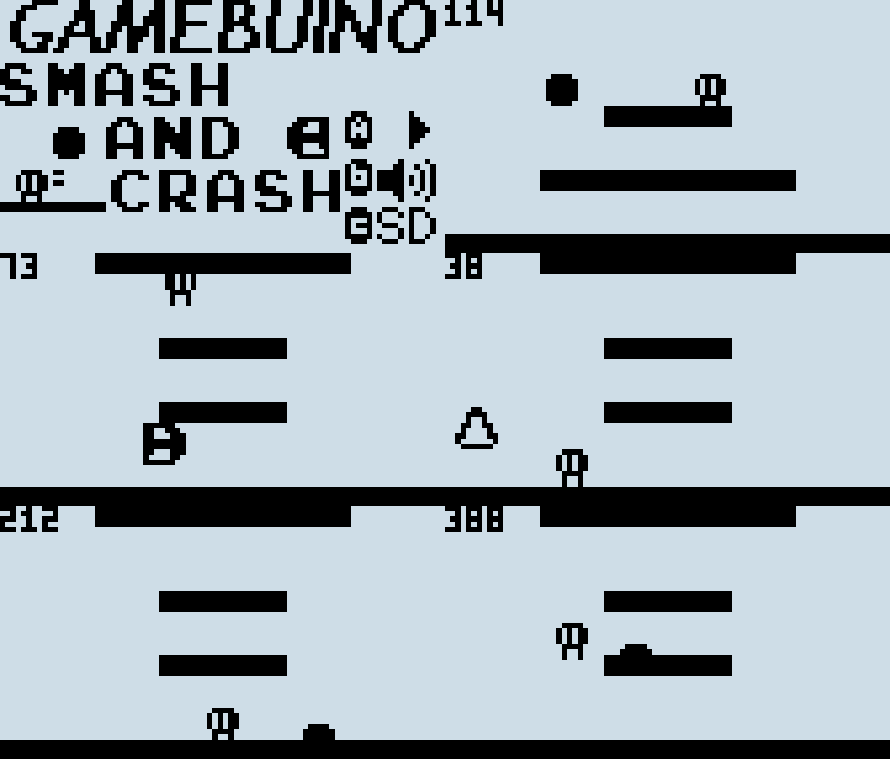
- Gameplay.gif (253.2 KiB) Viewed 3194 times
Download
Skyrunner65 Mon Feb 16, 2015 9:34 pm
Added in Arrows and a second platform.
Crouching is also a thing now, but it will be refined soon.
Crouching is also a thing now, but it will be refined soon.
Skyrunner65 Thu Feb 19, 2015 8:17 pm
- Updated graphics a bit
- Made a logo
- Changed "Back to Title Screen" into "Change Game"
- Made the meteors a bit slower
- Added "Press B" to death screen
Anyone got any suggestions?
- Made a logo
- Changed "Back to Title Screen" into "Change Game"
- Made the meteors a bit slower
- Added "Press B" to death screen
Anyone got any suggestions?
Skyrunner65 Fri Apr 03, 2015 12:14 am
Woah! I haven't worked on this in a month? Jeez. :?
Changes:
Two things:
1. Is this good enough to go onto the Games page?
2. Anyone know what to do for jumping? Right now it just adds to his Y position.
Changes:
- Crouching is fixed
- Custom Title Screen has been added
- Boundaries have been added
- Changed some wording
Two things:
1. Is this good enough to go onto the Games page?
2. Anyone know what to do for jumping? Right now it just adds to his Y position.
Atomic Mon May 25, 2015 2:23 am
Anyone know what to do for jumping?
This is a late reply but if you are still stuck on this question:
Make another variable for vertical inertia. When the jump button is pressed, set the variable to a negative number. When the player touches the ground, set the variable to zero. Every frame, add 1 to the variable, and add the variable to the player's Y position.
For example:
- Code: Select all
if(gb.buttons.pressed(BTN_A)) player_y_inertia = -4;
player_y += player_y_inertia;
player_y_inertia += 1;
// Do some collision checking
if(player_is_touching_ground) player_y_inertia = 0; // Just for example
Skyrunner65 Mon Jul 13, 2015 1:42 pm
Thanks to Atomic, I've made the Jumping smoother!
I've also added a frame counter.
And changed the sprite of the character a little, but does that really matter?
If anyone is wondering where I've been for 3 months, I've been getting a better computer!
Also, I kinda sorta forgot about the forums (I forget a lot of things, sorry!).
But, now I'm back, I guess.
I've also added a frame counter.
And changed the sprite of the character a little, but does that really matter?
If anyone is wondering where I've been for 3 months, I've been getting a better computer!
Also, I kinda sorta forgot about the forums (I forget a lot of things, sorry!).
But, now I'm back, I guess.
EatMyBlitch Fri Aug 07, 2015 4:16 pm
please do put it on the game page looks awesome!!! :lol: :lol:
Skyrunner65 Sat Aug 08, 2015 1:28 am
I don't feel it's good enough to be called a game.
If you've tried out the game, it's not very playable.
EDIT: Made an Update!
-Added Disaster switching.
-Added Flooding.
If you've tried out the game, it's not very playable.
EDIT: Made an Update!
-Added Disaster switching.
-Added Flooding.
EatMyBlitch Sat Aug 08, 2015 7:44 am
Well its your choice :)
Skyrunner65 Sat Aug 08, 2015 6:28 pm
Hooray! Another update!
I think that I should get more maps in sometime. :lol:
- There is a pause menu!
- Removed Multiplayer(Would've been a Nightmare to make.)
- I thought the Flooding was impossible to dodge, so I changed it to a Ball disaster!
- Running is probably important, so I've added that.
- Added controls to get rid of confusion.
- (Tried to add) more randomization.
- Made things a little harder.
I think that I should get more maps in sometime. :lol:
Quirby64 Sat Aug 08, 2015 9:26 pm
This looks and sounds great! I should go play it soon. :D
A way you could incorporate the flooding idea is to have the player being constantly pushed to the right left (the stream of water!) and have him/her to avoid logs, ect.
A way you could incorporate the flooding idea is to have the player being constantly pushed to the right left (the stream of water!) and have him/her to avoid logs, ect.
Skyrunner65 Sat Aug 08, 2015 9:34 pm
Perhaps that, but you've given me an idea!
Black hole disaster!
It sucks you in, along with some other stuff!
Not only would you have to dodge the stuff, but you'd also have to stay away from the black hole.
EDIT:
Whoops, I didn't know you had to sync stuff to Github!
Well now it is, and you get a brand new update because of that!
EDIT #2:
Another update! Maps are good for variety, so 3 maps and a map system were added!
Black hole disaster!
It sucks you in, along with some other stuff!
Not only would you have to dodge the stuff, but you'd also have to stay away from the black hole.
EDIT:
Whoops, I didn't know you had to sync stuff to Github!
Well now it is, and you get a brand new update because of that!
- Brand New Black Hole Disaster!
- Changed Framerate from 20 to 30, for 50% more panic!
- Added custom sounds(should've used patterns, but those are confusing)
- Classed up the death screen (You're going to see it a lot anyways).
EDIT #2:
Another update! Maps are good for variety, so 3 maps and a map system were added!
Skyrunner65 Sun Aug 09, 2015 8:27 pm Explanation of the Map System
(It probably wouldn't fit into the last post... sorry!)
Here's an explanation of how the map system works, because I don't know how Tiles can collide with Sprites (I should probably look at Super Crate Buino's code).
mapscroll is used for the selection menu.
First, we draw the terrain. I just used the two platforms I already had(I'm lazy, okay? :oops: ).
The "If" statement is where I put the collision data for the first platform. When I collide with the platform, it pushes me above the platform and sets my gravity to 0, allowing me to jump. Do "else if" for any other platforms. the "else" statement covers falling.
I put in Meteor collision code for certain scenarios (like a roof in Tower). When the meteor hits the platforms specified above, It will make another in a random area.
It's basically the same for the Arrow, but you can ignore the base platform.
I recommend the "Lonely" map if you want to start making maps. :D
Here's an explanation of how the map system works, because I don't know how Tiles can collide with Sprites (I should probably look at Super Crate Buino's code).
mapscroll is used for the selection menu.
- Code: Select all
//Drawing
          gb.display.drawBitmap(0,44,platform);
          gb.display.drawBitmap(30,28,platform2);
First, we draw the terrain. I just used the two platforms I already had(I'm lazy, okay? :oops: ).
- Code: Select all
if(gb.collideBitmapBitmap(playerx, playery, player, 0, 44, platform) == true){
            playery = 38;
            playergrav = 0;
            playerjump = true;
          }
          else if(gb.collideBitmapBitmap(playerx, playery, player, 30, 28, platform2) == true){
            playery = 22;
            playergrav = 0;
            playerjump = true;
          }
          else {
            playergrav = playergrav + 1;
            playerjump = false;
          };
The "If" statement is where I put the collision data for the first platform. When I collide with the platform, it pushes me above the platform and sets my gravity to 0, allowing me to jump. Do "else if" for any other platforms. the "else" statement covers falling.
- Code: Select all
if((gb.collideBitmapBitmap(meteorx, meteory, meteor, 0, 44, platform)) || (gb.collideBitmapBitmap(meteorx, meteory, meteor, 30, 28, platform2)) == true){
            gb.display.drawBitmap(meteorx, meteory + 4, blow);
            meteory = -6;
            meteorx = random(0,76);
          };
I put in Meteor collision code for certain scenarios (like a roof in Tower). When the meteor hits the platforms specified above, It will make another in a random area.
It's basically the same for the Arrow, but you can ignore the base platform.
I recommend the "Lonely" map if you want to start making maps. :D
Skyrunner65 Mon Aug 10, 2015 4:38 pm
Another update!
I would say that I'm finished with this, but I could do more, I dunno.
This game is now on the Game list! :o
I would say that I'm finished with this, but I could do more, I dunno.
- added a .INF file, for the latest loader!
- Changed the Title Screen.
- Fixed a few bugs.
This game is now on the Game list! :o
EatMyBlitch Mon Aug 10, 2015 7:20 pm
i installed the inf and hex file on my gamebuino but it does not show up in the game loader. i also had this problem with some other games.
Skyrunner65 Tue Aug 11, 2015 2:28 am
Do you have the latest loader and Bootloader?
If not, see the Getting Started page on the Wiki.
If not, see the Getting Started page on the Wiki.
EatMyBlitch Tue Aug 11, 2015 8:01 am
Well i can just look at my gamebuino and see the new loader so that's not the problem. But what do you mean by the bootloader ?
Everything works fine on my Gamebuino exept for like 3 games sooooo.
Everything works fine on my Gamebuino exept for like 3 games sooooo.
Skyrunner65 Tue Aug 11, 2015 4:19 pm
Does anyone else have problems related to Smash and Crash?
It would be great if I could know whether or not this would work on actual hardware.
It would be great if I could know whether or not this would work on actual hardware.
EatMyBlitch Wed Aug 12, 2015 9:11 am
i fixed it :mrgreen: :mrgreen: :mrgreen:
and the game works fine. only in my opinion the player jumps a little bit to super high. :lol:
and the game works fine. only in my opinion the player jumps a little bit to super high. :lol:
Skyrunner65 Wed Aug 12, 2015 1:11 pm
Yeah, you're right, he does jump a little high.
Fixed now.
Fixed now.
EatMyBlitch Wed Aug 12, 2015 1:47 pm
Happy to help you.
BUG report:
sometimes when you load a map, there is to the right a wall. And you get pulled towards it and there is nothing you can do. :cry:
i believe its the black hole you where talking about but it immediately sucks you up.
BUG report:
sometimes when you load a map, there is to the right a wall. And you get pulled towards it and there is nothing you can do. :cry:
i believe its the black hole you where talking about but it immediately sucks you up.
Skyrunner65 Wed Aug 12, 2015 7:08 pm
Oh yeah, that.
You gotta run, but I guess I could turn down the sucking speed.
You gotta run, but I guess I could turn down the sucking speed.
EatMyBlitch Wed Aug 12, 2015 7:55 pm
Oh you run :?
superfreaky Sat Nov 14, 2015 1:11 am
i fixed it :mrgreen: :mrgreen: :mrgreen:
and the game works fine. only in my opinion the player jumps a little bit to super high. :lol:
How did you fix it? I have the same problem. I also noticed that this is not an isolated case; I looked closely at the files on the sd card, and there is a game there that doesn't show up on the bootloader. Also, pong singleplayer hex file is there, but the gamebuino only finds the inf. file for that, and when I enter the game, it is just multiplayer. I don't really care about pong and 'wormz', but I do want smash and crash. Do I just need to wipe the sd and reload all the games?
Skyrunner65 Sat Nov 14, 2015 3:40 pm
That's the only thing I can think of.
It really doesn't find the .HEX? Strange....
It really doesn't find the .HEX? Strange....
superfreaky Sat Nov 14, 2015 5:17 pm
Well I tried wiping the card and starting over (all my scores lost... :( ) It didn't do anything. Smash and Crash still won't work. I do just need the .inf and .hex files, right? Not the .elf? Perhaps I even need to just put the full master zip file on.
[EDIT] Apparently Gamebuino is really picky about whether a file ends like .hex or like .HEX. It works fine once you rename it to SMSHCRSH.HEX. By the way, the black hole is almost impossible to see and escape before you're dead. You might want to make it a little slower.
[EDIT] Apparently Gamebuino is really picky about whether a file ends like .hex or like .HEX. It works fine once you rename it to SMSHCRSH.HEX. By the way, the black hole is almost impossible to see and escape before you're dead. You might want to make it a little slower.