
Archive of the Gamebuino Classic forum (2014-2018), rebuilt from the pages kept by the Wayback Machine: only part of the topics and pages were captured. Read-only. Removal on request: hi@gamebuino.com.
GBtracker 0.0.6 Alpha
FreddyWild Sun Jun 12, 2016 3:27 pm GBtracker 0.0.6 Alpha
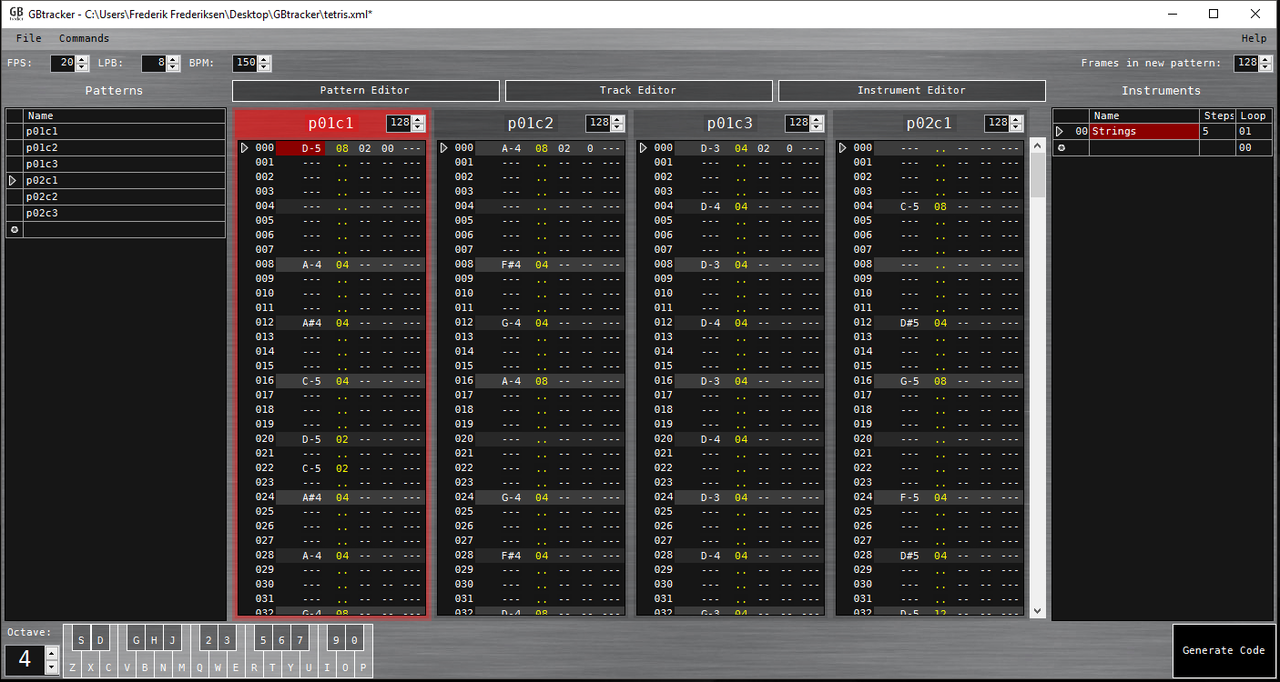
>>Download<<
NEWS!
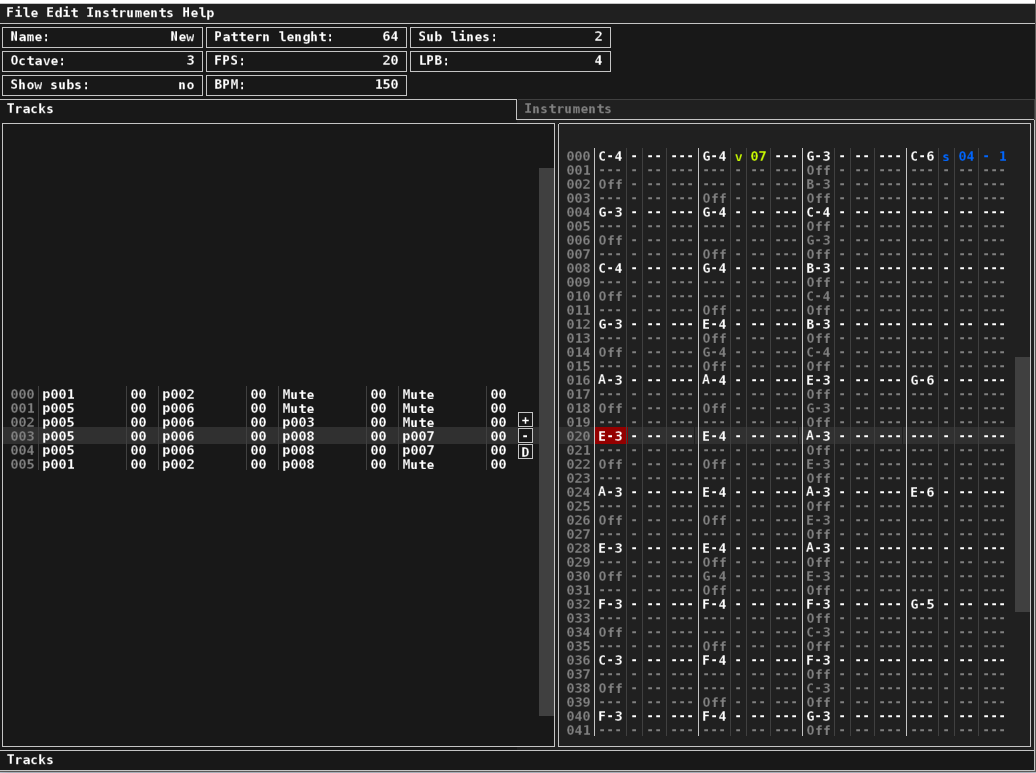
I'm now working on version 1.0, It is a complete rewrite of the Alpha. Releases for Windows and Ubuntu will be availible soon.
Screenshot of beta:
CHANGELOG:
0.0.6 Alpha
Fixed error in commands using the "Y" column.
0.0.5 Alpha
More marked lines in pattern editor.
Instrument editor added.
Dublicate patterns added.
"Safer" user interface.
Fixed calculation mistake in pattern frames
0.0.2 Alpha
Warning! Files saved in 0.0.1 might not load in 0.0.2
Many changes to interface, a bit of code cleanup.
Changed "off" note to Gamebuino note 63.
New method for adjusting frames in pattern.
Fixed problems when adding patterns to loaded file.
Hello :)
This is a Gambuino music tracker I am working on.
Features:
- Create Instruments, patterns and tracks
Four pattern editors
Export Arduino code
Planned features:
- Support copy/paste in pattern editor
Note, pattern and tracks playback on Gamebuino from GBtracker.
Save and load instruments
This is an alpha release, be save out there and expect bugs!
I do not own a Gamebuino myself, but build my own "Musicbuino" for testing. Let me hear what you think about GBtracker :)
Sorunome Sun Jun 12, 2016 8:02 pm Re: GBtracker Alpha 0.0.1
This sounds awesome!
Is there a way to import an existing track? Are you able to play it back to test how it sounds? Which language is it written in? Does it run on linux?
Sorry if I asked too many questions :p
Is there a way to import an existing track? Are you able to play it back to test how it sounds? Which language is it written in? Does it run on linux?
Sorry if I asked too many questions :p
FreddyWild Sun Jun 12, 2016 11:03 pm Re: GBtracker Alpha 0.0.1
Thanks for the interest Sorunome, no problem with the questions :)
You can't import existing songs, but you can save and load songs in GBtrackers xml format.
You can export songs as Arduino code, just compile, upload and listen :) I do plan for live playback on Gamebuino ;)
Maybe there is an emulator with sound support?
It's written in Visual C# using WinForms, I do not know if Wine will run it, maybe?
You can't import existing songs, but you can save and load songs in GBtrackers xml format.
You can export songs as Arduino code, just compile, upload and listen :) I do plan for live playback on Gamebuino ;)
Maybe there is an emulator with sound support?
It's written in Visual C# using WinForms, I do not know if Wine will run it, maybe?
erico Mon Jun 13, 2016 4:21 am Re: GBtracker Alpha 0.0.1
Wildly done Freddy! I will be checking out the tool.
Thanks for sharing . ;)
edit: Myndale did an awesome gamebuino emulator with sound support, check that out on the emulation section. There is stuff going on to push it online too, great stuff!
Here the simbuino web thread:
viewtopic.php?f=12&t=3408&hilit=simbuino
Here the simbuino exe thread:
viewtopic.php?f=12&t=1028&hilit=simbuino
Thanks for sharing . ;)
edit: Myndale did an awesome gamebuino emulator with sound support, check that out on the emulation section. There is stuff going on to push it online too, great stuff!
Here the simbuino web thread:
viewtopic.php?f=12&t=3408&hilit=simbuino
Here the simbuino exe thread:
viewtopic.php?f=12&t=1028&hilit=simbuino
albertinjo Mon Jun 13, 2016 11:06 pm Re: GBtracker Alpha 0.0.1
Oooh great!
Great work, congratulations!
It looks and sounds great! And I love that game. It was about time for someone to build a tracker. I hope you'll publish the tracker.
I can't wait to test it!
Great work, congratulations!
It looks and sounds great! And I love that game. It was about time for someone to build a tracker. I hope you'll publish the tracker.
I can't wait to test it!
FreddyWild Tue Jun 14, 2016 10:59 am Re: GBtracker Alpha 0.0.1
Hello Albertinjo, thanks! The Alpha is published, Press the big text that says "Download" or this link https://sourceforge.net/projects/gbtracker/files/ ;) Fixes and updates will be released soon. I will be glad to hear if anyone experiences any bugs..
FreddyWild Tue Jun 14, 2016 11:10 am Re: GBtracker Alpha 0.0.1
I had to add a line in the Gamebuino library to support "off" notes(a note that stops the playing note and waits for the next one a specific number of frames), It's a pretty crucial function for a tracker. You can emulate this note by commands, set the volume to 0 then play a silent note, then turn the volume up again and play the next, but that is complicated and takes up extra memory. Does anyone know if such a note or function already exist?
Sorunome Tue Jun 14, 2016 1:25 pm Re: GBtracker Alpha 0.0.1
A note with pitch value 63 is a silent node ( 0xlengthFC ) where length is 0-FF
FreddyWild Tue Jun 14, 2016 2:56 pm Re: GBtracker Alpha 0.0.1
Thanks Sorunome, will make small update next weekend :)
Another question, I used rodot's tracker as a example to work from, how come he's array of notes end in this way?
As ýou can see the last row is missing: D7, F7, G7, A7, B7...
*Edit
Maybe I should just read a little more..
From the wiki:
I guess the notes from rodot's tracker are the predefined ones :)
Another question, I used rodot's tracker as a example to work from, how come he's array of notes end in this way?
- Code: Select all
{"A#2", "B2",
"C3", " C#3", "D3", "D#3", "E3", "F3", "F#3", "G3", "G#3", "A3", "A#3", "B3",
"C4" , "C#4", "D4", "D#4", "E4", "F4", "F#4", "G4", "G#4", "A4", "A#4", "B4",
"C5" , "C#5", "D5", "D#5", "E5", "F5", "F#5", "G5", "G#5", "A5", "A#5", "B5",
"C6" , "C#6", "D6", "D#6", "E6", "F6", "F#6", "G6", "G#6", "A6", "A#6", "B6",
"C7 ", "C#7", "D#7", "E7", "F#7", "G#7", "A#7", "C8", "D#8", "---"};
As ýou can see the last row is missing: D7, F7, G7, A7, B7...
*Edit
Maybe I should just read a little more..
From the wiki:
Pitch (from 0 to 58) is the ID of a predefined frequency from A#2 to D#8. If the pitch ID is equal to 63, the note is muted.
I guess the notes from rodot's tracker are the predefined ones :)
rodot Fri Jun 17, 2016 9:57 am Re: GBtracker Alpha 0.0.1
Awesome work ! Do you plan to support the other layers of the library (instruments, tracks) in addition to the patterns and notes ?
Anyway it's really going to help making great game sounds ! :)
Anyway it's really going to help making great game sounds ! :)
FreddyWild Fri Jun 17, 2016 3:09 pm Re: GBtracker Alpha 0.0.1
Thanks Rodot.
Yes I plan for instrument support. Tracks are already supported :)
Yes I plan for instrument support. Tracks are already supported :)
rodot Sat Jun 18, 2016 7:11 am Re: GBtracker Alpha 0.0.1
Really cool, I'll have to give it a try... too bad I don't know how to compose music :(
FreddyWild Sat Jun 18, 2016 7:44 am Re: GBtracker Alpha 0.0.1
Well i'm not any good with cords and all that either. I always used trackers for making sound effects and tiny melodies. The Mario melody is just copied from a old mod file i had lying around. I think a tracker is very useful even if you don't know how to compose a whole piece of music :)
Don't be sad, we are all the best at something ;)
Don't be sad, we are all the best at something ;)
Awot Wed Jan 18, 2017 8:19 pm Re: GBtracker 0.0.6 Alpha
Nice work !
could you provide a file ready to import (like the mario theme), or a quick tutorial to help ?
Thanks
could you provide a file ready to import (like the mario theme), or a quick tutorial to help ?
Thanks
erico Tue Jan 24, 2017 2:40 am Re: GBtracker 0.0.6 Alpha
Hey Freddy, I have been wanting to check this out for a veeery long time!
Hopefully I´m going to be a free man later this week and can give a go.
A tracker is the best way imho to try music, even if one have no idea about such. :)
Hopefully I´m going to be a free man later this week and can give a go.
A tracker is the best way imho to try music, even if one have no idea about such. :)
FreddyWild Sun Mar 12, 2017 8:46 pm Re: GBtracker 0.0.6 Alpha
Hey, Awot, I will provide a example for the soon to come 1.0 release. Erico please wait a bit for the new release, it will be a much better experience :)
FreddyWild Sun Mar 12, 2017 8:51 pm Re: GBtracker 0.0.6 Alpha
Hey Rodot :)
If you see this, is there any good reason to reinit the commands when we play a new pattern?
I would like to keep my commands between patterns, when playing a track. See code below.
If you see this, is there any good reason to reinit the commands when we play a new pattern?
I would like to keep my commands between patterns, when playing a track. See code below.
- Code: Select all
void Sound::playPattern(const uint16_t* pattern, uint8_t channel) {
#if(NUM_CHANNELS > 0)
   if (channel >= NUM_CHANNELS)
      return;
   stopPattern(channel);
   patternData[channel] = (uint16_t*)pattern;
   patternCursor[channel] = 0;
   patternIsPlaying[channel] = true;
   noteVolume[channel] = 9;
   //reinit commands
   volumeSlideStepDuration[channel] = 0;
   arpeggioStepDuration[channel] = 0;
   tremoloStepDuration[channel] = 0;
   //Serial.print("play pattern\n");
#endif
}
Sorunome Tue Mar 14, 2017 12:26 am Re: GBtracker 0.0.6 Alpha
While I am not rodot....yes there is a good reason. Patterns should be independent of each other, so that you could just take a pattern and play it anywhere else yielding the exact same result. Thus you need to set all the effects etc. to the defualt value.
FreddyWild Wed Mar 15, 2017 2:01 pm Re: GBtracker 0.0.6 Alpha
Ok, I see. Maybe we could disable this while playing a track. It would be nice to set a effect in the beginning of a track, and then reset it only when the track ends, or another pattern/track/note is played. Or maybe disable by command??
- Code: Select all
void Sound::playPattern(const uint16_t* pattern, uint8_t channel) {
#if(NUM_CHANNELS > 0)
   if (channel >= NUM_CHANNELS)
      return;
   stopPattern(channel);
   patternData[channel] = (uint16_t*)pattern;
   patternCursor[channel] = 0;
   patternIsPlaying[channel] = true;
   if (!trackIsPlaying[channel])
      {
      noteVolume[channel] = 9;
      //reinit commands
      volumeSlideStepDuration[channel] = 0;
      arpeggioStepDuration[channel] = 0;
      tremoloStepDuration[channel] = 0;
      }
   //Serial.print("play pattern\n");
#endif
}
Sorunome Wed Mar 15, 2017 6:10 pm Re: GBtracker 0.0.6 Alpha
Again, that would change the entire idea of patterns.
Just place all your setting-commands at the beginning of a pattern, it is only a few bytes and allows for way more flexibility ;)
Just place all your setting-commands at the beginning of a pattern, it is only a few bytes and allows for way more flexibility ;)
FreddyWild Thu Mar 16, 2017 7:38 am Re: GBtracker 0.0.6 Alpha
It could be a lot of bytes! What if I want the same pattern playing with different volume 5 times in a song!
Sorunome Fri Mar 17, 2017 11:00 pm Re: GBtracker 0.0.6 Alpha
Hm, right, I haven't thought about that.
Either way, the gamebuino library itself doesn't support that currently, you could make a fork of it, though ^.^
Either way, the gamebuino library itself doesn't support that currently, you could make a fork of it, though ^.^
FreddyWild Sun Mar 19, 2017 9:22 am Re: GBtracker 0.0.6 Alpha
Nah, i want my tracker to support vanilla gamebuino.
I changed the behavior of the tracker, to allow infinite commands per line/step. I might make the tracker output some extra code to allow non resetting commands, if the user would like that. Thanks for the response, helped a lot :)
I changed the behavior of the tracker, to allow infinite commands per line/step. I might make the tracker output some extra code to allow non resetting commands, if the user would like that. Thanks for the response, helped a lot :)
Awot Wed May 03, 2017 9:10 am Re: GBtracker 0.0.6 Alpha
Hello,
is the v 1.0 still in dev ? i hope yes,
and meanwhile, could you provide a little tuto to help me create sounds with GBtracker ?
Thanks
is the v 1.0 still in dev ? i hope yes,
and meanwhile, could you provide a little tuto to help me create sounds with GBtracker ?
Thanks