
Archive of the Gamebuino Classic forum (2014-2018), rebuilt from the pages kept by the Wayback Machine: only part of the topics and pages were captured. Read-only. Removal on request: hi@gamebuino.com.
LCD screen advice
Duhjoker Thu Aug 04, 2016 12:29 am
im trying to build a classic Legend of Zelda port for the Gamebuino but in order for it to really look nice I need to have an LCD that can support the amount of pixel resolution it takes.
So I'm looking to build a Gamebuino clone with a screen of about 176x220. Well all I can find on about the right size are 256 colors.
Can a color LCD be used with out too much hassle?
Which arduino unit do I need for the logic and what would you reccomend for a charger module and arduino programmer module?
So I'm looking to build a Gamebuino clone with a screen of about 176x220. Well all I can find on about the right size are 256 colors.
Can a color LCD be used with out too much hassle?
Which arduino unit do I need for the logic and what would you reccomend for a charger module and arduino programmer module?
Duhjoker Thu Aug 04, 2016 4:14 am
Specifically this LCD here.......
http://pages.ebay.com/link/?nav=item.vi ... ID=EBAY-US
Note to Admin::: not spam, for details and info
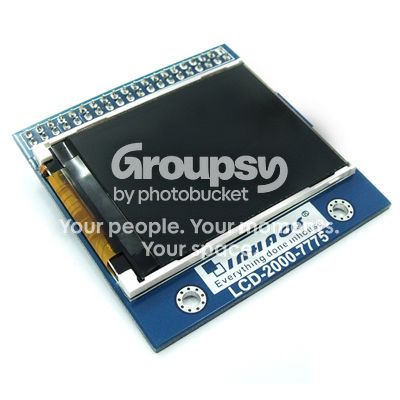
http://pages.ebay.com/link/?nav=item.vi ... ID=EBAY-US
Note to Admin::: not spam, for details and info
Duhjoker Thu Aug 04, 2016 4:14 am
sorry double post
Sorunome Thu Aug 04, 2016 6:54 am
I would rather try to fit everything into the current screen, using a different one would mean that barely anybody would be able to play your game ;)
Then there's also the ram issue, with the current screen (1-bit color) you already need a screen buffer of 512 bytes, so if you were to use the current resolution and 4-bit color you'd already need a screenbuffer that is 2048 bytes large, which is all of the gamebuinos ram!
Then there's also the ram issue, with the current screen (1-bit color) you already need a screen buffer of 512 bytes, so if you were to use the current resolution and 4-bit color you'd already need a screenbuffer that is 2048 bytes large, which is all of the gamebuinos ram!
Duhjoker Thu Aug 04, 2016 7:40 am
The ram would be a problem. Is there any thought of upgrades to the system in the future?
I figure y'all might upgrade in the future in which case the game would be there but not until after I finish the 6-bit version.
Curious but could 2 arduino pro minis be used use one as the slave to hold all the progmem data (sprites and other data and the second as the master which has all the actual programming?
I figure y'all might upgrade in the future in which case the game would be there but not until after I finish the 6-bit version.
Curious but could 2 arduino pro minis be used use one as the slave to hold all the progmem data (sprites and other data and the second as the master which has all the actual programming?
Sorunome Thu Aug 04, 2016 8:06 am
There was somewhere a survey about what we'd like to see in a possible gamebuino 2, so maybe one will come?Duhjoker wrote:The ram would be a problem. Is there any thought of upgrades to the system in the future?
I figure y'all might upgrade in the future in which case the game would be there but not until after I finish the 6-bit version.
Curious but could 2 arduino pro minis be used use one as the slave to hold all the progmem data (sprites and other data and the second as the master which has all the actual programming?
Yeah, you could use the ICSP port or the I2C port to have two devices communicate. For a master-slave-like system I2C would probably be the easier option as its protocol is already master-slave-based.
Duhjoker Thu Aug 04, 2016 8:49 am
I was also looking at the teensy 3.1. It has 256k but don't know if it would work with out a bunch of work I'm not ready for.
Duhjoker Thu Aug 04, 2016 9:27 am
Ok ive had something kinda of bothering me and i could use one of your explanations.
We were talking on another thread and i had mentioned it would be cheaper to use binary for sprites but i think you said hex was actually cheaper.
How exactly does that work with all the hex string code taking up so much space.
Is it storing the bitmaps at their actual size? So if i made a bitmap that was 325 bytes but to encode is a bunch string, will it stire the bitmap as a bunch of string or actual size?
We were talking on another thread and i had mentioned it would be cheaper to use binary for sprites but i think you said hex was actually cheaper.
How exactly does that work with all the hex string code taking up so much space.
Is it storing the bitmaps at their actual size? So if i made a bitmap that was 325 bytes but to encode is a bunch string, will it stire the bitmap as a bunch of string or actual size?
Sorunome Thu Aug 04, 2016 9:45 am
Duhjoker wrote:Ok ive had something kinda of bothering me and i could use one of your explanations.
We were talking on another thread and i had mentioned it would be cheaper to use binary for sprites but i think you said hex was actually cheaper.
How exactly does that work with all the hex string code taking up so much space.
Is it storing the bitmaps at their actual size? So if i made a bitmap that was 325 bytes but to encode is a bunch string, will it stire the bitmap as a bunch of string or actual size?
For the compiled program it is exactly the same if you use binary, decimal or hexadecimal. It is only more compressed to look at in the source if you use hex.
nuts4ever Thu Aug 04, 2016 5:53 pm
I think we need better res too...
Duhjoker Fri Aug 26, 2016 9:00 am
All right so how involved would it be to add color to the library or rather make my LCDs library work with the Gamebuino.
I figure I'm about to build my own any way any way and I can make two versions. One version of the game for the general use and another for any one that might want to upgrade in 256. With a teensy one could build some pretty big games at 256k memory and color.
I figure I'm about to build my own any way any way and I can make two versions. One version of the game for the general use and another for any one that might want to upgrade in 256. With a teensy one could build some pretty big games at 256k memory and color.
rodot Fri Aug 26, 2016 2:21 pm
The library won't work with a higher resolution/color screen, because the whole screen is stored in a back buffer... and you only have 2KB of RAM. For example a 160x128x16-bit buffer would take 40KB of RAM. If I were you I would use the current Gamebuino as it is, and wait for a potential new version of Gamebuino ;)
Duhjoker Sat Aug 27, 2016 4:35 am
Well I have all the parts and the teensy has more than enough memory to handle a small colorized game and having the library out there will encourage game makers and builders alike. Then theres one upping the competition.
All right so I took a simple tilemap[] with character sprites and tried to compile it with the included library and expected to get a bunch of errors about not finding blah blah blah in the library but I do know it uses spi. But it does give an error posted below....
now mind you I was using two sprites for the character sprites you know to get two colors.
Also it doesnt have a display.h file so the current one used by the gamebuino should work with it. Barring the color issue.
so what is a maintainer and how do give it one
Also was looking at the .h file for the LCD and the one created by summoner123 which I have been using (since it has the upgrades I need for the game i.e., tilemap[]) and I can see that the 7775 screen .h file that some of these functions are missing.
So I'm wondering if I could transplant the functions from display.h that are needed in the LCDs library file. Of course I realize I would have to do the same the other c++ files.
All right so I took a simple tilemap[] with character sprites and tried to compile it with the included library and expected to get a bunch of errors about not finding blah blah blah in the library but I do know it uses spi. But it does give an error posted below....
- Code: Select all
Arduino: 1.6.7 (Windows 7), Board: "Arduino Duemilanove or Diecimila, ATmega328"

WARNING: Category '' in library LCD_2000_7775 is not valid. Setting to 'Uncategorized'
Missing 'maintainer' from library in C:\Users\duhjoker\Documents\Arduino\libraries\LCD_2000_7775

Error compiling.

  This report would have more information with
  "Show verbose output during compilation"
  enabled in File > Preferences.
now mind you I was using two sprites for the character sprites you know to get two colors.
Also it doesnt have a display.h file so the current one used by the gamebuino should work with it. Barring the color issue.
so what is a maintainer and how do give it one
Also was looking at the .h file for the LCD and the one created by summoner123 which I have been using (since it has the upgrades I need for the game i.e., tilemap[]) and I can see that the 7775 screen .h file that some of these functions are missing.
So I'm wondering if I could transplant the functions from display.h that are needed in the LCDs library file. Of course I realize I would have to do the same the other c++ files.
Duhjoker Mon Aug 29, 2016 8:45 am
I'm looking at the settings file for the GB library and I'm looking at the //screen.....
Are these describing the pins used for the screen? So I would hook up the LCD's clk to 13, din to 11 and etc?
What is scr_din
And the same for the button pins?
- Code: Select all
//Screen

#define scr_clk   13
#define scr_din   11
#define scr_dc    A2
#define scr_cs    A1
#define scr_rst   A0
Are these describing the pins used for the screen? So I would hook up the LCD's clk to 13, din to 11 and etc?
What is scr_din
And the same for the button pins?
Duhjoker Mon Aug 29, 2016 11:42 pm
Ok can I assume that scr_din is data in so it would be mosi and scr_dc is data out so it would moso on the screen, all the others are labeled right.
naed Tue Aug 30, 2016 8:33 am
A quick Google brings up this info
DC = data/command
DIN = data in
DC = data/command
DIN = data in
Duhjoker Tue Aug 30, 2016 8:46 am
hmmmmmmm
Ok heres a pic of my boards pin out.
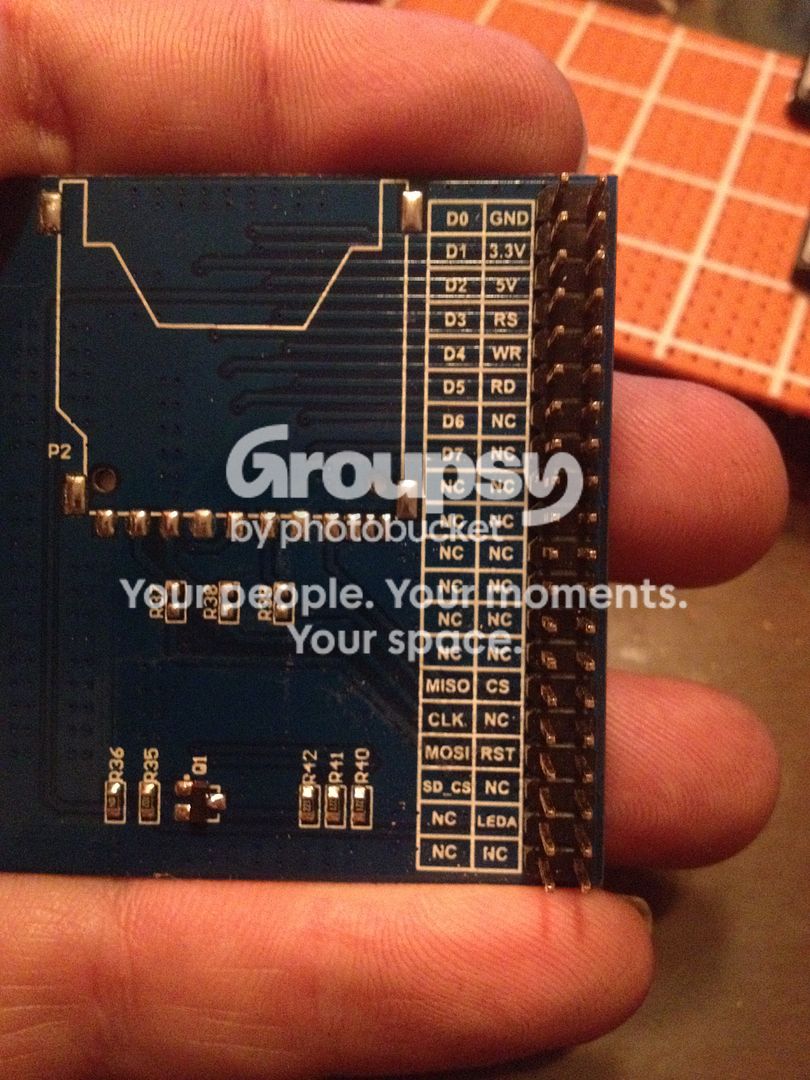
Looks like it has every thing but scr_din and scr_dc.
It's got spi would you happen to know which pins would work would they be mosi and miso?
Ok heres a pic of my boards pin out.
Looks like it has every thing but scr_din and scr_dc.
It's got spi would you happen to know which pins would work would they be mosi and miso?
Duhjoker Tue Aug 30, 2016 9:20 am
Thank you for posting by the way.
Im also curious about the sck pin in the dchematics and looks like threedifferen wires go that pin. Is that right or are thereother pins that can be used as sck?
Heres a pick of my console. It actually has more done but im afraid to solder any leads till i figure out hiw to attach the screen.
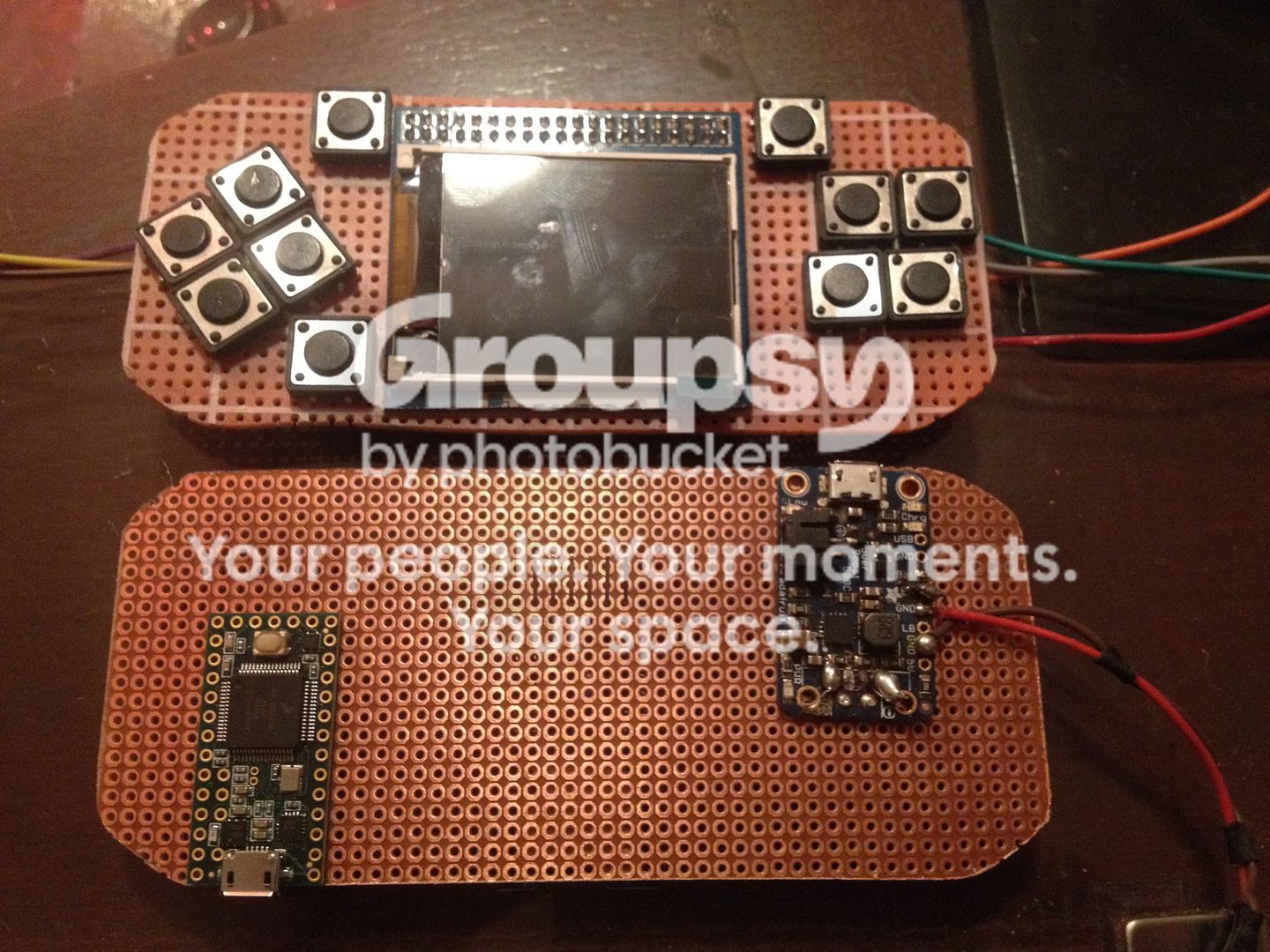
Also added more buttons as an expansion for up to 32-bit games but only in black and white. This should also fix thr grey issues as you actually have the color grey instead of flipping frames.
Any help as always will be greatly appreciated.
Im also curious about the sck pin in the dchematics and looks like threedifferen wires go that pin. Is that right or are thereother pins that can be used as sck?
Heres a pick of my console. It actually has more done but im afraid to solder any leads till i figure out hiw to attach the screen.

Also added more buttons as an expansion for up to 32-bit games but only in black and white. This should also fix thr grey issues as you actually have the color grey instead of flipping frames.
Any help as always will be greatly appreciated.
naed Tue Aug 30, 2016 8:26 pm
Looks good :mrgreen:
I'm afraid building a console is out of my ability right now tho :?
I'm afraid building a console is out of my ability right now tho :?
Duhjoker Tue Aug 30, 2016 8:57 pm
Ok I did some searching and was able to figure out that SCR_DIN is definitely mosi. But for SCR_DC or mode selec, I can't seem to find out which pin that is.
Duhjoker Tue Aug 30, 2016 9:41 pm
Ok i found a page that tells me how to hook up the Nokia 5110 screen but I still can't figure out where DC goes......
http://hackers.gallery/660/electronics/ ... cd-display
Looks like I will need to change some pins in the settings file though
http://hackers.gallery/660/electronics/ ... cd-display
Looks like I will need to change some pins in the settings file though
jonnection Wed Aug 31, 2016 7:33 am
Hello Duhjoker
DC is data/command select as someone here already pointed out.
What you need to understand, is some basics of the SPI protocol. Its just not a simple question of "what pin does D/C go to?". You need to understand what each pin does. Once you understand what the pins mean, you can start to build any kind of console with any kind of SPI screen.
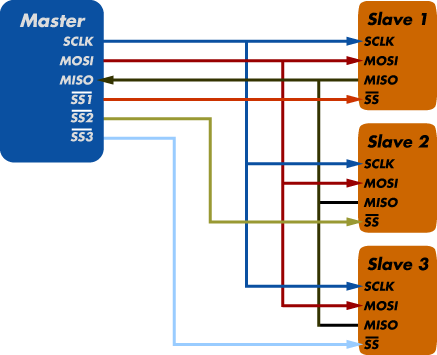
This is how SPI works:
- there is a master
- there is one or more slaves
- notice, that there are only 4 pins going into each slave
This is what the pins do:
- SCLK is the clock line. Very important. It synchronises the Master and the Slaves to exchange information at the same speed.
- MOSI - Master Out, Slave In. Data from master to slave. This goes from master mosi to slave (lcd) SCR_DIN as you figured out
- MISO - data in the opposite direction
- SS - slave select. In order to tell WHICH slave is supposed to get the next command or data, the Master pulls this pin LOW to talk to each slave. Only one slave should be active at the same time. All other SS lines should be HIGH. SS is often also called CS (cable select) or EN (enable)
Now, you notice now that there is NO DC line in this picture.
How can it be ?
The DC or D/C is a feature, that is specific to the 5110 graphics driver chip. It has nothing to do with the SPI protocol. Therefore, the DC pin can be ANY NORMAL PIN you choose from the Master side. You choose what pin it is, by specifying it in the program code.
So you see, there is no one answer to your question. You need to look at the code and/or copy paste it here to find out what pin on the Master is the DC.
DC is data/command select as someone here already pointed out.
What you need to understand, is some basics of the SPI protocol. Its just not a simple question of "what pin does D/C go to?". You need to understand what each pin does. Once you understand what the pins mean, you can start to build any kind of console with any kind of SPI screen.
This is how SPI works:
- there is a master
- there is one or more slaves
- notice, that there are only 4 pins going into each slave
This is what the pins do:
- SCLK is the clock line. Very important. It synchronises the Master and the Slaves to exchange information at the same speed.
- MOSI - Master Out, Slave In. Data from master to slave. This goes from master mosi to slave (lcd) SCR_DIN as you figured out
- MISO - data in the opposite direction
- SS - slave select. In order to tell WHICH slave is supposed to get the next command or data, the Master pulls this pin LOW to talk to each slave. Only one slave should be active at the same time. All other SS lines should be HIGH. SS is often also called CS (cable select) or EN (enable)
Now, you notice now that there is NO DC line in this picture.
How can it be ?
The DC or D/C is a feature, that is specific to the 5110 graphics driver chip. It has nothing to do with the SPI protocol. Therefore, the DC pin can be ANY NORMAL PIN you choose from the Master side. You choose what pin it is, by specifying it in the program code.
So you see, there is no one answer to your question. You need to look at the code and/or copy paste it here to find out what pin on the Master is the DC.
Duhjoker Wed Aug 31, 2016 7:50 am
Awesome thank you for the explanation.
Ok since this is the wrong forum for hardware development i went ahead and made a mast topic to cover everything involved in building the console.
viewtopic.php?f=11&t=3482
Ok since this is the wrong forum for hardware development i went ahead and made a mast topic to cover everything involved in building the console.
viewtopic.php?f=11&t=3482