
Archive of the Gamebuino Classic wiki, recovered from the Wayback Machine (capture 2017-01-13). Read-only.
gb.display.print
Description
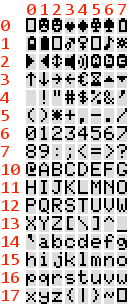
Prints data to the screen as human-readable ASCII text. This command can take many forms. Numbers are printed using an ASCII character for each digit. Floats are similarly printed as ASCII digits, defaulting to two decimal places. Bytes are sent as a single character. Characters and strings are sent as is. For example:
-
Serial.print(78)gives "78" -
Serial.print(1.23456)gives "1.23" -
Serial.print('N')gives "N" -
Serial.print("Hello world.")gives "Hello world."
An optional second parameter specifies the base (format) to use; permitted values are BIN (binary, or base 2), OCT (octal, or base 8), DEC (decimal, or base 10), HEX (hexadecimal, or base 16). For floating point numbers, this parameter specifies the number of decimal places to use. For example:
-
Serial.print(78, BIN)gives "1001110" -
Serial.print(78, OCT)gives "116" -
Serial.print(78, DEC)gives "78" -
Serial.print(78, HEX)gives "4E" -
Serial.println(1.23456, 0)gives "1" -
Serial.println(1.23456, 2)gives "1.23" -
Serial.println(1.23456, 4)gives "1.2346"
Special characters can also be printed (cf. character map on the right).
-
Serial.print("\25Accept")gives the A button symbol followed by "Accept" -
Serial.print("\23\24")gives a speaker symbol with sound waves -
Serial.print("\7")gives an empty battery symbol
To spare RAM it's advised to pass flash-memory based strings to Serial.print() by wrapping them with F(). For example :
-
Serial.print(F(“Hello World”))
For setting the location to print to use gb.display.cursorX and gb.display.cursorY. After printing text/numbers, the cursor will be at the end of what was printed.
You can change the font used with gb.display.setFont.
You can change the scale of the text using gb.display.fontSize.
Syntax
gb.display.print(val);
Value
- val: the value to print - any data type